
Märklin 72811
Marklin My World Engine Shed Single Light Instruction Manual
Model: 72811
Introduction
This manual provides detailed instructions for the assembly, operation, and maintenance of the Marklin My World Engine Shed Single Light. Please read this manual thoroughly before use to ensure proper function and longevity of your product.
The Marklin My World Engine Shed Single Light is a finely crafted accessory designed for model train layouts, specifically for H0 Gauge. It features a realistic design with metal components and provides illumination for maintenance facilities.
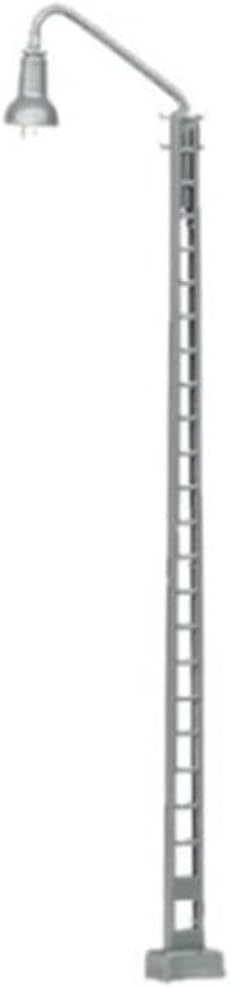
Figure 1: Marklin My World Engine Shed Single Light. This image displays the complete light unit, featuring a tall grey pole with a ladder-like structure on one side and a curved arm extending from the top, holding a downward-facing light fixture.
Product Features
- Construction: Mostly constructed of metal for durability and realistic appearance.
- Easy Installation: Features a plug-in base for straightforward setup and removal.
- Illumination: Equipped with a miniature light bulb for effective lighting.
- Compatibility: Designed for Marklin H0 Gauge model train systems.
- Dimensions: Height 124 mm / 4-7/8 inches.
Setup and Installation
Follow these steps to properly install your engine shed light:
- Unpacking: Carefully remove all components from the packaging. Verify that all parts are present according to the packing list.
- Power Supply: Ensure your model train layout's power supply is disconnected before proceeding with installation. This product requires a suitable power source for illumination (e.g., 16V AC/DC, typical for model train accessories). Refer to your layout's electrical diagram for appropriate connection points.
- Placement: Select a suitable location on your layout, ideally near maintenance facilities or engine sheds, to enhance realism.
- Mounting: The light features a plug-in base. Create a small opening in your layout baseboard at the desired location, sufficient for the base to fit securely.
- Wiring: Connect the wires from the light's base to your layout's accessory power terminals. Ensure correct polarity if applicable, though most model train lights are tolerant of AC or DC connection. Secure connections to prevent shorts.
- Testing: Once installed and wired, reconnect your layout's power supply. Turn on the accessory power to test the light's functionality. If the light does not illuminate, check wiring connections and bulb seating.
Operating Instructions
The Marklin My World Engine Shed Single Light operates as a static accessory on your model train layout. Its primary function is to provide illumination.
- Power On/Off: The light will illuminate when power is supplied to its connection points on your layout. Control its on/off state via the accessory power switch on your model train control unit or a dedicated switch wired into its circuit.
- Continuous Operation: Designed for continuous operation during layout use.
Maintenance
Regular maintenance ensures the longevity and optimal performance of your light unit.
- Cleaning: Periodically dust the light fixture and pole with a soft, dry cloth to prevent accumulation of dirt, which can diminish light output and appearance. Do not use abrasive cleaners or solvents.
- Bulb Replacement: The miniature bulb is designed for easy replacement. If the light stops illuminating, first check the power supply. If power is confirmed, the bulb may need replacement.
- Disconnect power to the light.
- Carefully remove the light fixture from its arm or access the bulb housing.
- Gently pull out the old miniature bulb.
- Insert a new, compatible miniature bulb (e.g., Marklin part number 610080 or equivalent) into the socket. Ensure it is seated firmly.
- Reassemble the fixture and reconnect power to test.
- Wiring Inspection: Occasionally inspect the wiring connections for any signs of wear, fraying, or loose connections. Secure any loose wires.
Troubleshooting
| Problem | Possible Cause | Solution |
|---|---|---|
| Light does not illuminate. | No power to the light. Loose wiring connection. Burnt-out bulb. | Check if accessory power is on. Verify all wiring connections are secure. Replace the miniature bulb (refer to Maintenance section). |
| Light flickers. | Loose connection. Insufficient power supply. | Check and secure all wiring connections. Ensure your power supply can adequately power all connected accessories. |
| Light is dim. | Dust accumulation on fixture. Bulb nearing end of life. | Clean the light fixture. Consider replacing the bulb. |
Specifications
- Model Number: 72811
- Gauge: H0
- Height: 124 mm / 4-7/8 inches
- Construction Material: Metal and plastic
- Power Requirement: Typically 16V AC/DC (standard for Marklin accessories)
- Product Dimensions: 6.63 x 2.54 x 0.7 inches (packaging/overall)
- Item Weight: 0.32 ounces
Warranty and Support
Märklin products are manufactured to high quality standards. For information regarding warranty coverage, please refer to the warranty card included with your product or visit the official Märklin website. Keep your proof of purchase for warranty claims.
For technical support, spare parts, or further assistance, please contact Märklin customer service or your authorized Märklin dealer. Contact information can typically be found on the Märklin website or in the product packaging.
Märklin Official Website: www.maerklin.de
Ask a question about this manual
Ask about setup, troubleshooting, compatibility, parts, safety, or missing instructions. Manuals+ will review the question and use this page’s manual context to help answer it.