
Introduction
This manual provides essential information for the safe and efficient use of your ONKYO INTEC205 C-705FX CD Player. Please read it thoroughly before operating the unit and keep it for future reference.
The ONKYO INTEC205 C-705FX CD Player is designed for superior sound quality, incorporating advanced audio technologies. It features patented VLSC (Vector Linear Shaping Circuitry) to completely eliminate digital noise during D/A conversion, ensuring pure audio reproduction. The unit also utilizes a 192kHz/24bit Advanced Multi-bit DAC (Cirrus Logic CS4398) to faithfully convert digital signals to analog, preserving subtle musical nuances with an excellent signal-to-noise ratio. Furthermore, the "Direct Digital Pass" system uses high-purity cables for digital audio output, preventing noise interference and contributing to clear sound reproduction.
Safety Precautions
- Do not expose the unit to rain or moisture.
- Do not open the casing; refer all servicing to qualified personnel.
- Ensure proper ventilation to prevent overheating.
- Avoid placing the unit near heat sources or in direct sunlight.
- Use only the specified power supply.
Package Contents
Verify that all items are present in the package:
- ONKYO INTEC205 C-705FX CD Player Unit
- Power Cord
- Remote Control (if included)
- RCA Audio Cable (if included)
- Instruction Manual (this document)
Setup
1. Placement
Place the CD player on a stable, level surface away from direct sunlight, heat sources, and excessive dust or vibration. Ensure adequate space around the unit for ventilation.
2. Connections
Connect the CD player to your amplifier or receiver using appropriate audio cables.
- Analog Audio Connection: Use an RCA audio cable to connect the ANALOG OUT jacks on the CD player to the CD IN or AUX IN jacks on your amplifier. Match the red plug to the right channel (R) and the white plug to the left channel (L).
- Digital Audio Connection (Optional): For digital audio output, use either a digital coaxial cable or an optical digital cable.
- Coaxial: Connect the DIGITAL OUT (COAXIAL) jack on the CD player to the COAXIAL DIGITAL IN jack on your amplifier.
- Optical: Connect the DIGITAL OUT (OPTICAL) jack on the CD player to the OPTICAL DIGITAL IN jack on your amplifier.
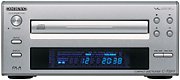 Image: Front view of the ONKYO INTEC205 C-705FX CD Player, showing the disc tray, display, and control buttons. This image illustrates the general appearance of the unit.
3. Power Connection
After all audio connections are made, plug the power cord into the AC INlet on the rear of the CD player, then plug the other end into a suitable wall outlet.
Operating Instructions
1. Loading a CD
- Press the POWER button to turn on the unit.
- Press the OPEN/CLOSE button to open the disc tray.
- Place a CD with the label side facing up into the disc tray.
- Press the OPEN/CLOSE button again to close the disc tray. The unit will read the disc.
2. Basic Playback
- PLAY (►): Press to start playback.
- PAUSE (‖): Press to temporarily stop playback. Press again to resume.
- STOP (■): Press to stop playback.
- SKIP (►►| / |◄◄): Press to skip to the next track or return to the beginning of the current track. Press twice to go to the previous track.
- FAST FORWARD/REWIND: Hold down the SKIP buttons during playback to fast forward or rewind through the track.
3. Front Panel Controls
The front panel includes buttons for Power, Open/Close, Play, Pause, Stop, and Skip. The display shows track number, elapsed time, and other playback information.
4. Remote Control (if applicable)
If your unit came with a remote control, refer to its specific instructions for advanced functions such as programming, repeat play, and random play.
Maintenance
1. Cleaning the Unit
Wipe the exterior of the unit with a soft, dry cloth. Do not use abrasive cleaners, waxes, or solvents as they may damage the finish. Never spray cleaning liquids directly onto the unit.
2. Disc Handling
- Handle discs by their edges to avoid fingerprints on the playing surface.
- Keep discs clean. Wipe them with a soft, lint-free cloth from the center outwards.
- Store discs in their cases to protect them from dust and scratches.
- Do not expose discs to direct sunlight or high temperatures.
Troubleshooting
If you experience problems with your CD player, consult the following table before seeking professional service.
| Problem | Possible Cause | Solution |
|---|---|---|
| No power | Power cord not connected securely. | Check power cord connection to the unit and wall outlet. |
| No sound | Audio cables not connected correctly; Amplifier input not selected. | Verify audio cable connections. Select the correct input on your amplifier. |
| Disc does not play / Skipping | Disc is dirty or scratched; Disc inserted incorrectly; Unit needs warm-up time. | Clean the disc. Insert the disc with the label side up. Allow the unit to warm up for a few minutes before playing. |
| Disc tray opens/closes too quickly | Sensitive tray mechanism. | This can be a characteristic of the unit. Ensure the disc is placed quickly and correctly. |
| LCD display not lighting up | Internal connection issue or display malfunction. | If the unit otherwise functions, this may indicate a display panel issue. Contact customer support. |
Specifications
| Feature | Detail |
|---|---|
| Brand | Onkyo |
| Model Number | C-705FX |
| Color | Silver |
| Item Weight | Approximately 2821 grams |
| Compatible Devices | Speakers, Amplifiers |
| Headphone Jack | 3.5mm Jack |
| Key Technologies | VLSC (Vector Linear Shaping Circuitry), 192kHz/24bit Advanced Multi-bit DAC (Cirrus Logic CS4398), Direct Digital Pass |
| Playback Type | Playback only |
Warranty and Support
For warranty information and customer support, please refer to the official Onkyo website or contact your local Onkyo dealer. Keep your purchase receipt as proof of purchase for warranty claims.


