
Introduction
This manual provides detailed instructions for the operation and maintenance of your Fujifilm Finepix S9000 digital camera. The Finepix S9000 is a 9-megapixel digital camera featuring a 10.7x wide optical zoom lens, designed for advanced amateur photographers seeking versatility and high-quality imaging.
Product Overview
Familiarize yourself with the main components of your Finepix S9000 camera.

Figure 1: Front View. This image displays the front of the Fujifilm Finepix S9000 camera, highlighting the Fujinon 10.7x optical zoom lens, the built-in flash in its raised position, and the grip for stable handling.
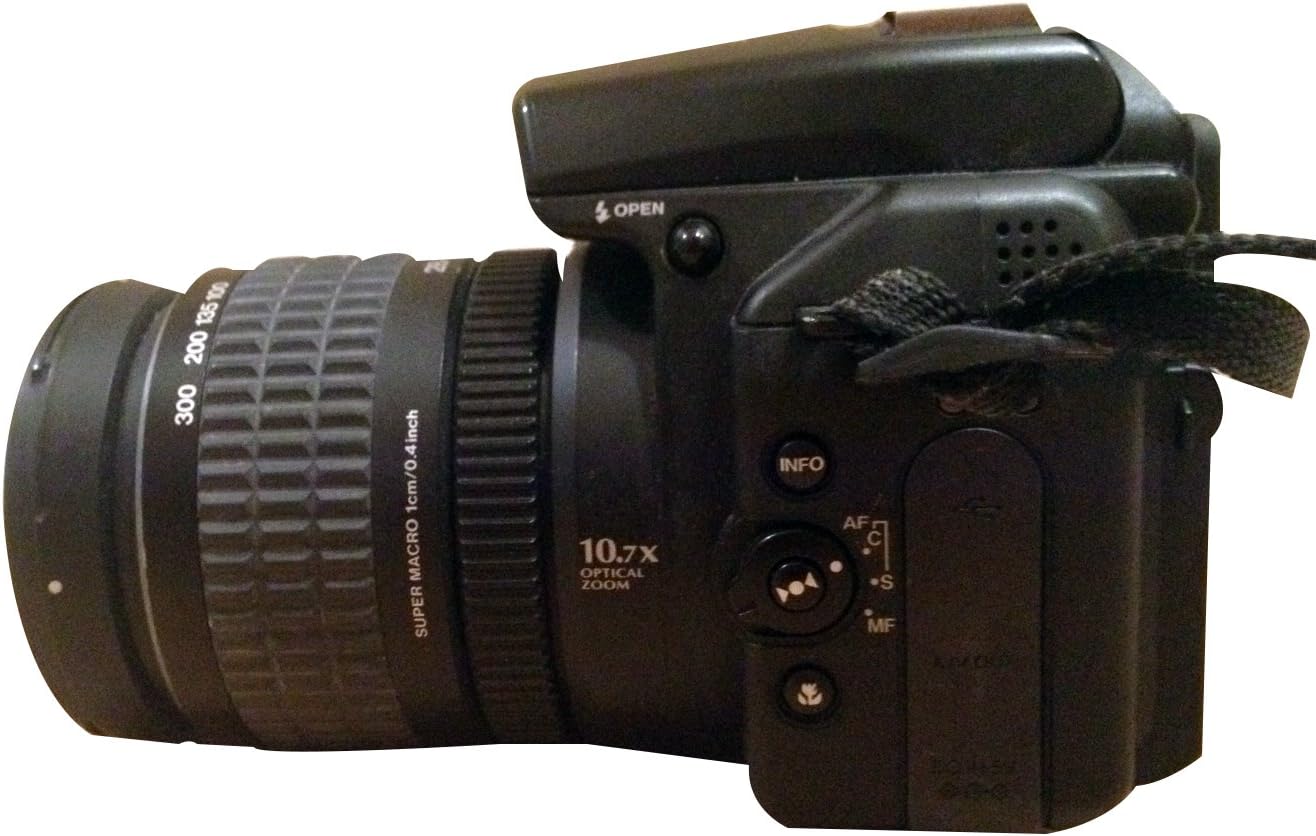
Figure 2: Side View. This image shows the left side of the camera, detailing the manual zoom ring on the lens, the AF/MF switch, and other function buttons such as INFO and the focus mode selector.

Figure 3: Rear View. This image illustrates the back of the camera, featuring the tilting 1.8-inch LCD display, the electronic viewfinder (EVF), the mode dial, and various control buttons including the menu/OK button and display/back button.
Key Features:
- 9-Megapixel Super CCD HR Sensor: Captures high-resolution images suitable for large prints.
- Fujinon 10.7x Optical Zoom Lens: Equivalent to 28-300mm on a 35mm camera, offering wide-angle to telephoto capabilities.
- Tilting 1.8-inch LCD Display: Provides flexibility for high and low-angle shooting.
- Dual Media Slot: Supports both xD Picture Card and CompactFlash/Microdrive.
- RAW File Format Support: For advanced post-processing.
- Real Photo Technology: Reduces image noise, especially at high ISO settings (up to ISO 1600 at full resolution).
Setup
1. Battery Installation
- Open the battery compartment cover, typically located at the bottom of the camera.
- Insert four AA-size batteries, ensuring correct polarity (+/-) as indicated inside the compartment.
- Close the battery compartment cover securely.
- Note: For optimal performance and battery life, use high-capacity AA NiMH rechargeable batteries.
2. Memory Card Insertion
- Locate the memory card slot, usually on the side or bottom of the camera.
- The Finepix S9000 supports both xD Picture Cards and CompactFlash (Type I or II) cards. Insert the desired card type into its respective slot until it clicks into place.
- Close the memory card compartment cover.
- Note: If using both card types, you can select the active card via the camera's menu.
Operating the Camera
1. Powering On/Off
Press the power button to turn the camera on or off. The camera has a fast start-up time of approximately 0.8 seconds.
2. Selecting a Shooting Mode
Rotate the mode dial, located on the top of the camera, to select your desired shooting mode:
- Program (P): Camera sets aperture and shutter speed for optimal exposure.
- Shutter Priority (S): You set shutter speed, camera sets aperture.
- Aperture Priority (A): You set aperture, camera sets shutter speed.
- Manual (M): You control both aperture and shutter speed.
- Auto: Fully automatic settings for simple point-and-shoot operation.
- Anti-Blur: Automatically adjusts ISO to minimize camera shake and blur.
- Natural Light: Optimizes settings for natural-looking photos in low light without flash.
- Scene Modes (SP): Includes Portrait, Landscape, and Sports for specific shooting conditions.
3. Focusing
The camera offers both autofocus and manual focus options:
- Autofocus (AF): Half-press the shutter button to activate autofocus. The camera uses contrast detection.
- Manual Focus (MF): Use the AF/MF switch on the side of the lens barrel to switch to manual focus, then rotate the focus ring on the lens to adjust focus.
- Super Macro Mode: Allows focusing on subjects as close as 0.4 inches for extreme close-ups.
4. Taking Photos
- Frame your shot using either the electronic viewfinder (EVF) or the tilting LCD screen.
- Adjust zoom using the manual zoom ring on the lens.
- Half-press the shutter button to focus.
- Fully press the shutter button to capture the image.
5. Recording Videos
The Finepix S9000 can record videos at 480p resolution in MP4 format.
- Select the movie mode on the mode dial.
- Press the record button to start and stop video recording.
- During video capture, manual zoom, auto exposure, and autofocus functions remain operational.
6. Flash Usage
The camera features a built-in flash. Flash modes include Auto, On, Off, Slow Synch, and Rear Curtain Synch. A hot shoe and synchronizing terminal are also available for external flash units.
Maintenance
- Cleaning the Lens: Use a soft, lint-free cloth specifically designed for camera lenses. Avoid touching the lens surface with your fingers.
- Cleaning the Body: Wipe the camera body with a soft, dry cloth. For stubborn dirt, slightly dampen the cloth with water. Do not use solvents.
- Battery Care: Remove batteries when the camera will not be used for an extended period. Store batteries in a cool, dry place.
- Storage: Store the camera in a dry, dust-free environment, away from extreme temperatures and direct sunlight.
- Firmware Updates: Check the Fujifilm support website periodically for any available firmware updates for your model.
Troubleshooting
| Problem | Possible Cause / Solution |
|---|---|
| Camera does not power on. | Check if batteries are inserted correctly and fully charged. Replace with fresh batteries if necessary. |
| Images are blurry. | Ensure proper focus. Check for camera shake (use a tripod or increase shutter speed). Clean the lens. |
| Flash does not fire. | Check flash mode settings. Ensure flash is popped up if using built-in flash. |
| Memory card error. | Reinsert the memory card. Try a different compatible memory card. Format the card (this will erase all data). |
| Poor image quality in low light. | Increase ISO sensitivity (up to 1600). Use the "Natural Light" mode. Consider using an external flash or tripod. |
| LCD screen is blank. | Check if the EVF/LCD switch is set correctly. Ensure the camera is powered on. |
Specifications
| Feature | Detail |
|---|---|
| Model Name | Finepix S9000 |
| Effective Still Resolution | 9 MP |
| Photo Sensor Technology | CCD |
| Optical Zoom | 10.7x |
| Lens Type | Fujinon 28-300mm (35mm equivalent) |
| Maximum Aperture | F2.8-F5.6 |
| Image Stabilization | Digital, Optical |
| Expanded ISO Range | 80 - 1600 |
| Shutter Speed | 1/4000 to 1/1600 seconds |
| Display Type | Tilting 1.8-inch LCD |
| Viewfinder | Electronic |
| Flash Memory Type | xD Picture Card, Compact Flash Type I or II |
| Supported File Format | RAW, JPEG |
| Video Resolution | 480p |
| Connectivity Technology | USB |
| Battery Type | 4 AA NiMH batteries (included) |
| Item Weight | 1.6 Pounds |
Warranty and Support
This product comes with a FULL 14 DAY SATISFACTION GUARANTEE and a FULL 90 DAY PARTS AND LABOR WARRANTY. For technical support, service, or further inquiries, please refer to the official Fujifilm support channels or visit their website.
You can find more information and support resources on the Fujifilm Store on Amazon.