
Introduction
The REVLON Spa MoistureStay Shower Brush/Massager RVS1400 is designed to enhance your bathing experience by providing moisturizing, massaging, cleansing, and exfoliating benefits. This battery-operated device features a watertight design and comes with interchangeable attachments for various skin care needs.
Important Safety Information
- Read all instructions before use.
- Do not immerse the entire unit in water for extended periods, despite its watertight design.
- Keep out of reach of children.
- Do not use on irritated, broken, or sunburned skin.
- If you experience any discomfort, discontinue use immediately.
- Ensure the battery compartment is securely sealed before each use to maintain watertight integrity.
Package Contents
- 1 REVLON Spa MoistureStay Shower Brush/Massager unit
- 1 Brush attachment
- 2 Accunode massage attachments
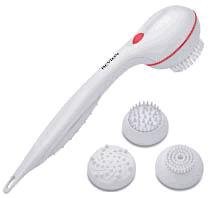
Image: The REVLON Spa MoistureStay Shower Brush/Massager unit with its included brush and accunode massage attachments.
Setup
- Install Batteries:
Locate the battery compartment on the handle of the unit. Twist or slide the cover to open. Insert two (2) AA batteries (not included), ensuring correct polarity (+/-). Securely close the battery compartment cover to maintain the watertight seal.
- Attach Desired Head:
Select either the brush attachment or one of the accunode massage attachments. Align the attachment with the rotating head on the main unit and gently push until it clicks into place. Ensure it is firmly secured.
- Fill Soap Reservoir (Optional):
If using with liquid soap or body wash, locate the soap reservoir opening. Carefully pour your preferred liquid soap into the reservoir. For thicker lotions or washes, a small funnel may be helpful to prevent spillage and ensure efficient filling. Do not overfill.
Operating Instructions
- Wet Your Skin:
Before use, wet your skin thoroughly in the shower or bath.
- Turn On the Unit:
Locate the power switch on the handle. Slide or press the switch to the "ON" position. You may need to apply firm pressure if the switch feels stiff. The attachment head will begin to rotate.
- Apply to Skin:
Gently move the rotating attachment in circular motions over your skin. Apply light to moderate pressure. The unit is designed to moisturize, massage, cleanse, and exfoliate. Avoid pressing too hard, as this may slow down the rotation and reduce effectiveness.
- Rinse Off:
After use, rinse your body thoroughly to remove any soap or exfoliated skin.
- Turn Off the Unit:
Slide or press the power switch to the "OFF" position to stop the rotation.
Maintenance
- Cleaning Attachments: After each use, detach the brush or massage head. Rinse it thoroughly under warm running water to remove any soap residue or skin particles.
- Cleaning the Unit: Wipe the main unit with a damp cloth. Do not use abrasive cleaners or solvents.
- Drying: Allow all components to air dry completely before storing. Store in a clean, dry place.
- Battery Replacement: If the unit's power weakens or stops rotating, replace both AA batteries with new ones, following the installation steps in the "Setup" section.
Troubleshooting
| Problem | Possible Cause | Solution |
|---|---|---|
| Unit does not turn on. | Batteries are dead or incorrectly installed. Power switch is stiff. | Replace batteries, ensuring correct polarity. Apply firm pressure to the power switch. |
| Attachment rotation slows down or stops during use. | Low battery power. Excessive pressure applied to skin. | Replace batteries. Reduce pressure on the skin; allow the brush to do the work. |
| Difficulty filling the soap reservoir. | Opening is small, or soap/lotion is too thick. | Use a small funnel for easier filling. Consider diluting very thick lotions slightly or using a thinner body wash. |
| Attachments do not stay on. | Attachment not properly secured. | Ensure the attachment is aligned and pushed firmly until it clicks into place. |
Specifications
- Model Number: RVS1400
- Brand: REVLON
- Power Source: 2 AA Batteries (not included)
- Operation Mode: Automatic
- Material: Plastic
- Color: White
- Item Weight: 1 Pound (approximately)
- ASIN: B00078MCMY
- UPC: 761318014003
Warranty and Support
Specific warranty information and customer support contact details are not provided within this manual. Please refer to the product packaging or the manufacturer's official website for warranty terms and support options.