
OttLite L139AB
OttLite L139AB 13 Watt Desk Lamp User Manual
Model: L139AB
Introduction
Thank you for choosing the OttLite L139AB 13 Watt Desk Lamp. This lamp is designed to provide clear, natural daylight illumination, reducing eyestrain and enhancing visual clarity for various tasks. Its compact and adjustable design makes it suitable for many environments.
Important Safety Instructions
Please read all instructions carefully before using the lamp to ensure safe operation and to prevent injury or damage.
- Do not operate the lamp with a damaged cord or plug.
- Do not use the lamp in wet or damp conditions.
- Always unplug the lamp from the electrical outlet before cleaning or replacing the bulb.
- Keep the lamp away from heat sources and direct sunlight.
- This lamp is for indoor use only.
- Use only the specified OttLite 13-watt replacement bulb (Type E).
Package Contents
Verify that all components are present in your package:
- OttLite L139AB Desk Lamp Unit
- 13 Watt OttLite Fluorescent Tube (Type E)
- User Manual (this document)
Setup Instructions
Follow these steps to set up your OttLite L139AB Desk Lamp:
- Unpack the Lamp: Carefully remove all components from the packaging.
- Place the Lamp: Position the lamp on a stable, flat surface. Ensure the base is secure.
- Unfold the Lamp: Gently unfold the lamp arm and shade to the desired position. The lamp is designed to turn on automatically when unfolded past a certain angle.
- Connect to Power: Plug the power cord into a standard electrical outlet.

Figure 1: OttLite L139AB Desk Lamp in open position.

Figure 2: The lamp features a 360-degree swivel base and multi-position shade for optimal light angle adjustment.
Operating Instructions
The OttLite L139AB lamp is designed for simple operation:
- Turning On: To turn the lamp on, simply unfold the lamp arm and shade. The lamp will illuminate once it reaches an open position (approximately 30 degrees or more from its folded state).
- Adjusting the Light: The lamp features a 360-degree swivel base and a multi-position shade. Adjust these components to direct the light precisely where needed. The height can be adjusted from 11.5 inches to 19.5 inches.
- Turning Off: To turn the lamp off, fold the lamp arm and shade back into its closed, compact position. There is no separate on/off switch; the lamp's operation is controlled by its folding mechanism.

Figure 3: The lamp folds into a compact design for portability and storage.
Maintenance
Cleaning
Always unplug the lamp before cleaning. Use a soft, dry cloth to wipe down the lamp. Do not use abrasive cleaners or solvents, as these may damage the finish.
Bulb Replacement
The OttLite L139AB uses a 13-watt fluorescent tube (Type E) rated to last up to 10,000 hours. When replacement is needed:
- Unplug the Lamp: Ensure the lamp is unplugged from the power source and has cooled down.
- Remove Old Bulb: Carefully grasp the fluorescent tube and pull it straight out from its socket. Do not twist.
- Insert New Bulb: Align the pins of the new OttLite 13-watt Type E replacement bulb with the slots in the socket. Gently push the bulb straight into the socket until it is secure.
- Test: Plug the lamp back in and test its operation.

Figure 4: OttLite 13-watt Type E replacement bulb.
Troubleshooting
| Problem | Possible Cause | Solution |
|---|---|---|
| Lamp does not turn on. |
|
|
| Light flickers. |
|
|
| Lamp makes buzzing sound. |
|
|
Specifications
| Model Number | L139AB |
| Brand | OttLite |
| Lamp Type | Desk Lamp |
| Light Source Type | Fluorescent |
| Wattage | 13 Watts |
| Bulb Type | Type E (OttLite 13-watt tube) |
| Bulb Base | E26 |
| Color | Black |
| Material | Plastic, Metal |
| Product Dimensions (Folded) | 4.25"D x 4.75"W x 10.75"H |
| Adjustable Height | 11.5 inches to 19.5 inches |
| Base Dimensions | 5 inches (diameter, approximate) |
| Item Weight | 2.8 Pounds |
| Switch Type | Integrated with folding mechanism |
| Power Source | Corded Electric |
| Voltage | 110 Volts |
| Special Features | Reduces eyestrain, adjustable lighting, portable design, 360-degree swivel base, multi-position shade. |
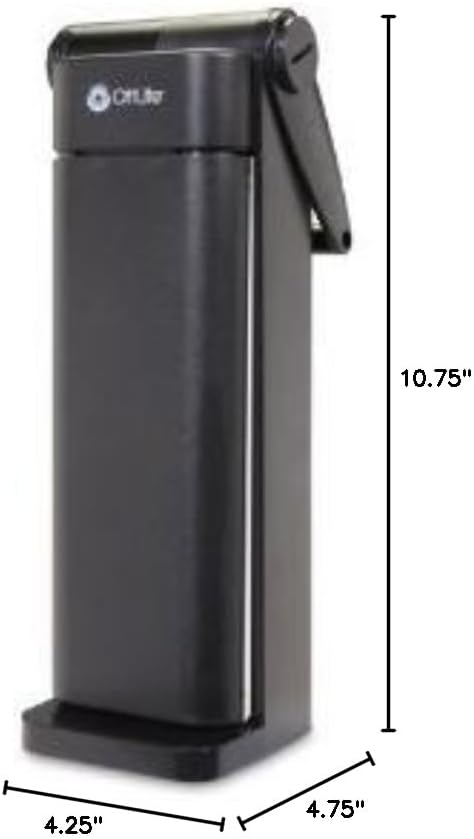
Figure 5: Product dimensions.
Product Information Video
Video 1: This video demonstrates the OttLite 508 Technology, highlighting how it provides a balanced light for true color and reduced eyestrain. It shows comparisons between standard lighting and OttLite illumination for various tasks like reading and crafting.
Warranty and Support
For warranty information or technical support, please refer to the official OttLite website or contact their customer service directly. Keep your purchase receipt as proof of purchase.
Online Support: Visit the OttLite Store on Amazon for more product information and resources.
Related documentsL139AB


Ask a question about this manual
Ask about setup, troubleshooting, compatibility, parts, safety, or missing instructions. Manuals+ will review the question and use this page’s manual context to help answer it.