
Actron CP7678
Actron Digital Multimeter CP7678 User Manual
Model: CP7678
Introduction
This manual provides comprehensive instructions for the safe and effective operation, maintenance, and troubleshooting of your Actron Digital Multimeter, Model CP7678. Please read this manual thoroughly before using the device to ensure proper functionality and to prevent damage.
Product Features
- Easy-to-read Digital LCD Display: Features a 3-1/2 digit, 0.8-inch high display for clear readings.
- Detachable Heat-Resistant Leads: Includes color-coded leads with booted alligator clips for secure connections and durability.
- Automatic Reverse Polarity Indication: Simplifies measurements by automatically indicating polarity.
- Overload Protection: Ensures safety and protects the device across all measurement ranges.
- Automatic Zero Adjust: Provides accurate readings by automatically adjusting to zero on all functions.
Package Contents
Upon opening the package, verify that all components are present and undamaged:
- Actron Digital Multimeter CP7678 Unit
- Detachable Test Leads (Red and Black) with Alligator Clips
- User Manual
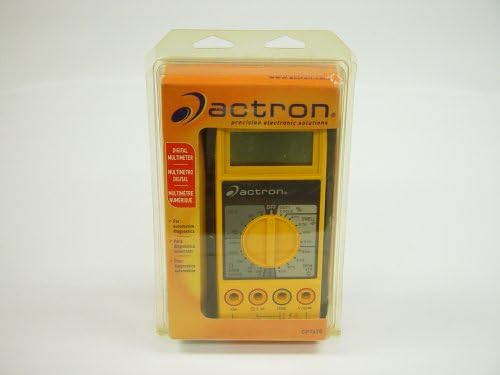
Image: The Actron Digital Multimeter CP7678, yellow and black, enclosed in its clear plastic retail packaging, displaying the Actron brand logo and product information.
Setup
1. Battery Installation
The Actron CP7678 requires a 9V battery for operation (battery not included). To install the battery:
- Locate the battery compartment cover on the back of the multimeter.
- Use a screwdriver (if necessary) to open the compartment.
- Connect a new 9V battery to the battery clip, observing correct polarity (+ and -).
- Place the battery inside the compartment and replace the cover, ensuring it is securely fastened.
2. Connecting Test Leads
The multimeter comes with detachable, color-coded test leads. Ensure they are properly connected before use.
- Insert the black test lead into the "COM" (common) jack.
- Insert the red test lead into the appropriate input jack for your measurement (e.g., VΩmA for voltage, resistance, or current, or a dedicated A jack for higher current measurements if available). Refer to the markings on the multimeter for specific jack functions.
- Attach the booted alligator clips to the ends of the test leads for secure connections to circuits.
Operating Instructions
Always ensure the multimeter is set to the correct function and range before making any measurements to prevent damage to the device or the circuit being tested.
General Operation
- Power On: Rotate the central rotary switch from the "OFF" position to the desired measurement function (e.g., DCV for DC Volts, ACV for AC Volts, Ohms for Resistance, DCA for DC Amps, etc.).
- Select Range: For manual ranging multimeters, select the appropriate range that is higher than the expected measurement value. The CP7678 features automatic zero adjust and overload protection, simplifying some aspects of range selection.
- Connect Leads: Carefully connect the test leads to the circuit or component you wish to measure. Ensure good contact.
- Read Display: The measurement will be shown on the digital LCD display. The automatic reverse polarity indication will show if the polarity is reversed.
- Power Off: When finished, rotate the central rotary switch back to the "OFF" position to conserve battery life.
Specific Measurement Functions
- Voltage Measurement (DCV/ACV): Select the DCV or ACV function. Connect leads in parallel with the component or power source.
- Resistance Measurement (Ω): Select the Ohms function. Ensure the circuit is de-energized before measuring resistance. Connect leads across the component.
- Current Measurement (DCA/ACA): Select the DCA or ACA function. Connect leads in series with the circuit. Be cautious with current measurements as incorrect connection can blow the multimeter's fuse or damage the circuit.
- Continuity Test: Some multimeters have a continuity function (often indicated by a speaker symbol). This function emits an audible tone if there is a continuous path (low resistance) between the probes.
- Diode Test: Used to check the functionality of diodes.
- RPM/Tachometer (if applicable): If your model includes this feature, follow specific instructions for connecting to ignition systems or other rotating components. Note: Some users have reported issues with RPM functionality on certain CP7678 units.
Maintenance
Cleaning
To maintain the multimeter's performance and appearance:
- Wipe the casing with a soft, damp cloth. Do not use abrasive cleaners or solvents.
- Keep the display clean and free from dust.
Storage
When not in use, store the multimeter in a cool, dry place, away from direct sunlight and extreme temperatures. Remove the battery if the unit will not be used for an extended period to prevent leakage.
Battery Replacement
Replace the 9V battery when the low battery indicator appears on the display or if the unit fails to power on. Refer to the "Battery Installation" section under Setup for instructions.
Troubleshooting
If you encounter issues with your Actron CP7678, try the following steps before seeking professional assistance:
- No Display/Unit Not Powering On:
- Check if the battery is installed correctly and fully charged. Replace the 9V battery if necessary.
- Ensure the rotary switch is turned to an ON position, not OFF.
- Incorrect Readings:
- Verify that the test leads are securely connected to the correct input jacks for the measurement type.
- Ensure the rotary switch is set to the correct function and range for the measurement.
- Check the test leads for damage or breaks.
- Ensure good contact between the test lead probes/clips and the circuit/component.
- Buzzer Not Working (if applicable):
- Confirm the multimeter is set to the continuity test function.
- Test the buzzer by touching the two probes together; it should sound. If not, there may be an internal issue.
- RPM Function Not Working (if applicable):
- Ensure proper connection to the ignition system or RPM source as per specific instructions for this function.
- Verify the engine is running and providing a signal.
Specifications
| Attribute | Detail |
|---|---|
| Brand | Actron |
| Model Number | CP7678 |
| Measurement Type | Multimeter |
| Style | Digital |
| Power Source | Battery Powered (9V battery not included) |
| Display Type | Digital LCD, 3-1/2 digit, 0.8" high |
| Item Weight | 1.65 pounds |
| Package Dimensions | 8.8 x 5.7 x 2.7 inches |
| UPC | 021467076780 |
| First Available Date | July 12, 2004 |
Warranty and Support
Actron products are manufactured to high-quality standards. For information regarding warranty coverage, technical support, or service, please refer to the warranty card included with your product or visit the official Actron website. Keep your purchase receipt as proof of purchase.
For further assistance, you may contact Actron customer service through the contact information provided on their official website or product packaging.
Ask a question about this manual
Ask about setup, troubleshooting, compatibility, parts, safety, or missing instructions. Manuals+ will review the question and use this page’s manual context to help answer it.