1. Important Safety Instructions
Please read all instructions carefully before using the Health-o-Meter HM7540 Percussion Massager. Retain this manual for future reference.
- Always unplug the appliance from the electrical outlet immediately after using and before cleaning.
- Do not use while bathing or in a shower.
- Do not place or store appliance where it can fall or be pulled into a tub or sink.
- Do not place in or drop into water or other liquid.
- Never use pins or other metallic fasteners with this appliance.
- Close supervision is necessary when this appliance is used by, on, or near children, invalids, or disabled persons.
- Use this appliance only for its intended use as described in this manual. Do not use attachments not recommended by the manufacturer.
- Never operate this appliance if it has a damaged cord or plug, if it is not working properly, if it has been dropped or damaged, or dropped into water. Return the appliance to a service center for examination and repair.
- Keep the cord away from heated surfaces.
- Never use while sleeping or drowsy.
- Never drop or insert any object into any opening.
- Do not use outdoors.
- Do not operate where aerosol (spray) products are being used or where oxygen is being administered.
- Do not use on sensitive skin areas or where circulation is poor.
- The use of the massager should be pleasant and comfortable. Should pain or discomfort result, discontinue use and consult your physician.
- This product is not intended for medical use. It is intended only to provide a luxurious massage.
- Consult your doctor before using this product if you are pregnant, have a pacemaker, or have any concerns regarding your health.
2. Product Overview
The Health-o-Meter HM7540 Percussion Massager with Infrared Paddle is designed to provide targeted massage and soothing infrared heat to relieve muscle aches and fatigue.
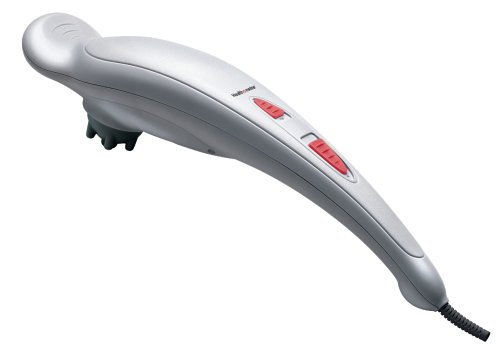
Image 1: The Health-o-Meter HM7540 Percussion Massager with its main body and paddle attachment.
Key Features:
- Directs infrared heat and massage where it is needed most.
- Includes 4 massage attachments to customize massages for different body parts.
- Two massage speed settings for gentle or deep massage.
- Provides effective pain relief for fatigued and sore muscles.
- Powerful, yet lightweight design.
Package Contents:
- Health-o-Meter HM7540 Percussion Massager Unit
- Infrared Paddle Attachment (pre-attached or separate)
- 3 Additional Massage Attachments
- User Manual
3. Setup
3.1 Unpacking
- Carefully remove the massager and all accessories from the packaging.
- Inspect the unit for any signs of damage. Do not use if damaged.
- Retain the packaging for storage or future transport.
3.2 Attaching Massage Heads
The HM7540 comes with four interchangeable massage attachments to customize your massage experience.
- Ensure the massager is unplugged before changing attachments.
- To attach, align the desired massage head with the connector on the massager and push firmly until it clicks into place.
- To remove, gently twist and pull the attachment away from the massager.
Note: The infrared paddle attachment is typically the default or primary attachment.
4. Operation
4.1 Powering On/Off
- Plug the power cord into a standard electrical outlet.
- Locate the power switch on the massager.
- Slide the switch to the 'ON' position to start the massager.
- Slide the switch to the 'OFF' position to turn off the massager.
- Always unplug the unit after use.
4.2 Selecting Massage Speed
The HM7540 offers two massage speed settings:
- Low Speed: For a gentle, relaxing massage.
- High Speed: For a deeper, more invigorating massage.
Adjust the speed by moving the power switch to the desired setting (e.g., 'I' for low, 'II' for high, or similar markings).
4.3 Using Infrared Heat
The infrared paddle attachment provides soothing heat in conjunction with the massage. The infrared heat function is typically activated automatically when the massager is turned on with the infrared paddle attached.
- Allow a few minutes for the infrared heat to reach its optimal temperature.
- Apply the heated paddle to the desired area.
- Do not use infrared heat on sensitive skin or for prolonged periods in one spot to avoid discomfort.
4.4 Massage Techniques
Gently apply the massager to the area you wish to treat. Move the massager slowly, applying light to moderate pressure. Do not apply excessive pressure. Focus on muscle knots or tense areas. Limit each massage session to 15-20 minutes per area.
5. Care and Maintenance
5.1 Cleaning
- Ensure the massager is unplugged and completely cool before cleaning.
- Wipe the unit with a soft, slightly damp cloth. Do not use abrasive cleaners, solvents, or harsh detergents.
- Do not immerse the massager in water or any other liquid.
- Clean massage attachments with a damp cloth and mild soap, then rinse and air dry thoroughly before reattaching or storing.
5.2 Storage
- Store the massager in its original box or a safe, dry, cool place.
- Avoid contact with sharp edges or pointed objects that might cut or puncture the surface.
- Do not wrap the power cord around the appliance. Hang the unit by the cord when storing.
6. Troubleshooting
If you experience issues with your Health-o-Meter HM7540 massager, please refer to the table below for common problems and solutions.
| Problem | Possible Cause | Solution |
|---|---|---|
| Massager does not turn on. | Not plugged in; power switch off; power outlet malfunction. | Ensure the unit is securely plugged into a working outlet. Check the power switch is in the 'ON' position. Test the outlet with another appliance. |
| Infrared heat is not felt. | Not enough time for heating; incorrect attachment; unit malfunction. | Allow 5-10 minutes for the heat to build up. Ensure the infrared paddle attachment is correctly installed. If still no heat, contact customer support. |
| Weak massage intensity. | Low speed setting selected; insufficient pressure. | Switch to the high-speed setting. Apply slightly more pressure to the massage area. |
| Unusual noise or vibration. | Loose attachment; internal issue. | Ensure all attachments are securely fastened. If the noise persists, discontinue use and contact customer support. |
7. Specifications
| Feature | Detail |
|---|---|
| Brand | Health o meter |
| Model Number | HM7540 |
| Power Source | Corded Electric |
| Special Features | Heat (Infrared) |
| Massage Speeds | 2 |
| Attachments | 4 (including Infrared Paddle) |
| Item Weight | 1.45 kg |
| Package Dimensions | 44.96 x 12.7 x 12.19 cm |
| UPC | 097954075406 |
8. Warranty Information
Health o meter products are manufactured to the highest quality standards. For specific warranty details, including duration and coverage, please refer to the warranty card included with your product or contact Health o meter customer support. Keep your purchase receipt as proof of purchase for warranty claims.
9. Customer Support
If you have any questions, require assistance, or need to report an issue with your Health-o-Meter HM7540 Percussion Massager, please contact Health o meter customer support. Contact information can typically be found on the product packaging or the official Health o meter website.


