
1. Introduction
Thank you for choosing the ECCO 6220A Medium Profile Strobe Light. This manual provides essential information for the safe and effective installation, operation, and maintenance of your strobe light. The 6220A is designed for industrial applications, operating within a 12-80 VDC range and featuring robust protection against electrical anomalies. Its design allows for easy flash tube replacement and secure mounting.
2. Safety Information
Important Safety Instructions:
- Always disconnect power before installation, maintenance, or servicing.
- Ensure the power supply matches the specified voltage range (12-80 VDC).
- This product is tested in accordance with UL583 safety standard. Adhere to all local and national electrical codes.
- The unit is protected against reverse polarity, voltage spikes, and surges, but proper wiring is crucial for optimal performance and safety.
- Do not look directly into the strobe light when it is operating, as it can cause eye strain or temporary vision impairment.
3. Package Contents
The ECCO 6220A Medium Profile Strobe Light package typically includes:
- ECCO 6220A Strobe Light Unit (Main component only)
Note: Additional mounting hardware or wiring may be required and sold separately.
4. Setup and Installation
4.1 Mounting
The 6220A strobe light utilizes a two-hole flange mount, also referred to as a bracket mount. Ensure the mounting surface is stable and capable of supporting the unit's weight. Use appropriate fasteners (not included) for a secure installation.
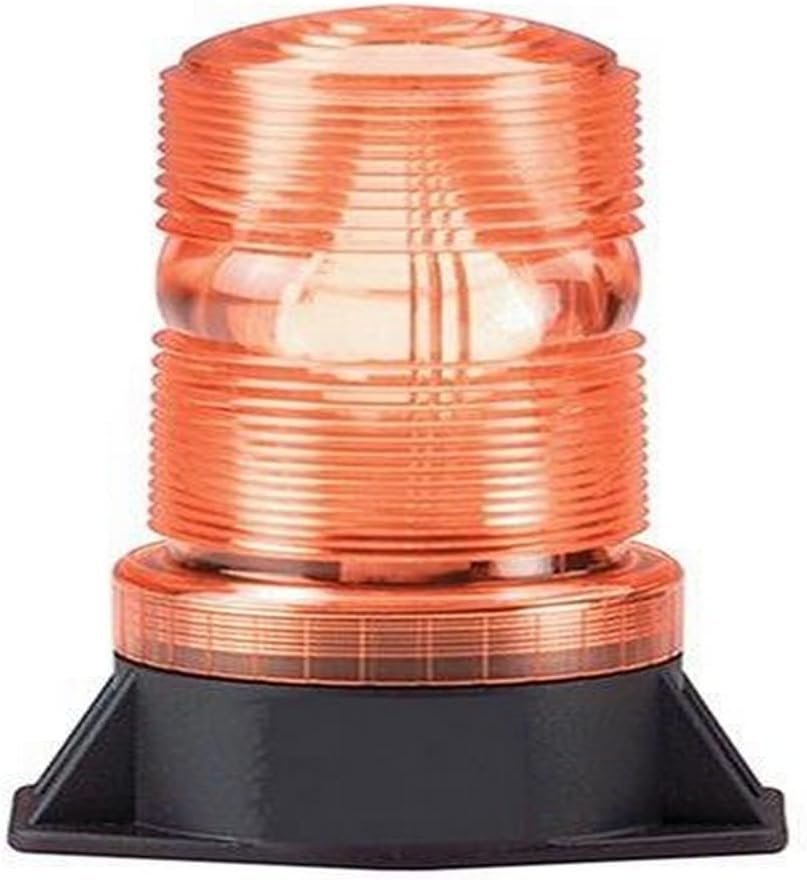
Figure 1: ECCO 6220A Medium Profile Strobe Light. This image shows the amber-colored strobe light with its black two-hole flange base, ready for mounting.
4.2 Electrical Connection
- Verify the power source is within the 12-80 VDC range.
- Connect the positive (+) wire from the power source to the positive terminal of the strobe light.
- Connect the negative (-) wire from the power source to the negative terminal of the strobe light.
- Ensure all connections are secure and insulated to prevent short circuits. The epoxy-filled base provides power-supply protection, and the unit is protected against reverse polarity, voltage spikes, and surges.
This strobe light is suitable for use in Type E, ES, and EE industrial trucks.
5. Operation
Once properly installed and connected to a 12-80 VDC power source, the ECCO 6220A strobe light will begin to flash automatically. No user intervention is typically required for basic operation. Ensure the light is positioned to provide maximum visibility for its intended warning purpose.
6. Maintenance
6.1 Cleaning
Periodically clean the lens with a soft, damp cloth to ensure optimal light output. Avoid abrasive cleaners that could scratch the lens.
6.2 Flash Tube Replacement
The thread-on lens design allows for easy replacement of the flash tube without the need for specialized tools. To replace the flash tube:
- Disconnect power to the unit.
- Carefully unscrew the lens counter-clockwise until it detaches from the base.
- Remove the old flash tube.
- Insert the new flash tube, ensuring it is seated correctly.
- Screw the lens back onto the base clockwise until secure. Do not overtighten.
- Reconnect power and test the unit.
7. Troubleshooting
| Problem | Possible Cause | Solution |
|---|---|---|
| Strobe light does not flash. | No power or incorrect wiring. Faulty flash tube. | Check power connections and ensure correct voltage (12-80 VDC). Replace flash tube (refer to Section 6.2). |
| Light output is dim or inconsistent. | Dirty lens. Aging flash tube. | Clean the lens (refer to Section 6.1). Replace flash tube (refer to Section 6.2). |
8. Specifications
| Model Number | 6220A |
| Brand | ECCO |
| Voltage | 12-80 VDC |
| Power Source | DC adapter |
| Light Source Type | Strobe |
| Mounting Type | Two-hole flange mount (bracket mount) |
| Product Dimensions (L x W x H) | 5.5" x 3.81" x 2.81" |
| Material | Plastic (lens), Metal (internal components), Epoxy-filled base |
| Item Weight | Approximately 408 grams (14.4 ounces) |
| Safety Standard | UL583 compliant |
| UPC | 758379005392 |
9. Warranty and Support
9.1 Product Warranty
The ECCO 6220A Medium Profile Strobe Light comes with a five-year warranty on the main unit. The flash tube component is covered by a separate six-month warranty. This warranty covers defects in materials and workmanship under normal use.
9.2 Customer Support
For technical assistance, warranty claims, or replacement parts, please contact ECCO customer support. Refer to the ECCO official website for the most current contact information.