
1. Introduction
Thank you for choosing the Sherwood RD-6500 Surround Sound Receiver. This receiver is designed to deliver high-quality audio performance for your home entertainment system, supporting both stereo and 5.1 channel surround sound configurations. It features Dolby Digital and Dolby Pro Logic II processing, multiple audio/video inputs, and a dedicated subwoofer output to enhance your listening experience. Please read this manual thoroughly before operating your new receiver to ensure proper setup and optimal performance.
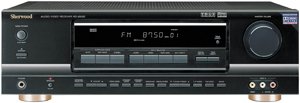
Figure 1.1: Front view of the Sherwood RD-6500 Surround Sound Receiver.
2. Important Safety Instructions
To reduce the risk of electric shock, fire, or damage to your equipment, please observe the following safety precautions:
- Read Instructions: Read all safety and operating instructions before using the appliance.
- Retain Instructions: Keep these instructions for future reference.
- Heed Warnings: Adhere to all warnings on the appliance and in the operating instructions.
- Water and Moisture: Do not use this apparatus near water.
- Cleaning: Clean only with a dry cloth.
- Ventilation: Do not block any ventilation openings. Install in accordance with the manufacturer's instructions.
- Heat: Do not install near any heat sources such as radiators, heat registers, stoves, or other apparatus (including amplifiers) that produce heat.
- Power Cord Protection: Protect the power cord from being walked on or pinched, particularly at plugs, convenience receptacles, and the point where they exit from the apparatus.
- Servicing: Refer all servicing to qualified service personnel. Servicing is required when the apparatus has been damaged in any way.
3. Package Contents
Please check that all items are present in the package:
- Sherwood RD-6500 Surround Sound Receiver
- Remote Control Unit
- Power Cord
- User Manual (this document)
If any items are missing or damaged, please contact your dealer immediately.
4. Setup
4.1 Speaker Connections
The RD-6500 supports a 5.1 channel speaker configuration. Ensure all speakers are correctly wired with proper polarity (+ to + and - to -) to avoid phase issues.
- Front Speakers (L/R): Connect your main left and right speakers to the FRONT L/R terminals.
- Center Speaker: Connect your center channel speaker to the CENTER terminal.
- Surround Speakers (L/R): Connect your left and right surround speakers to the SURROUND L/R terminals.
- Subwoofer: Connect an active subwoofer to the SUBWOOFER PRE-OUT jack using an RCA cable.
Note: An image showing the rear panel speaker terminals would typically be included here for visual guidance.
4.2 Audio/Video Source Connections
Connect your audio and video components to the appropriate input jacks on the rear panel of the receiver.
- Digital Audio Inputs: For high-quality digital audio, use the OPTICAL or COAXIAL digital inputs for devices like DVD/Blu-ray players, game consoles, or set-top boxes.
- Analog Audio/Video Inputs: Use the 3 AV inputs for devices such as VCRs, older game consoles, or cable boxes.
- Analog Audio Inputs: Use the 4 dedicated audio inputs for CD players, tape decks, or other stereo audio sources.
- 6-Channel Direct Inputs: For external multi-channel decoders or DVD-Audio/SACD players with multi-channel analog outputs, use the 6-channel direct inputs.
Note: An image illustrating various input/output ports on the rear panel would typically be included here.
4.3 Power Connection
Once all audio and speaker connections are made, connect the supplied power cord to the receiver's AC inlet and then to a suitable wall outlet.
5. Operating Instructions
5.1 Basic Operation
- Power On/Off: Press the POWER button on the front panel or the remote control to turn the receiver on or off.
- Volume Control: Use the VOLUME knob on the front panel or the VOLUME +/- buttons on the remote control to adjust the sound level.
- Input Selection: Press the INPUT SELECTOR buttons on the front panel or the corresponding source buttons (e.g., CD, DVD, OPTICAL) on the remote control to select your desired audio/video source.
Note: An image of the remote control with button descriptions would typically be included here.
5.2 Sound Mode Selection
The RD-6500 offers various sound modes to optimize your listening experience.
- Stereo Mode: For traditional two-channel audio, select the STEREO mode. The receiver delivers 100 watts x 2 channels in this mode.
- Surround Mode (Dolby Digital): When playing content encoded with Dolby Digital, the receiver will automatically detect and process the signal for 5.1 channel surround sound, delivering 100 watts x 5 channels.
- Surround Mode (Dolby Pro Logic II): For two-channel sources, Dolby Pro Logic II can create an immersive 5.1 channel surround sound experience. Select this mode for non-Dolby Digital encoded content.
5.3 Audio Adjustments
Use the receiver's menu system (accessed via the remote control) to fine-tune audio settings such as speaker levels, delay times, and tone controls (bass/treble) to match your room acoustics and personal preferences.
6. Maintenance
To ensure the longevity and optimal performance of your Sherwood RD-6500 receiver, follow these maintenance guidelines:
- Cleaning: Wipe the exterior surfaces with a soft, dry cloth. Do not use abrasive cleaners, waxes, or solvents.
- Ventilation: Ensure that the ventilation openings on the top and rear of the receiver are not obstructed. Adequate airflow is crucial to prevent overheating.
- Power Cord: Regularly inspect the power cord for any signs of damage. If damaged, replace it immediately with an approved cord.
- Dust: Periodically use a soft brush or a vacuum cleaner with a brush attachment to remove dust from the ventilation grilles.
7. Troubleshooting
If you encounter problems with your receiver, refer to the following table for possible solutions. If the issue persists, contact qualified service personnel.
| Problem | Possible Cause | Solution |
|---|---|---|
| No power | Power cord disconnected; Power outlet faulty; Receiver in standby mode. | Check power cord connection; Try another outlet; Press POWER button. |
| No sound | Incorrect input selected; Speaker wires disconnected; Volume too low; Mute function active. | Select correct input; Check speaker connections; Increase volume; Deactivate MUTE. |
| Distorted sound | Poor cable connection; Speaker impedance mismatch; Source device issue. | Check all cable connections; Ensure speakers match receiver impedance; Test with another source. |
| Remote control not working | Batteries depleted; Obstruction between remote and receiver; Incorrect remote mode. | Replace batteries; Remove obstructions; Ensure remote is in correct mode for receiver. |
8. Specifications
The following are the technical specifications for the Sherwood RD-6500 Surround Sound Receiver:
- Power Output (Stereo): 100 Watts x 2 channels (8 ohms, 20Hz-20kHz, 0.09% THD)
- Power Output (Surround): 100 Watts x 5 channels (8 ohms, 1kHz, 0.9% THD)
- Total Power Output: 500 Watts
- Surround Sound Decoders: Dolby Digital, Dolby Pro Logic II
- Audio Inputs: 4 Analog Audio, 3 AV (Audio/Video), 1 Optical Digital, 1 Coaxial Digital, 6-Channel Direct
- Audio Outputs: Subwoofer Pre-out
- Speaker Channels: 5.1
- Control Method: Remote Control
- Dimensions (W x H x D): 17 3/8" x 5 3/8" x 13" (44.1 cm x 13.7 cm x 33 cm)
- Weight: Approximately 20 lbs (9.07 kg)
- Model Number: RD-6500
- UPC: 093279445566
9. Warranty and Support
Sherwood products are manufactured to the highest quality standards. For warranty information, please refer to the warranty card included with your product or visit the official Sherwood website. For technical support or service inquiries, please contact your authorized Sherwood dealer or customer service center.
Please retain your proof of purchase for warranty claims.


