
Introduction
This manual provides essential information for the safe and efficient operation of your Behringer XENYX QX1002USB mixer. Please read it thoroughly before using the device to ensure proper setup, optimal performance, and to prevent damage.

Figure 1: Front view of the Behringer XENYX QX1002USB mixer, showcasing its various input channels, faders, and control knobs.
Safety Instructions
- Power Supply: Use only the power adapter supplied with the unit. Ensure the voltage matches your local power supply.
- Water and Moisture: Do not expose this appliance to rain or moisture. Do not place objects filled with liquids on the appliance.
- Ventilation: Ensure adequate ventilation. Do not block ventilation openings.
- Heat: Do not place near heat sources such as radiators, heat registers, stoves, or other apparatus (including amplifiers) that produce heat.
- Cleaning: Clean only with a dry cloth.
- Servicing: Refer all servicing to qualified service personnel. Do not attempt to service this product yourself.
Setup
1. Unpacking and Placement
Carefully unpack the mixer and inspect it for any signs of damage. Place the mixer on a stable, flat surface, ensuring sufficient space for ventilation around the unit.
2. Power Connection
Connect the supplied power adapter to the "AC POWER IN" socket on the rear panel of the mixer. Plug the other end into a suitable power outlet. Ensure the mixer's power switch is in the OFF position before connecting to power.

Figure 2: Rear panel of the Behringer XENYX QX1002USB mixer, showing the AC power input, USB interface, and other connections.
3. Audio Connections
- Microphone Inputs: Connect microphones to the XLR inputs (MIC) on the mono channels. These inputs feature XENYX mic preamps.
- Line Inputs: Connect line-level sources (e.g., keyboards, CD players) to the 1/4" balanced/unbalanced inputs on the mono or stereo channels.
- Main Outputs: Connect your main speakers or amplifier to the MAIN OUT (XLR or TRS) connectors.
- Control Room/Phones: Connect studio monitors to the CONTROL ROOM OUT and headphones to the PHONES jack for monitoring.
- USB Interface: Connect the mixer to your computer via the USB port for audio recording and playback.
Operating Instructions
This section details the primary controls and their functions for mixing audio.
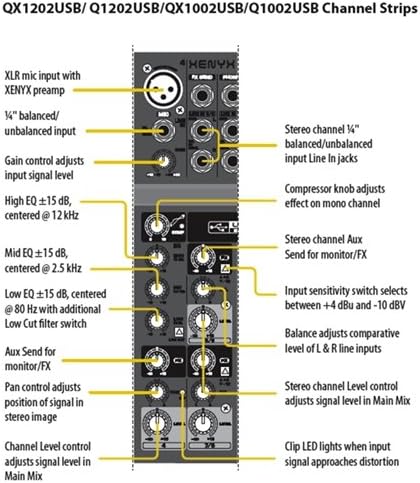
Figure 3: Detailed diagram illustrating the controls of a channel strip on the Behringer XENYX QX1002USB mixer, including gain, EQ, and auxiliary sends.
1. Channel Controls (Mono Channels)
- GAIN: Adjusts the input sensitivity for the microphone or line input. Set this so the "CLIP" LED flashes only occasionally.
- COMPRESSOR: (On mono channels) Adjusts the amount of compression applied to the input signal.
- EQ (HIGH, MID, LOW): Three-band equalizer to shape the tone of the input signal. HIGH affects treble, MID affects midrange, and LOW affects bass frequencies.
- FX: Sends a portion of the channel signal to the internal KLARK TEKNIK Multi-FX processor.
- PAN: Adjusts the position of the channel signal in the stereo image (left to right).
- LEVEL: Controls the overall output level of the channel to the main mix.
2. Stereo Channels
- INPUT SENSITIVITY SWITCH: Selects between +4 dBu and -10 dBV for optimal input level.
- BALANCE: Adjusts the comparative level of the left and right line inputs.
- LEVEL: Controls the overall output level of the stereo channel to the main mix.
3. Main Section Controls
- FX SEND: Controls the overall level of the signal sent to the internal effects processor.
- FX TO MAIN: Adjusts the amount of the processed effect signal that is mixed into the main output.
- MAIN MIX FADER: Controls the overall output level of the main stereo mix.
- PHONES/CONTROL ROOM: Adjusts the output level for headphones and control room monitors.
- USB/2-TRACK TO MAIN/PHONES: Routes the USB/2-Track input to the main mix or headphones/control room.
4. KLARK TEKNIK Multi-FX Processor
The integrated KLARK TEKNIK Multi-FX processor offers a variety of effects. Use the PROGRAM knob to select an effect and the TAP/ENTER button to confirm. The FX level is controlled by the FX knob on each channel and the FX TO MAIN knob in the main section.
Maintenance
1. Cleaning
Regularly clean the mixer with a soft, dry, lint-free cloth. Do not use liquid cleaners, solvents, or abrasive materials, as these can damage the finish and internal components.
2. Storage
When not in use, store the mixer in a cool, dry place, away from direct sunlight and extreme temperatures. If transporting, use appropriate protective casing.
3. Firmware Updates
Check the official Behringer website periodically for any available firmware updates for your QX1002USB mixer. Follow the instructions provided by Behringer for any update procedures.
Troubleshooting
- No Sound Output:
- Ensure the mixer is powered on and all cables are securely connected.
- Check the MAIN MIX fader and individual channel LEVEL knobs are raised.
- Verify that your speakers/amplifier are powered on and connected correctly.
- Check the PHONES/CONTROL ROOM knob if monitoring through headphones/monitors.
- Distorted Sound:
- Reduce the GAIN on the input channels if the CLIP LED is constantly lit.
- Lower the MAIN MIX fader or the input level to your speakers/amplifier.
- Ensure all cables are in good condition and correctly connected.
- Hum or Noise:
- Check for ground loops. Try connecting all audio equipment to the same power strip.
- Ensure all cables are shielded and in good condition.
- Keep audio cables away from power cables.
- USB Audio Issues:
- Ensure the correct USB audio driver is installed on your computer (if required by Behringer).
- Verify the QX1002USB is selected as the input/output device in your computer's sound settings and DAW.
- Check the USB/2-TRACK TO MAIN/PHONES switch.
Specifications
| Feature | Detail |
|---|---|
| Model | XENYX QX1002USB |
| Brand | Behringer |
| Number of Channels | 10 Inputs (2 Mono, 4 Stereo) |
| Mic Preamps | 2 x XENYX Mic Preamps |
| Compressors | 2 x Studio-grade compressors (on mono channels) |
| EQ | 3-band "British" EQs |
| Multi-FX Processor | KLARK TEKNIK FX processor with 100 presets |
| USB/Audio Interface | Built-in stereo USB/Audio Interface |
| Wireless Option | "Wireless-ready" for Behringer ULM digital wireless system |
| Output Connector Type | XLR, TRS |
| Item Weight | Approximately 8 pounds (3.6 kg) |
| Product Dimensions | 14.8 x 10.91 x 6.14 inches (37.6 x 27.7 x 15.6 cm) |
| Power Source | Corded Electric |
Note: Specifications are subject to change without notice. For the most current information, please refer to the official Behringer website.
Warranty and Support
For detailed warranty information, product registration, and technical support, please visit the official Behringer website at www.behringer.com. You can find FAQs, driver downloads, and contact information for customer service there.
Behringer provides a limited warranty for its products. Please retain your proof of purchase for warranty claims.


