
Introduction
This manual provides comprehensive instructions for the safe and effective operation of your Stanley 0-77-260 Intellilaser Pro Laser Tracer and Detector. This versatile tool combines a laser level for accurate alignment with a detector for locating wood studs, metal, and live electrical wires within walls. Please read this manual thoroughly before first use and keep it for future reference.
Safety Information
WARNING: This device emits a laser beam. Avoid direct eye exposure to the laser beam. Do not stare into the beam. Laser radiation can cause eye injury.
- Always operate the device in a safe manner, following all instructions.
- Do not attempt to modify or disassemble the device. There are no user-serviceable parts inside.
- Keep the device away from children and unauthorized personnel.
- Ensure the work area is clear of obstructions and potential hazards.
- When detecting live electrical wires, always exercise extreme caution. Turn off power at the circuit breaker if possible before drilling or cutting into walls.
- Do not use the device in wet or damp conditions.
Package Contents
Verify that all items are present in your package:
- Stanley 0-77-260 Intellilaser Pro Detector
- User Manual
- Battery (if included as per packaging)
Setup
Battery Installation
- Locate the battery compartment cover on the back of the device.
- Slide or unclip the cover to open it.
- Insert the required batteries (typically 9V, check device markings) according to the polarity indicators (+/-).
- Close the battery compartment cover securely.
Note: Always use fresh batteries for optimal performance. Remove batteries if the device will not be used for an extended period.
Operating Instructions
General Operation and Auto-Calibration
To power on the device, press the power button. The Intellilaser Pro features auto-calibration. Upon activation, place the device flat against the wall or surface where you intend to scan or project the laser. The device will automatically calibrate itself, indicated by a brief sequence on the LCD screen. Wait for the calibration process to complete before proceeding.
Laser Tracing Function
The laser tracing function projects a bright red laser line up to 6 meters (approximately 20 feet) for accurate leveling and alignment tasks. The 180° rotating laser head allows for versatile projection angles.
- Activate Laser: Press the laser button to turn on the laser line.
- Positioning: Place the device on a stable surface or hold it against the wall. Use the integrated bubble levels for initial manual leveling if precise horizontal or vertical lines are needed.
- Adjusting Angle: Rotate the laser head to project the line horizontally, vertically, or at an angle as required for your task.
- Applications: Ideal for hanging pictures, shelves, cabinets, or aligning tiles.

Image: A person uses the Stanley Intellilaser Pro to project a horizontal red laser line across a wall, aligning two picture frames. The device is held in the right hand, and the laser line extends from the device across the wall, passing over the top edge of the frames.
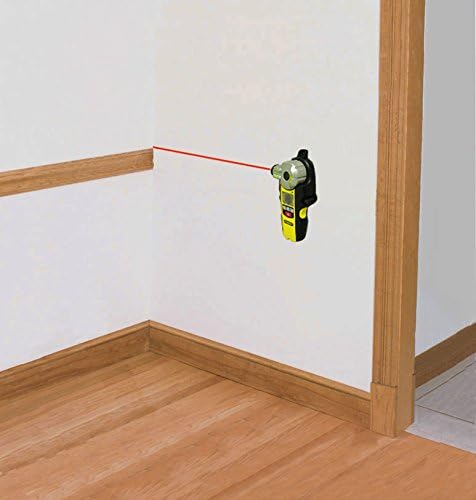
Image: The Stanley Intellilaser Pro is shown mounted on an interior wall corner, projecting a red laser line horizontally along the wall. This demonstrates its ability to project lines from various positions.

Image: The Stanley Intellilaser Pro is positioned on a tiled floor, projecting a red laser line across the tiles. This illustrates its use for floor layout and alignment tasks.
Detection Modes (Stud, Metal, Live Wire)
The Intellilaser Pro can detect various materials behind walls, providing crucial information before drilling or cutting.
- Select Mode: Use the mode selection button to cycle through the detection modes: wood/metal detection and live electrical wire detection. The selected mode will be indicated on the LCD screen.
- Scanning: Place the device flat against the wall and slowly slide it horizontally across the surface. Maintain constant contact with the wall.
- Detection Indication: The LCD screen will display indicators when an object is detected. It will also signal the center of the detected object for precise marking.
- Wood and Metal Detection: Detects wood and metal studs up to 25mm (approximately 1 inch) deep.
- Live Electrical Wire Detection: Detects live electrical wires up to 51mm (approximately 2 inches) deep. Exercise extreme caution when live wires are detected.

Image: A hand holds the Stanley Intellilaser Pro against a drywall surface, with the device indicating the presence of a stud (wood or metal) behind the wall. The image shows the device's display and its position relative to the wall structure.
Maintenance
- Cleaning: Wipe the device with a soft, dry cloth. Do not use abrasive cleaners or solvents.
- Storage: Store the device in a dry, cool place, away from direct sunlight and extreme temperatures.
- Battery: Remove batteries if the device is not used for extended periods to prevent leakage.
Troubleshooting
| Problem | Possible Cause | Solution |
|---|---|---|
| Device does not power on. | Dead or incorrectly installed batteries. | Check battery polarity. Replace with fresh batteries. |
| Inaccurate detection. | Improper calibration or scanning technique. | Ensure device is calibrated on a clear section of the wall. Scan slowly and maintain constant contact. Avoid scanning over recently painted or damp areas. |
| Laser line is dim or not visible. | Low battery or bright ambient light. | Replace batteries. Use in areas with less direct sunlight or bright artificial light. |
Specifications
| Model Number | 0-77-260 |
| Brand | STANLEY |
| Laser Range | 6 meters (approx. 20 feet) |
| Laser Head Rotation | 180° |
| Wood/Metal Detection Depth | Up to 25mm (approx. 1 inch) |
| Live Wire Detection Depth | Up to 51mm (approx. 2 inches) |
| Display | LCD screen for object indication |
| Calibration | Automatic |
| Power Source | Battery (type not specified, typically 9V) |
| Color | Black/Yellow |
Warranty and Support
This Stanley 0-77-260 Intellilaser Pro comes with a 2-year warranty from the date of purchase, covering defects in materials and workmanship. Please retain your proof of purchase for warranty claims.
For technical support, troubleshooting assistance, or warranty service, please contact Stanley customer service through their official website or the contact information provided in your product packaging.


