
1. Introduction
This instruction manual provides comprehensive guidance for the safe and effective use of your JVC UX-QD7-S Micro Component DVD/MD System. Please read this manual thoroughly before operating the system and retain it for future reference. This system integrates a DVD video player, an MD deck, and a 3-way speaker setup, designed to deliver a high-quality audio and video experience.
2. Safety Information
- Power Supply: Ensure the system is connected to a power source that matches the voltage specified on the unit.
- Ventilation: Do not block ventilation openings. Allow adequate space around the unit for proper airflow to prevent overheating.
- Moisture: Do not expose the unit to rain, moisture, or excessive humidity. Keep liquids away from the system.
- Foreign Objects: Do not insert any objects into the unit's openings.
- Servicing: Do not attempt to service this product yourself. Refer all servicing to qualified service personnel.
- Placement: Place the unit on a stable, level surface. Avoid placing it near heat sources or in direct sunlight.
3. System Overview and Package Contents
The JVC UX-QD7-S system consists of a central main unit, two stereo speakers, and a remote control. The main unit houses the DVD player, MD deck, and amplifier. The speakers are designed for optimal sound reproduction, and the remote control provides convenient operation from a distance.
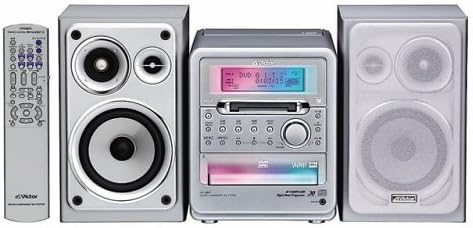
Package Contents:
- Main Unit (DVD/MD Player)
- Left Speaker
- Right Speaker
- Remote Control
- Power Cord
- Speaker Cables
- Instruction Manual (this document)
4. Setup
4.1 Speaker Connection
- Connect the speaker cables from the main unit's speaker terminals to the corresponding terminals on each speaker. Ensure correct polarity (red to red, black to black) for optimal sound.
- Position the speakers to the left and right of the main unit for stereo sound.
4.2 Power Connection
- Plug the power cord into the AC inlet on the rear of the main unit.
- Insert the other end of the power cord into a wall outlet.
4.3 Connecting to a Television (for DVD Video)
To view DVD video content, connect the system to your television using appropriate video cables (e.g., composite video, S-video, or component video, depending on available ports on both devices). Refer to your TV's manual for specific input connections.
4.4 Connecting External Audio Sources (AUX)
To connect an external audio device (e.g., a portable music player), use an audio cable to connect the device's audio output to the AUX input jacks on the JVC UX-QD7-S main unit.
5. Operating Instructions
5.1 Basic Operation
- Power On/Off: Press the POWER button on the main unit or remote control.
- Volume Control: Use the VOLUME +/- buttons on the main unit or remote control to adjust the sound level.
- Source Selection: Press the FUNCTION or SOURCE button to cycle through DVD, MD, AUX, and Tuner (if available) inputs.
5.2 DVD Playback
- Select the DVD function.
- Press the OPEN/CLOSE button to open the disc tray.
- Place a DVD video or DVD audio disc onto the tray with the label side up.
- Press OPEN/CLOSE again to close the tray. Playback will usually start automatically.
- Use PLAY, PAUSE, STOP, SKIP, and SEARCH buttons on the remote for control.
- The system supports 5.1ch surround sound reproduction with 3D phonics and is compatible with DVD Audio discs for high-quality audio playback.
5.3 MD Deck Operation
- Select the MD function.
- Insert a MiniDisc (MD) into the MD slot.
- Playback: Press the PLAY button.
- Recording: The MD deck supports MDLP (MiniDisc Long Play) for extended recording times. Refer to the detailed MD recording section in the full manual for specific instructions on recording modes and procedures.
- Erase: Follow the instructions in the full manual to erase tracks or entire MDs.
5.4 External Input (AUX)
To listen to an external device connected to the AUX input, select the AUX function using the FUNCTION or SOURCE button.
6. Maintenance
- Cleaning the Unit: Wipe the unit with a soft, dry cloth. For stubborn stains, use a cloth lightly dampened with a mild detergent solution, then wipe dry. Do not use abrasive cleaners or solvents.
- Disc/MD Handling: Handle discs and MDs by their edges. Keep them clean and free from scratches. Store them in their cases when not in use.
- Speaker Care: Keep speakers free from dust. Do not press on the speaker cones.
7. Troubleshooting
| Problem | Possible Cause | Solution |
|---|---|---|
| No power | Power cord not connected; Power outlet faulty | Check power cord connection; Try a different outlet |
| No sound | Volume too low; Speakers not connected; Incorrect source selected | Increase volume; Check speaker connections; Select correct input source |
| Disc not playing | Disc inserted incorrectly; Disc dirty or scratched; Disc format not supported | Insert disc correctly; Clean or replace disc; Ensure disc is DVD video or DVD audio |
| MD not recording | MD is full or protected; Incorrect recording mode | Use a blank MD or erase existing content; Check recording settings |
| Remote control not working | Batteries depleted; Obstruction between remote and unit | Replace batteries; Remove any obstructions |
If the problem persists after attempting these solutions, please contact JVC customer support or a qualified service technician.
8. Specifications
- Model Number: UX-QD7-S
- Brand: JVC
- Connectivity Technology: AUX
- Speaker Type: Surround
- Audio Output Mode: Surround
- Product Weight: Approximately 6151 grams
- Supported Media: DVD Video, DVD Audio, MiniDisc (MD, MDLP)
- Platform: Desktop Audio System
9. Warranty and Support
For warranty information, please refer to the warranty card included with your product or visit the official JVC website. Keep your purchase receipt as proof of purchase for warranty claims.
For technical support or service inquiries, please contact JVC customer service. Contact details can typically be found on the official JVC website or in the product packaging.


