
1. Introduction
Thank you for choosing the Sunpak PZ 4000 AF Flash. This instruction manual provides essential information for the safe and effective use of your new flash unit. Please read this manual thoroughly before operating the device and keep it for future reference.
2. Safety Information
To ensure safe operation and prevent damage to the unit or injury to yourself, please observe the following precautions:
- Do not expose the flash unit to water or excessive moisture.
- Avoid direct eye contact with the flash light, especially at close range, as it can cause temporary vision impairment.
- Do not attempt to disassemble or modify the flash unit. Refer all servicing to qualified personnel.
- Keep batteries out of reach of children. Dispose of used batteries properly according to local regulations.
- Ensure proper battery polarity when inserting batteries.
3. Package Contents
Please check that all the following items are included in your package:
- Sunpak PZ 4000 AF Flash Unit
- Zoom Head
- Remote Release
- Instruction Manual (this document)
4. Product Overview
The Sunpak PZ 4000 AF is a compact and versatile flash unit designed to enhance your photography. It features a motorized zoom head that automatically adjusts to your lens's focal length, and a rotating head for creative bounce flash effects.
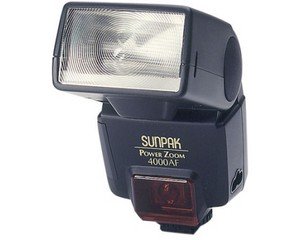
Figure 1: Front view of the Sunpak PZ 4000 AF Flash Unit, showing the flash head and control panel.
5. Setup
5.1. Battery Installation
Locate the battery compartment on the flash unit. Insert the required batteries (typically AA batteries, not included) according to the polarity indicators (+/-) inside the compartment. Close the battery compartment securely.
5.2. Mounting the Flash
Slide the flash unit's hot shoe mount onto your camera's hot shoe. Ensure it is fully seated and then tighten the locking mechanism (if present) to secure the flash to the camera.
5.3. Initial Power On
Press the power button to turn on the flash unit. The LCD panel will illuminate, indicating the flash is ready for operation. Allow a few seconds for the flash to charge before its first use.
6. Operating the Sunpak PZ 4000 AF Flash
6.1. Automatic Zoom Function
The PZ 4000 AF features a motorized zoom head that automatically adjusts its coverage to match the focal length of your lens, typically between 28mm and 80mm. This ensures optimal light distribution for your chosen lens.
6.2. Manual Zoom Control
If desired, the zoom head can be manually controlled. Refer to the flash's control panel and buttons to override the automatic setting and select a specific zoom position.
6.3. Flash Head Rotation
For creative lighting, the flash head can rotate up to 90 degrees. This allows you to bounce the flash off ceilings or walls, creating softer, more natural illumination and reducing harsh shadows.
6.4. Flash Modes
The flash supports various modes, including TTL (Through-The-Lens) for automatic exposure control, Manual mode for precise power adjustments, and Fill-in mode for balancing ambient light with flash. Select the desired mode via the control panel.
6.5. Standby Mode
To conserve battery power, the PZ 4000 AF enters a standby mode if it is not fired for a few minutes. To reactivate the flash, lightly press the camera's shutter button, and the flash will quickly become ready to fire again.
6.6. Synchronization Speed
The flash supports a synchronization speed of up to 1/250 second, allowing for effective flash photography in various conditions.
7. Maintenance
7.1. Cleaning
Wipe the flash unit with a soft, dry cloth. For stubborn dirt, use a slightly damp cloth and then dry thoroughly. Do not use strong detergents or solvents. Keep the flash tube and sensor clean for optimal performance.
7.2. Storage
When not in use for extended periods, remove the batteries to prevent leakage. Store the flash unit in a cool, dry place, away from direct sunlight and extreme temperatures.
8. Troubleshooting
If you encounter issues with your Sunpak PZ 4000 AF Flash, refer to the following common problems and solutions:
- Flash not firing: Check battery levels and ensure they are inserted correctly. Verify the flash is securely mounted on the camera's hot shoe.
- Flash not charging: Replace batteries with fresh ones. If the issue persists, contact customer support.
- Incorrect exposure: Ensure the flash mode (TTL, Manual) is appropriate for your shooting conditions. Check camera settings for flash compensation.
- Zoom head not moving: Check for obstructions. If in manual zoom mode, ensure settings are correct.
9. Technical Specifications
| Feature | Value |
|---|---|
| Brand | Sunpak |
| Model Number | 4000AF Minolta AF |
| Compatible Mounts | Canon (also available for Minolta AF) |
| Camera Flash Type | Integrated |
| Flash Sync Speed | 1/250s |
| Included Components | Zoom Head, Remote Release |
| Wireless Technology | Optical Pulse |
| Lens Mount Type | Hot Shoe Mount |
| Color | Black |
| Guide Number (ISO 100) | 28mm - 24m, 35mm - 28m, 50mm - 34m, 80mm - 40m |
10. Warranty and Support
The Sunpak PZ 4000 AF Flash is covered by a limited warranty. Please refer to the warranty card included with your purchase for specific terms and conditions. For technical support, service, or warranty claims, please contact your retailer or the official Sunpak customer service.


