
Dayton Audio BSDA013
Dayton Audio DA135-8 5-1/4" Aluminum Cone Woofer User Manual
Model: BSDA013
Introduction
This manual provides comprehensive instructions for the proper installation, operation, and maintenance of your Dayton Audio DA135-8 5-1/4" Aluminum Cone Woofer. Please read this manual thoroughly before using the product to ensure optimal performance and longevity. Retain this manual for future reference.

The Dayton Audio DA135-8 woofer is designed for integration into various audio systems, providing clear and precise low-frequency reproduction.
Product Overview
Key Features
- Makes a great studio monitor speaker
- Aluminum cone offers a flat frequency response
- Cosmetically appealing integrated trim ring
- Very low distortion driver
What's in the Box
- Dayton Audio DA135-8 5-1/4" Aluminum Cone Woofer
- Rubber surround
- Flat spider
- Special composite dustcap
- Mounting holes
- Baffle cutout
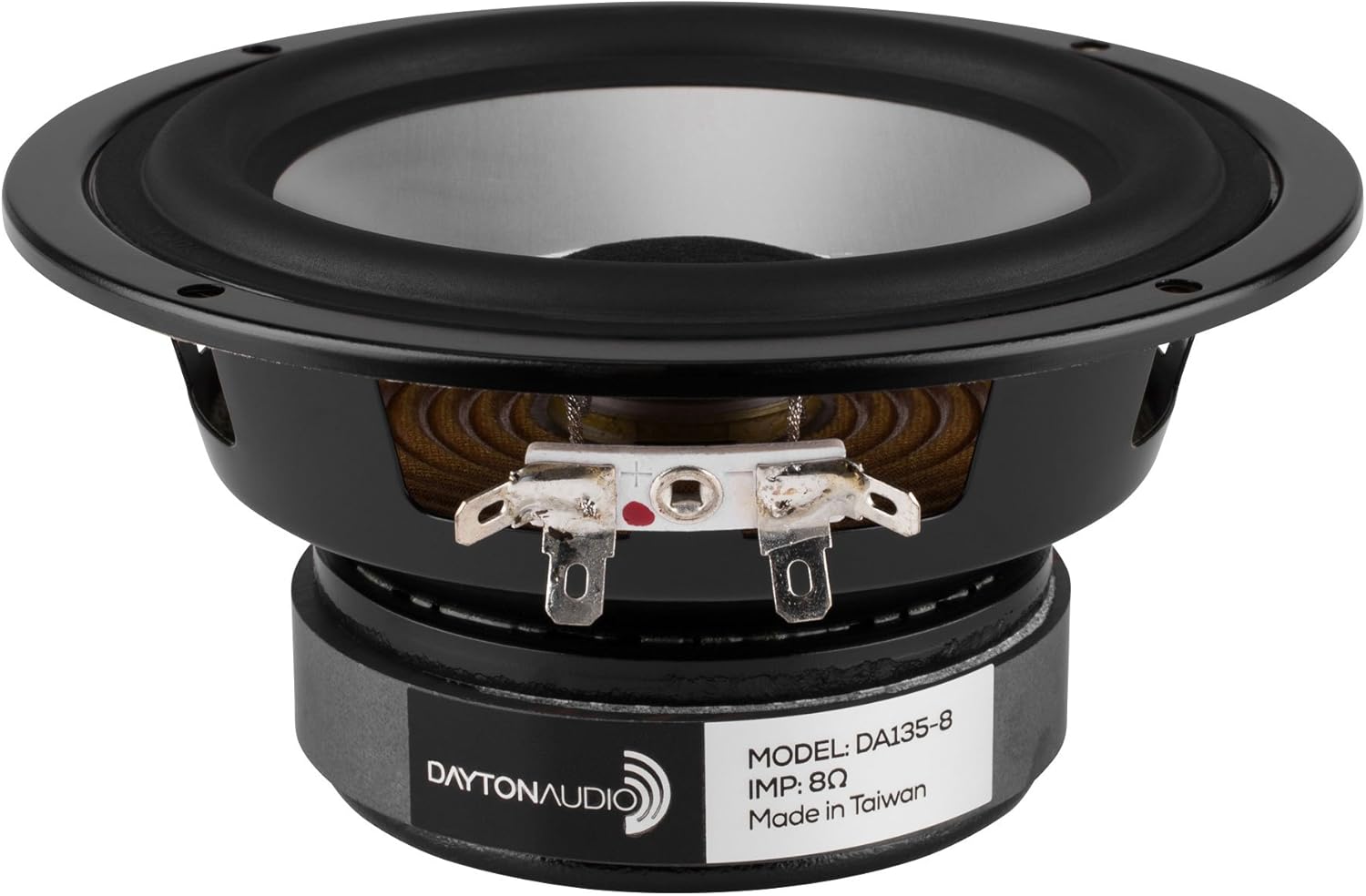
The Dayton Audio DA135-8 woofer features an aluminum cone and robust construction.

The flat spider and composite dustcap contribute to the woofer's low distortion characteristics.
Setup
Unpacking
Carefully remove the woofer and all components from the packaging. Inspect for any signs of damage during transit. If any damage is found, contact your retailer immediately.
Mounting Considerations
The DA135-8 woofer is designed for flush mount installation. Ensure the mounting surface is rigid and free from vibrations. Use appropriate screws and ensure a tight seal around the woofer to prevent air leaks, which can negatively impact sound quality. Refer to the specifications section for product dimensions and recommended baffle cutout size.

The rear of the woofer displays the model number and impedance, crucial for proper installation.
Wiring Connections
The DA135-8 woofer features standard spade terminals for wired audio connection. Connect the positive (+) terminal of the woofer to the positive output of your amplifier or crossover, and the negative (-) terminal to the negative output. Ensure all connections are secure to prevent intermittent sound or short circuits. This woofer has an impedance of 8 Ohms.

Proper connection to the clearly marked positive and negative terminals is essential for correct audio phasing.
Operation
Basic Operation
Once properly installed and connected, the Dayton Audio DA135-8 woofer will function as a component of your audio system, primarily responsible for reproducing low-frequency sounds (bass). It is designed for stereo audio output mode. Ensure your amplifier's power output does not exceed the woofer's maximum power handling capacity of 60 Watts to prevent damage.
Compatible Devices
This woofer is compatible with a variety of audio systems and devices, including:
- Desktop audio systems
- Television audio systems
- Laptop audio systems (when connected to an external amplifier)
- Car audio systems (as a component subwoofer)
Maintenance
Cleaning
To clean the woofer, gently wipe the cone and surround with a soft, dry, lint-free cloth. Avoid using harsh chemicals, solvents, or abrasive cleaners, as these can damage the cone material or surround. Do not apply excessive pressure to the cone.
Storage
If storing the woofer for an extended period, keep it in a cool, dry place away from direct sunlight and extreme temperatures. Protect it from dust and physical impact.
Troubleshooting
Common Issues and Solutions
- No Sound:
- Check all wiring connections to ensure they are secure and correctly polarized (+ to +, - to -).
- Verify that the amplifier is powered on and functioning correctly.
- Ensure the audio source is active and sending a signal.
- Distorted Sound:
- Reduce the volume level from the amplifier or source. Overdriving the woofer can cause distortion.
- Check for loose connections or frayed wires.
- Ensure the woofer is properly mounted and sealed within its enclosure.
- Weak Bass Output:
- Verify that the woofer is connected to the correct low-frequency output of your amplifier or crossover.
- Check the phase of the woofer. Incorrect phasing can lead to cancellation of bass frequencies.
- Ensure the enclosure volume and design are appropriate for the woofer's specifications.
Technical Specifications
| Model Name | DA135-8 |
| Item Model Number | BSDA013 |
| Speaker Type | Woofer |
| Material | Aluminum cone, Rubber surround |
| Woofer Diameter | 5.25 Inches |
| Speaker Maximum Output Power | 60 Watts |
| Nominal Impedance | 8 Ohms |
| Connectivity Technology | Wired audio connection |
| Item Weight | 1.9 pounds |
| Product Dimensions | 2.48"D x 0.93"W x 2.48"H |
| Manufacturer | Dayton Audio |
| Date First Available | October 25, 2006 |
Warranty and Support
Warranty Information
The Dayton Audio DA135-8 5-1/4" Aluminum Cone Woofer comes with a Limited Warranty. Please refer to the warranty documentation provided with your purchase or visit the official Dayton Audio website for detailed terms and conditions regarding coverage, duration, and claims procedures.
Customer Support
For technical assistance, troubleshooting beyond this manual, or warranty inquiries, please contact Dayton Audio customer support. Contact information can typically be found on the manufacturer's official website or on your product packaging.
Manufacturer: Dayton Audio
For more information, visit the Dayton Audio Store on Amazon.
Related documentsBSDA013

Ask a question about this manual
Ask about setup, troubleshooting, compatibility, parts, safety, or missing instructions. Manuals+ will review the question and use this page’s manual context to help answer it.