
1. Introduction and Overview
The Netgear FS605-300PES is a 5-port 10/100 Mbps Fast Ethernet switch designed to expand your network connectivity. This unmanaged switch provides a simple and efficient way to connect up to five Ethernet-enabled devices to your network, such as computers, printers, and gaming consoles. It features automatic speed detection for 10 Mbps or 100 Mbps devices and Auto-Uplink (Auto MDI-X) functionality, which automatically adjusts for straight-through or crossover cables. The FS605 operates silently due to its fanless design and includes front-panel LED indicators for quick status monitoring.
2. Package Contents
Verify that your package contains the following items:
- Netgear FS605 Fast Ethernet Switch
- Power Adapter
- Installation Guide
- Warranty Registration Card
- Support Information Card
3. Product Features
- 5 Fast Ethernet Ports: Provides five 10/100 Mbps RJ-45 ports for network expansion.
- Auto-Uplink (Auto MDI-X): Automatically detects and adjusts for straight-through or crossover Ethernet cables on all ports.
- Full-Duplex Communication: Supports full-duplex mode for maximum data throughput.
- Flow Control (IEEE 802.3x): Ensures reliable data transmission by preventing packet loss during network congestion.
- Store-and-Forward Architecture: Improves network integrity by checking for errors before forwarding data.
- Fanless Design: Operates silently, suitable for quiet environments.
- LED Indicators: Front-panel LEDs display power, link status, and activity for each port.
- Compact Design: Small footprint for flexible placement.
4. Setup
Follow these steps to set up your Netgear FS605 switch:
- Connect the Power Adapter: Plug the included power adapter into the DC power input port on the rear of the switch. Connect the other end of the adapter to a standard electrical outlet. The Power LED on the front panel should illuminate.
- Connect to Your Network: Connect an Ethernet cable from your router or modem to any of the five RJ-45 ports on the switch. The corresponding Link/Activity LED for that port will light up.
- Connect Devices: Connect your network devices (e.g., computer, laptop, printer, gaming console) to the remaining RJ-45 ports on the switch using standard Category 5 (or higher) Ethernet cables. The Link/Activity LED for each connected device's port will illuminate, indicating a successful connection.
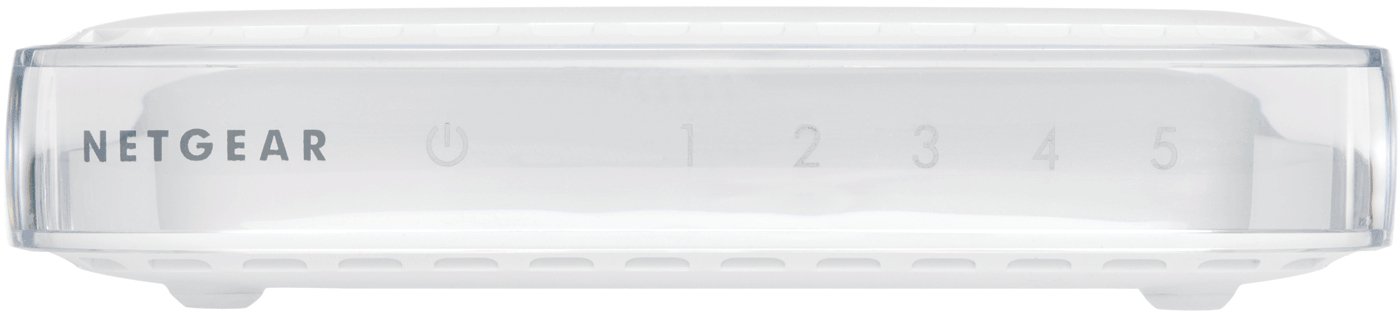
Figure 1: Front view of the Netgear FS605-300PES switch, displaying the power indicator and five port status LEDs.

Figure 2: Rear view of the Netgear FS605-300PES switch, illustrating the power input and the five Ethernet ports.
The switch is plug-and-play and does not require any software configuration.
5. Operating Instructions
Once connected, the Netgear FS605 switch operates automatically. It functions as an unmanaged device, requiring no user intervention for basic network traffic management.
LED Indicators
- Power LED: Illuminates when the switch is powered on.
- Link/Activity LEDs (1-5): Each port has a corresponding LED.
- Solid Green: Indicates a valid network link at 100 Mbps.
- Solid Amber: Indicates a valid network link at 10 Mbps.
- Flashing: Indicates network activity (data transmission or reception) on that port.
- Off: No link detected or device is not connected.
6. Maintenance
The Netgear FS605 switch requires minimal maintenance:
- Cleaning: Keep the device clean and free from dust. Use a soft, dry cloth for cleaning. Do not use liquid or aerosol cleaners.
- Ventilation: Although fanless, ensure the switch is placed in a location with adequate airflow to prevent overheating. Do not block ventilation openings.
- Environment: Operate the switch within the specified temperature and humidity ranges (refer to Specifications section). Avoid direct sunlight, heat sources, and excessive moisture.
7. Troubleshooting
If you encounter issues with your Netgear FS605 switch, refer to the following troubleshooting tips:
- No Power: If the Power LED is off, ensure the power adapter is securely connected to both the switch and a working electrical outlet. Try a different outlet if necessary.
- No Link/Activity LED: If a Link/Activity LED does not illuminate for a connected device:
- Verify that the Ethernet cable is securely plugged into both the switch port and the device's network port.
- Try a different Ethernet cable.
- Ensure the connected device is powered on and its network adapter is functioning correctly.
- Try connecting the device to a different port on the switch.
- Slow Network Speed: If network performance is slower than expected:
- Check the Link/Activity LED color. Green indicates 100 Mbps, Amber indicates 10 Mbps. Ensure your devices and cables support 100 Mbps if desired.
- Ensure all connected devices are functioning optimally.
- Avoid using excessively long or damaged Ethernet cables. The maximum recommended cable length is 100 meters.
- Intermittent Connectivity: If the switch occasionally stops functioning or loses connection, try restarting the device by unplugging and re-plugging the power adapter. If the issue persists, ensure the switch is not placed in an area prone to electromagnetic interference.
8. Technical Specifications
| Feature | Specification |
|---|---|
| Model | FS605-300PES |
| Number of Ports | 5 x 10/100 Mbps RJ-45 |
| Data Transfer Rate | 100 Mbps (Fast Ethernet) |
| Protocols | IEEE 802.3i 10BASE-T, IEEE 802.3u 100BASE-TX, IEEE 802.3x Flow Control |
| Switching Method | Store-and-forward |
| MAC Address Table Size | 1024 entries |
| Buffer Memory | 128 KB |
| Latency | < 20 microseconds (for 64-byte frame, 100 Mbps to 100 Mbps) |
| Power Consumption | 7.5 W maximum |
| Dimensions (L x W x H) | 116.57 mm x 89.75 mm x 34.42 mm |
| Weight | 0.13 kg (130 grams) |
| Operating Temperature | 0°C to 40°C (32°F to 104°F) |
| Storage Temperature | -20°C to 70°C (-4°F to 158°F) |
| Operating Humidity | 90% non-condensing |
| Noise Level | 0 dB (fanless) |
| Max Cable Length | 100 meters (328 feet) |
| Electromagnetic Compliance | CE mark, FCC Part 15 Class B, EN 55022 Class B, C-Tick, EN 55024 |
| System Compatibility | Windows®, Mac® OS, NetWare®, Linux® |
9. Warranty and Support
The Netgear FS605-300PES switch comes with a 3-year manufacturer's warranty. Please refer to the Warranty Registration Card included in your package for detailed terms and conditions.
For technical support, product registration, and additional resources, please refer to the Support Information Card provided with your product or visit the official Netgear support website. Keep your product's model number (FS605-300PES) and serial number handy when contacting support.


