
Crown MA-3600VZ
Crown MA-3600VZ Power Amplifier User Manual
Model: MA-3600VZ | Brand: Crown
Introduction
This manual provides essential information for the safe and efficient operation of your Crown MA-3600VZ Power Amplifier. Please read this manual thoroughly before operating the unit and retain it for future reference.
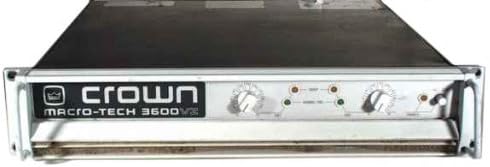
Figure 1: Front panel of the Crown MA-3600VZ Power Amplifier, showing input level controls, indicator LEDs, and power switch.
Safety Instructions
Always observe the following safety precautions to prevent electric shock, fire, or damage to the unit:
- Do not expose this appliance to rain or moisture.
- Do not remove the cover. No user-serviceable parts inside. Refer servicing to qualified personnel.
- Ensure proper ventilation. Do not block ventilation openings.
- Connect to a grounded mains socket outlet.
- Disconnect the mains plug during lightning storms or when unused for long periods.
Setup
Unpacking and Inspection
Carefully unpack the amplifier and inspect it for any signs of damage that may have occurred during transit. If damage is found, contact your dealer immediately.
Placement
Place the amplifier in a location with adequate ventilation. Avoid placing it near heat sources or in direct sunlight. Ensure there is sufficient space around the unit for airflow.
Connections
- Input Connections: Connect your audio source (mixer, preamplifier) to the input connectors on the rear panel. The MA-3600VZ typically uses XLR or TRS inputs.
- Output Connections: Connect your loudspeakers to the output terminals. Ensure correct polarity (+ to + and - to -) for each speaker. The MA-3600VZ supports various speaker configurations.
- Power Connection: Connect the amplifier to a grounded AC power outlet using the provided power cord. Ensure the voltage matches the amplifier's requirements (120V as per product description).
Operating Instructions
Powering On/Off
- To Power On: Ensure all connections are secure and input levels are turned down. Press the power switch on the front panel. The power indicator LED will illuminate.
- To Power Off: Turn down all input levels, then press the power switch.
Level Controls
The front panel features independent level controls for each channel. Start with these controls at their minimum setting and gradually increase them to achieve the desired output level. Monitor the signal presence and clip indicators to prevent distortion.
Indicator LEDs
- Signal LED: Illuminates when an audio signal is present.
- Clip LED: Illuminates when the output signal is clipping. Reduce the input level to prevent damage to speakers and the amplifier.
- Thermal LED: Indicates the amplifier is overheating. The amplifier may enter protection mode. Allow it to cool down.
Maintenance
Cleaning
Regularly clean the exterior of the amplifier with a soft, dry cloth. Do not use liquid cleaners or solvents. Ensure ventilation grilles are free from dust and debris.
Ventilation
Ensure that the amplifier's ventilation openings are not obstructed. Proper airflow is crucial for preventing overheating and ensuring long-term reliability.
Storage
If storing the amplifier for an extended period, disconnect it from power, clean it, and store it in a cool, dry place, preferably in its original packaging.
Troubleshooting
| Problem | Possible Cause | Solution |
|---|---|---|
| No power | Power cord disconnected; no power from outlet; blown fuse. | Check power cord connection; test outlet; replace fuse (refer to qualified technician). |
| No sound output | Input cables disconnected; speaker cables disconnected or incorrect polarity; input level too low; amplifier in protection mode. | Check all cable connections; ensure correct speaker polarity; increase input level; power cycle the amplifier. |
| Distorted sound | Input signal too high (clipping); faulty cables; damaged speakers. | Reduce input level; check/replace cables; test speakers with another amplifier. |
| Amplifier overheats | Poor ventilation; excessive load; prolonged high output. | Ensure adequate airflow; check speaker impedance; reduce output level. |
Specifications
The Crown MA-3600VZ is a high-performance power amplifier designed for professional audio applications. Key specifications include:
- Output Power: 3600 Watts
- Channels: 2 (Stereo)
- Frequency Response: Typically 20 Hz - 20 kHz
- Input Sensitivity: (Refer to manufacturer's official specifications)
- Input Impedance: (Refer to manufacturer's official specifications)
- Dimensions: (Refer to manufacturer's official specifications)
- Weight: (Refer to manufacturer's official specifications)
- Voltage: 120V AC
Note: Full specifications can often be found on the manufacturer's official website.

Figure 2: Crown Audio brand logo, representing the manufacturer of the MA-3600VZ amplifier.
Warranty and Support
For warranty information and technical support, please refer to the official Crown Audio website or contact your authorized dealer. Keep your proof of purchase for warranty claims.
Official Website: Crown Audio (Link provided in product description)
Related documentsMA-3600VZ


Ask a question about this manual
Ask about setup, troubleshooting, compatibility, parts, safety, or missing instructions. Manuals+ will review the question and use this page’s manual context to help answer it.