
1. Product Overview
The WARN 38626 Hand Held Winch Remote Controller is designed to provide convenient and safe operation of compatible WARN truck/SUV winches, including the CE M8000 and CE M8274 models. This remote allows users to maintain a safe distance from winching activities, enhancing both ease of use and protection. It features a durable rubber grip and a 12-foot lead cable for extended reach. The 'D' shaped plug is versatile, fitting both older round sockets and newer 'D' shaped sockets found on various WARN winches. The toggle switch style provides intuitive forward/reverse control.
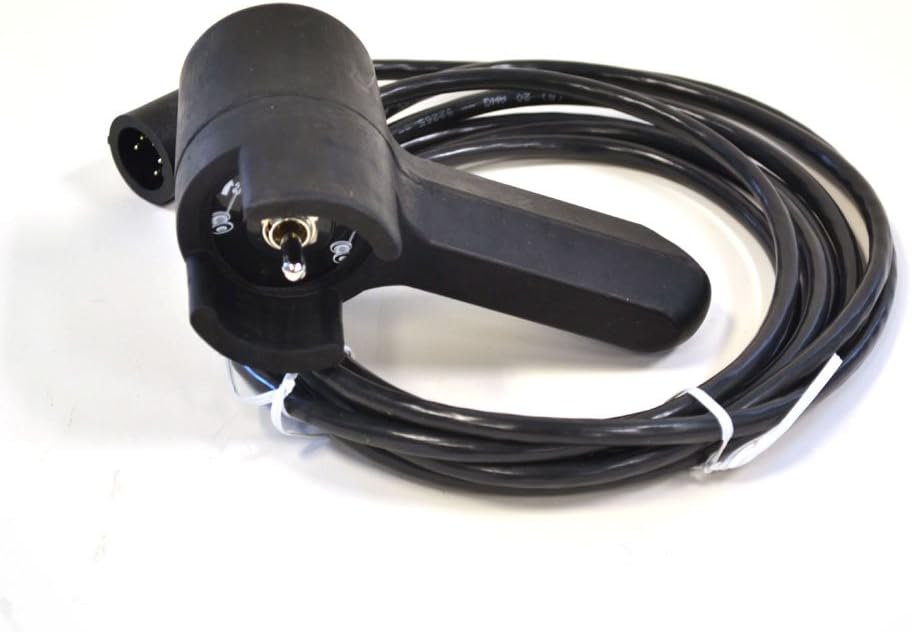
Image: The WARN 38626 Hand Held Winch Remote Controller, featuring its ergonomic design, coiled cable, and 'D' shaped plug connector.
2. Product Features
- Extended Reach: Equipped with a 12-foot (3.7m) lead cable, allowing for operation from a safe distance.
- Durable Construction: Features a robust rubber grip for comfortable and secure handling, designed to withstand tough environments.
- Versatile Compatibility: The 'D' shaped plug is engineered to fit both older round sockets and newer 'D' shaped sockets on WARN winches.
- Intuitive Control: Toggle switch style for straightforward forward and reverse winch operation.
- Broad Application: Compatible with WARN truck/SUV winches that utilize a 3 or 5 wire plug system.
3. Setup and Installation
3.1 Connecting the Remote Controller
- Locate the control socket on your WARN truck/SUV winch. This socket may be either a round or 'D' shaped receptacle.
- Align the 'D' shaped plug of the WARN 38626 remote controller with the winch's control socket.
- Gently push the plug into the socket until it is fully seated and secure. Ensure a firm connection to prevent accidental disconnection during operation.
- Once connected, the remote controller is ready for use.
3.2 Video Demonstration: Winch Remote Connection and Operation
Video: This demonstration illustrates the connection process of a similar hand-held winch remote controller to a winch's control socket and its basic forward/reverse operation. While not the exact WARN 38626 model, the principles of connection and control are applicable.
4. Operating Instructions
4.1 Basic Winch Operation
The WARN 38626 remote controller features a simple toggle switch for controlling the winch. Always ensure the area around the winch and the load is clear before operating.
- To Spool Out (Reverse): Push the toggle switch in the 'OUT' direction. The winch cable will unwind from the drum.
- To Spool In (Forward): Push the toggle switch in the 'IN' direction. The winch cable will wind onto the drum.
- To Stop: Release the toggle switch to its neutral (center) position. The winch will cease operation.
Always maintain a clear line of sight to the winch and the load during operation. Avoid operating the winch if the cable is frayed, kinked, or damaged. Refer to your winch's specific user manual for additional safety guidelines and operational procedures.
5. Maintenance
Proper maintenance ensures the longevity and reliable performance of your WARN 38626 remote controller.
- Cleaning: After use, especially in dirty or wet conditions, wipe the remote controller and cable with a clean, damp cloth. Avoid using harsh chemicals or abrasive cleaners.
- Inspection: Regularly inspect the cable for any signs of wear, cuts, or damage. Check the plug for bent pins or corrosion. If any damage is found, discontinue use and replace the remote controller.
- Storage: Store the remote controller in a dry, clean place, away from direct sunlight and extreme temperatures. Coil the cable neatly to prevent kinks or tangles.
6. Troubleshooting
If you encounter issues with your WARN 38626 remote controller, consider the following:
- Remote Not Responding:
- Ensure the remote's plug is fully and securely inserted into the winch's control socket.
- Check the winch's power supply and ensure it is turned on.
- Inspect the remote cable for any visible damage.
- Intermittent Operation:
- Verify the connection is stable and free from debris or corrosion.
- Ensure the toggle switch moves freely and returns to the neutral position.
- Incorrect Direction:
- Confirm you are pushing the toggle switch in the correct 'IN' or 'OUT' direction for the desired winch action.
If problems persist after performing these checks, contact WARN customer support or a qualified service technician.
7. Specifications
| Attribute | Detail |
|---|---|
| Model Number | 38626 |
| Brand | WARN |
| Cable Length | 12 feet (3.7 meters) |
| Plug Type | 'D' Shaped (compatible with 3 or 5 wire systems) |
| Control Type | Toggle Switch (Forward/Reverse) |
| Material | Plastic with Rubber Grip |
| Color | Black |
| Item Weight | 1.05 Pounds (0.48 kg) |
| Item Dimensions (LxWxH) | 10.5 x 6.25 x 2.5 inches (26.67 x 15.88 x 6.35 cm) |
| Max Number of Supported Devices | 1 |
| Included Components | WARN 38626 Hand Held Winch Remote Controller |
8. Warranty and Support
The WARN 38626 Hand Held Winch Remote Controller comes with a manufacturer's warranty. For specific details regarding warranty coverage, duration, and terms, please refer to the warranty information included with your product packaging or visit the official WARN website. For technical support, replacement parts, or any product-related inquiries, please contact WARN customer service directly.


