
Q-See QS60F
Q-See QS60F Audio, Video & Power 60 Foot Extension RCA Cable User Manual
Model: QS60F
Introduction
This user manual provides detailed instructions for the Q-See QS60F Audio, Video & Power 60 Foot Extension RCA Cable. It covers product features, setup, operation, maintenance, and troubleshooting to ensure optimal performance and longevity of your cable.
Product Overview
The Q-See QS60F is a versatile 60-foot extension cable designed to transmit audio, video, and power signals. It is suitable for both indoor and outdoor applications and features high-quality connectors for reliable performance.
Package Contents
- 1 x Q-See QS60F 60-Foot Audio, Video & Power Extension RCA Cable
- Gender changers (included to facilitate various connection types)
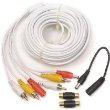
Image: The Q-See QS60F 60-foot extension cable, showing the yellow, white, and red RCA connectors for video and audio, and the power connector. Also visible are the included gender changers for versatile connectivity.
Setup
Follow these steps to properly set up your Q-See QS60F extension cable:
- Identify Connectors: The cable features standard RCA connectors for audio (white and red) and video (yellow), along with a power connector. Ensure you identify the correct ports on your devices.
- Connect Video: Plug the yellow RCA connector from the QS60F cable into the video output port of your source device (e.g., security camera, DVR) and the yellow RCA input port of your display device (e.g., monitor, TV).
- Connect Audio: Plug the white and red RCA connectors from the QS60F cable into the corresponding audio output ports of your source device and the audio input ports of your display device or audio receiver.
- Connect Power: Connect the power connector of the QS60F cable to the power output of your source device and the power input of the device requiring power (e.g., security camera). Ensure power requirements match.
- Secure Connections: Gently push all connectors firmly into their respective ports to ensure a secure and stable connection. Loose connections can lead to signal loss or interference.
- Use Gender Changers (if needed): If your devices require a different gender for connection, use the included gender changers. For example, if you need to connect two male RCA ends, use a female-to-female gender changer.
- Cable Routing: Route the cable carefully to avoid kinks, sharp bends, or placement in high-traffic areas where it could be tripped over or damaged. For outdoor use, ensure the cable is protected from direct exposure to harsh weather conditions where possible.
Operating
Once the Q-See QS60F cable is properly connected, its operation is straightforward as it acts as a passive extension. Ensure all connected devices are powered on and configured correctly to transmit and receive signals.
- Signal Transmission: The cable will transmit audio, video, and power signals between your connected devices.
- Device Compatibility: Verify that the devices you are connecting are compatible with RCA audio/video and the specified power connector type.
- Signal Quality: For optimal signal quality, avoid extending the cable beyond its intended length by daisy-chaining multiple extension cables, as this can lead to signal degradation.
Maintenance
Proper maintenance will help extend the life of your Q-See QS60F cable:
- Cleaning: Use a soft, dry cloth to wipe down the cable and connectors. Avoid using harsh chemicals or abrasive cleaners.
- Storage: When not in use, coil the cable loosely to prevent kinks and store it in a cool, dry place away from direct sunlight and extreme temperatures.
- Inspection: Periodically inspect the cable for any signs of damage, such as frayed insulation, bent pins on connectors, or cracks. Replace the cable if significant damage is observed.
- Environmental Protection: Although designed for indoor/outdoor use, prolonged exposure to extreme weather conditions (e.g., direct rain, snow, intense UV) can degrade the cable over time. Consider additional protective measures for permanent outdoor installations.
Troubleshooting
If you encounter issues with your Q-See QS60F cable, refer to the following common problems and solutions:
| Problem | Possible Cause | Solution |
|---|---|---|
| No video signal | Loose video connection; incorrect video input selected on display; faulty cable; source device not outputting video. | Ensure yellow RCA connectors are firmly seated. Check display's input source. Test with a different cable if possible. Verify source device is functioning. |
| No audio signal | Loose audio connection; incorrect audio input selected; faulty cable; source device not outputting audio. | Ensure white and red RCA connectors are firmly seated. Check audio receiver/display's input source. Test with a different cable. Verify source device is functioning. |
| No power to device | Loose power connection; power source issue; faulty cable; device power input issue. | Ensure power connector is firmly seated. Check power adapter/source. Test with a different power cable if available. Verify device's power input. |
| Fuzzy or distorted picture/sound | Poor connection; electromagnetic interference (EMI); cable damage; signal degradation over long distance. | Reseat all connections. Keep cable away from power lines or other electronics that emit strong EMI. Inspect cable for damage. Ensure cable length is appropriate for signal strength. |
Specifications
| Feature | Detail |
|---|---|
| Model Number | QS60F |
| Cable Type | Composite (Audio, Video, Power) |
| Length | 60 feet |
| Connector Type | RCA (Male-to-Female) |
| Color | Black |
| Usage Environment | Indoor, Outdoor |
| Product Dimensions | 9 x 11 x 2 inches (packaging) |
| Item Weight | 1.25 pounds |
| Manufacturer | Digital Peripheral Solutions |
| UPC | 645439199811 |
Warranty and Support
For information regarding warranty coverage or technical support for your Q-See QS60F cable, please refer to the official Q-See website or contact their customer service directly. Keep your purchase receipt as proof of purchase for any warranty claims.
Q-See Official Website: www.q-see.com
Ask a question about this manual
Ask about setup, troubleshooting, compatibility, parts, safety, or missing instructions. Manuals+ will review the question and use this page’s manual context to help answer it.