
Introduction
This manual provides comprehensive instructions for the setup, operation, maintenance, and troubleshooting of your Pyle PPEQ231 2-Channel 31-Band Graphic Equalizer. Please read this manual thoroughly before operating the unit to ensure proper use and to maximize its performance and longevity.
The Pyle PPEQ231 is a professional-grade 1/3 octave graphic equalizer designed for precise audio frequency control. Key features include:
- Constant Q Circuitry with a 3% Center Frequency Accuracy
- Selectable Boost Range of +/-6 dB or +/-12dB
- High Pass Filter at 40 Hz (12dB per Octave)
- Low Pass Filter at 16kHz (12dB per Octave)
- Variable Input Level control
- Clip LED Indicator for signal monitoring
- Bypass Switch for direct signal path
- Automatic Bypass When Powered Off
- Active Balanced XLR and TRS Inputs and Outputs
- Unbalanced RCA Inputs and Outputs
- Ground/Lift Switch to eliminate hum
- 110/220 Voltage Switchable for international use
- Double Rack Space Unit design for standard audio racks
Product Overview
The Pyle PPEQ231 features a robust design suitable for various audio environments. Below is an image of the unit's front panel, highlighting its controls and indicators.
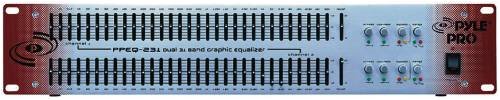
This image displays the front panel of the Pyle PPEQ231 graphic equalizer. It features two channels, each with 31 frequency bands controlled by faders. On the right side, there are controls for input level, high-pass filter, low-pass filter, and bypass for each channel, along with a power switch.
Setup and Installation
1. Unpacking and Inspection
Carefully remove the PPEQ231 from its packaging. Inspect the unit for any signs of damage that may have occurred during transit. If damage is found, contact your dealer immediately.
2. Rack Mounting
The PPEQ231 is designed as a double rack space unit (2U) and can be mounted into a standard 19-inch audio equipment rack. Secure the unit using appropriate rack screws to prevent movement and ensure proper ventilation.
3. Power Connection
- Ensure the unit's power switch is in the OFF position.
- Verify the voltage selector switch (usually located on the rear panel) is set to the correct voltage for your region (110V or 220V). Incorrect voltage selection can damage the unit.
- Connect the supplied AC power cord to the unit's power inlet and then to a grounded electrical outlet.
4. Audio Connections
The PPEQ231 offers both balanced and unbalanced input/output options:
- Balanced Connections (XLR and 1/4" TRS): For professional audio setups, use XLR or 1/4" TRS cables for inputs and outputs. These connections provide superior noise rejection over long cable runs. Connect your audio source (e.g., mixer output) to the PPEQ231's inputs and the PPEQ231's outputs to your amplifier or next processing unit.
- Unbalanced Connections (RCA): For consumer-grade or shorter cable runs, use RCA cables. Connect your audio source to the RCA inputs and the RCA outputs to your destination device.
Ensure all connections are secure before powering on the unit.
5. Ground/Lift Switch
If you experience hum or ground loop noise, try toggling the Ground/Lift switch (typically on the rear panel). This switch helps to isolate the audio ground from the chassis ground, potentially eliminating unwanted noise.
Operating Instructions
1. Power On
After all connections are made, switch the power button on the front panel to the ON position. The unit will automatically bypass the equalizer circuit during power-up and power-down to prevent sudden audio spikes.
2. Input Level Adjustment
Use the Variable Input Level control for each channel to adjust the incoming signal strength. Monitor the Clip LED Indicator. If the LED illuminates frequently or stays lit, reduce the input level to prevent signal distortion.
3. Equalization
The PPEQ231 features 31 frequency bands per channel, ranging from 20Hz to 20kHz. Each band has a dedicated fader to boost or cut frequencies. The boost/cut range can be selected between +/-6 dB or +/-12dB using the range switch for finer or broader adjustments.
- Boosting: Move a fader up to increase the volume of that specific frequency band.
- Cutting: Move a fader down to decrease the volume of that specific frequency band.
- Flat Response: For a neutral sound, ensure all faders are at their center (0 dB) position.
4. High Pass Filter (HPF)
The High Pass Filter (HPF) removes frequencies below 40 Hz at a slope of 12dB per octave. Engage this filter to eliminate unwanted low-frequency rumble, stage noise, or microphone handling noise, which can consume amplifier power and reduce clarity.
5. Low Pass Filter (LPF)
The Low Pass Filter (LPF) removes frequencies above 16 kHz at a slope of 12dB per octave. Engage this filter to reduce hiss or other high-frequency noise that may be present in the signal, especially with older recordings or equipment.
6. Bypass Switch
The Bypass Switch allows you to instantly compare the processed (equalized) signal with the unprocessed (flat) signal. Pressing the switch bypasses the equalizer circuit, sending the input signal directly to the output. This is useful for A/B testing your equalization settings.
Maintenance
Cleaning
To maintain the appearance and functionality of your PPEQ231, periodically wipe the unit with a soft, dry cloth. For stubborn dirt, a slightly damp cloth can be used, followed by a dry cloth. Do not use abrasive cleaners, solvents, or harsh chemicals, as these can damage the finish and internal components.
Ventilation
Ensure that the ventilation openings on the unit are not obstructed. Proper airflow is crucial to prevent overheating, especially when rack-mounted with other equipment.
Storage
If storing the unit for an extended period, disconnect it from power and store it in a cool, dry place away from direct sunlight and extreme temperatures.
Troubleshooting
| Problem | Possible Cause | Solution |
|---|---|---|
| No sound output |
|
|
| Distorted sound |
|
|
| Hum or buzzing noise |
|
|
| Unit does not power on |
|
|
Specifications
- Model: PPEQ231
- Channels: 2
- Bands per Channel: 31 (1/3 Octave)
- Frequency Range: 20Hz - 20kHz
- Boost/Cut Range: Selectable +/-6 dB or +/-12dB
- Circuitry: Constant Q with 3% Center Frequency Accuracy
- High Pass Filter: 40 Hz, 12dB/Octave
- Low Pass Filter: 16 kHz, 12dB/Octave
- Inputs: Balanced XLR, Balanced 1/4" TRS, Unbalanced RCA
- Outputs: Balanced XLR, Balanced 1/4" TRS, Unbalanced RCA
- Voltage: 110/220V Switchable
- Rack Space: Double Rack Space Unit (2U)
- Product Dimensions (LxWxH): Approximately 13 x 55 x 27.5 cm (5.1 x 21.7 x 10.8 inches)
- Item Weight: Approximately 4.54 kg (10 lbs)
- Manufacturer: Sound Around
- ASIN: B00026BOG6
- Date First Available: 21 August 2012
Warranty and Support
Warranty Information
The Pyle PPEQ231 typically comes with a 1 Year Warranty from the date of purchase. This warranty covers manufacturing defects and ensures the product is free from defects in material and workmanship under normal use. Please retain your proof of purchase for warranty claims. Specific terms and conditions may vary by region and retailer.
Customer Support
For technical assistance, warranty service, or general inquiries regarding your Pyle PPEQ231, please contact the manufacturer, Sound Around, or your authorized Pyle dealer. Refer to the contact information provided with your purchase documentation or visit the official Pyle website for support resources.


