
Extech RF20
Extech RF20 Automatic Temperature Compensation Salinity Refractometer User Manual
Model: RF20 | Brand: Extech
1. Introduction
This manual provides detailed instructions for the proper use, maintenance, and care of your Extech RF20 Automatic Temperature Compensation Salinity Refractometer. The RF20 is designed for accurate measurement of salinity in various applications, featuring automatic temperature compensation for reliable readings across different temperatures. Please read this manual thoroughly before operating the device to ensure optimal performance and longevity.
2. Safety Information
Observe the following safety precautions to prevent injury and damage to the instrument:
- Always handle the refractometer with care. Avoid dropping or subjecting it to severe impact.
- Do not immerse the entire instrument in water. Only the prism and cover plate should come into contact with the sample.
- Clean the prism and cover plate thoroughly after each use to prevent residue buildup, which can affect accuracy.
- Use only distilled water for calibration.
- Store the refractometer in a dry, cool place, away from direct sunlight and corrosive chemicals.
- Keep out of reach of children.
3. Package Contents
Verify that all items are present and in good condition upon unpacking:
- Extech RF20 Salinity Refractometer
- Protective Case
- Calibration Screwdriver
- Calibration Solution (small bottle)
- User Guide (this manual)
- Mini Microfiber Cloth
4. Product Overview
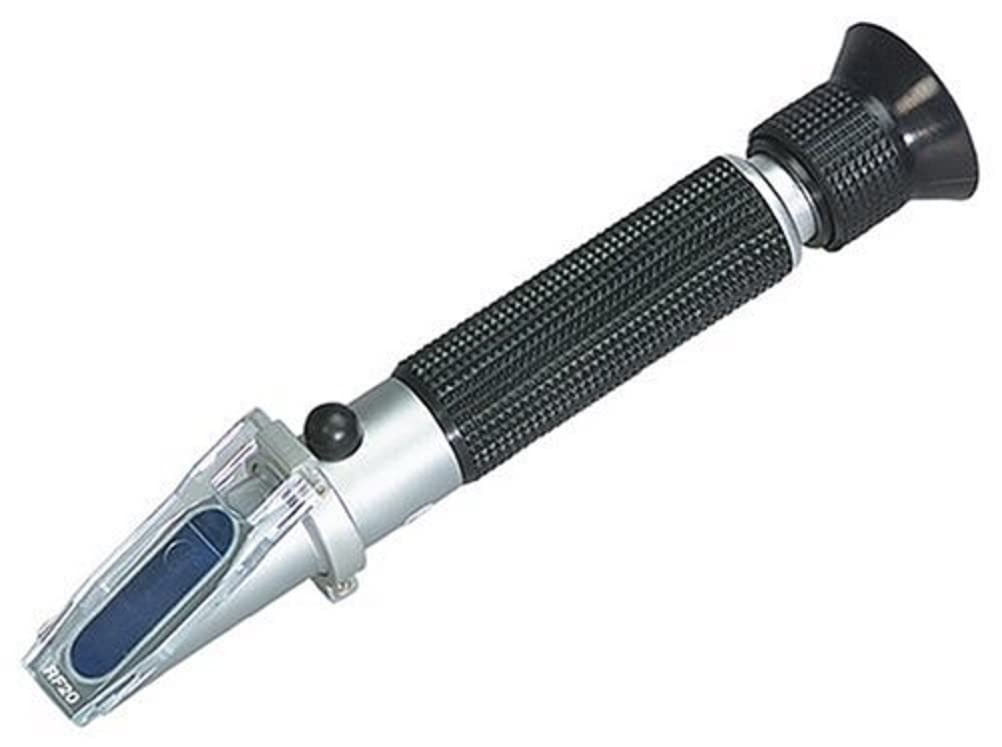
Image: The Extech RF20 Salinity Refractometer, a handheld device with a prism and eyepiece, designed for accurate salinity measurements.
The Extech RF20 is a precision optical instrument designed to measure the concentration of dissolved salts in water. It features a durable plastic body, a clear optical lens system, and an automatic temperature compensation (ATC) function, which ensures accurate readings regardless of ambient temperature fluctuations. The device includes a prism, a cover plate, an adjustment screw for calibration, and an eyepiece for viewing the measurement scale.
5. Setup
Before first use, ensure the refractometer is clean and calibrated.
- Unpack: Carefully remove the refractometer and all accessories from its protective case.
- Inspect: Check the prism and cover plate for any dust, smudges, or damage. Clean if necessary with the provided microfiber cloth.
- Familiarize: Locate the prism, cover plate, eyepiece, and calibration screw.
6. Calibration
Calibration is essential for accurate measurements and should be performed regularly, especially before first use or if the instrument has been stored for a long time.
- Prepare Distilled Water: Ensure you have distilled water at room temperature.
- Apply Sample: Open the cover plate and place 2-3 drops of distilled water onto the prism. Close the cover plate gently, ensuring no air bubbles are trapped and the water spreads evenly across the prism surface.
- Observe Reading: Point the refractometer towards a light source (e.g., daylight or a lamp) and look through the eyepiece. You will see a circular field with a blue and white boundary line.
- Adjust: If the boundary line is not exactly at the "0" mark on the scale, use the provided calibration screwdriver to turn the calibration screw until the boundary line aligns precisely with the "0" mark.
- Clean: After calibration, wipe the prism and cover plate dry with the microfiber cloth.
Note: The RF20 features Automatic Temperature Compensation (ATC), so temperature adjustments during calibration are not required as long as the distilled water is at room temperature.
7. Operation
Follow these steps to take a salinity measurement:
- Clean Prism: Ensure the prism and cover plate are clean and dry.
- Apply Sample: Open the cover plate and place 2-3 drops of the sample liquid (e.g., saltwater from an aquarium) onto the prism. Close the cover plate gently, ensuring the liquid spreads evenly without air bubbles.
- View Reading: Point the refractometer towards a light source and look through the eyepiece.
- Read Scale: The boundary line between the blue and white fields indicates the salinity value on the scale. Read the value where the boundary line intersects the scale.
- Clean After Use: Immediately after each measurement, clean the prism and cover plate thoroughly with distilled water and wipe dry with the microfiber cloth. This prevents cross-contamination and residue buildup.
8. Maintenance
Proper maintenance ensures the longevity and accuracy of your refractometer.
- Cleaning: After each use, wipe the prism and cover plate clean with a soft, damp cloth or the provided microfiber cloth. For stubborn residues, use a small amount of distilled water. Do not use abrasive cleaners or solvents.
- Storage: Store the refractometer in its protective case when not in use. Keep it in a dry, cool environment, away from extreme temperatures, humidity, and direct sunlight.
- Handling: Avoid dropping the instrument or subjecting it to harsh impacts.
- Calibration Check: Periodically check calibration with distilled water, even if not used frequently.
9. Troubleshooting
| Problem | Possible Cause | Solution |
|---|---|---|
| Inaccurate readings | Dirty prism/cover plate; improper calibration; insufficient sample. | Clean prism and cover plate thoroughly. Recalibrate the instrument. Ensure 2-3 drops of sample are used and spread evenly. |
| Boundary line unclear or fuzzy | Insufficient light; air bubbles in sample; dirty optics. | Point towards a brighter light source. Reapply sample, ensuring no air bubbles. Clean prism and eyepiece. |
| Difficulty focusing | Eyepiece not adjusted for user's vision. | Rotate the eyepiece to adjust focus until the scale is clear. |
10. Specifications
| Feature | Detail |
|---|---|
| Brand | Extech |
| Model Name | RF20 |
| Special Feature | High Accuracy, Automatic Temperature Compensation (ATC) |
| Included Components | Case, calibration screwdriver, calibration solution, guide |
| Outer Material | Plastic |
| Specification Met | ISO 9001 |
| Product Care Instructions | Wipe Clean |
| Item Length | 7.6 Inches |
| Item Weight | 5.3 ounces |
| Measurement Accuracy | +/-0.5% |
| Resolution | 0.001 |
| Style | Salt (ATC) |
| Reusability | Reusable |
11. Warranty and Support
Warranty: The Extech RF20 Salinity Refractometer comes with a 1-year warranty from the date of purchase, covering defects in materials and workmanship under normal use. Please retain your proof of purchase for warranty claims.
Support: For technical assistance, troubleshooting, or warranty inquiries, please contact Extech customer support. Visit the official Extech website for contact information and additional resources.
Disclaimer: Specifications are subject to change without notice.
Related documentsRF20


Ask a question about this manual
Ask about setup, troubleshooting, compatibility, parts, safety, or missing instructions. Manuals+ will review the question and use this page’s manual context to help answer it.