
Timex T78582
Timex Men's Classic Digital 34mm Watch Instruction Manual
Model: T78582
1. Product Overview
The Timex Men's Classic Digital 34mm Watch (Model T78582) is a durable and functional timepiece designed for everyday use. It features a classic digital display with Indiglo backlight, a 24-hour chronograph, alarm, and a month, day, and date calendar. The watch is water-resistant and comes with a comfortable stainless steel expansion band.

Figure 1: Front view of the Timex Men's Classic Digital 34mm Watch. This image highlights the digital display, the silver-tone resin case, and the stainless steel expansion band.
Video 1: Overview of the Timex Men's T78582 Classic Digital Watch. This video demonstrates the watch's appearance and some basic functions, including the Indiglo backlight.
2. Setup and Initial Configuration
2.1 Setting Time and Date
- Press the SET button (top left) until the time display flashes.
- Use the START/STOP button (top right) to adjust the hours.
- Press the MODE button (bottom left) to move to minutes, then use START/STOP to adjust.
- Continue pressing MODE to cycle through year, month, and day settings, adjusting each with START/STOP.
- Press SET again to exit the setting mode and save changes.
2.2 Setting the Alarm
- From the normal time display, press the MODE button repeatedly until "ALARM" appears on the display.
- Press the SET button. The alarm hour will flash.
- Use the START/STOP button to adjust the alarm hour.
- Press MODE to move to alarm minutes, then use START/STOP to adjust.
- Press SET to confirm the alarm time.
- To activate or deactivate the alarm, press the START/STOP button while in the alarm display mode. An alarm icon will appear/disappear.
3. Operating Modes
The watch features several operating modes accessible via the MODE button.
- Time Mode: Displays current time, day, and date. This is the default mode.
- Chronograph Mode:
To use the 24-hour chronograph:
- Press MODE until "CHRONO" or a stopwatch icon appears.
- Press START/STOP to begin timing.
- Press START/STOP again to pause. Press SPLIT/RESET (bottom right) to reset to zero.
- For lap/split times, press SPLIT/RESET while the chronograph is running. The display will show the split time while the chronograph continues to run in the background. Press SPLIT/RESET again to return to the running chronograph display.
- Alarm Mode: As described in Section 2.2.
- 24-Hour Military Time Mode: The watch can display time in 12-hour (AM/PM) or 24-hour format. To toggle, press the START/STOP button while in the normal time display mode.
3.1 Indiglo Night-Light
The Indiglo night-light illuminates the watch dial for easy viewing in low-light conditions. Press the LIGHT button (top left, often integrated with SET) to activate. The light will remain on for a few seconds.
4. Maintenance and Care
4.1 Water Resistance
This watch is water resistant to 30 meters (100 feet). This means it can withstand splashes or brief immersion in water, such as during hand washing or light rain. It is not suitable for swimming, bathing, or diving. Do not operate buttons while the watch is wet or submerged.
4.2 Cleaning
To clean your watch, wipe it with a soft, damp cloth. Avoid using harsh chemicals or abrasive materials, as these can damage the case or band.
4.3 Battery Replacement
The watch uses a Lithium Metal battery (included). While battery replacement is possible, it is recommended to have it performed by a qualified watch technician to ensure proper sealing and water resistance. Attempting to replace the battery yourself may void the warranty or compromise the watch's water resistance.
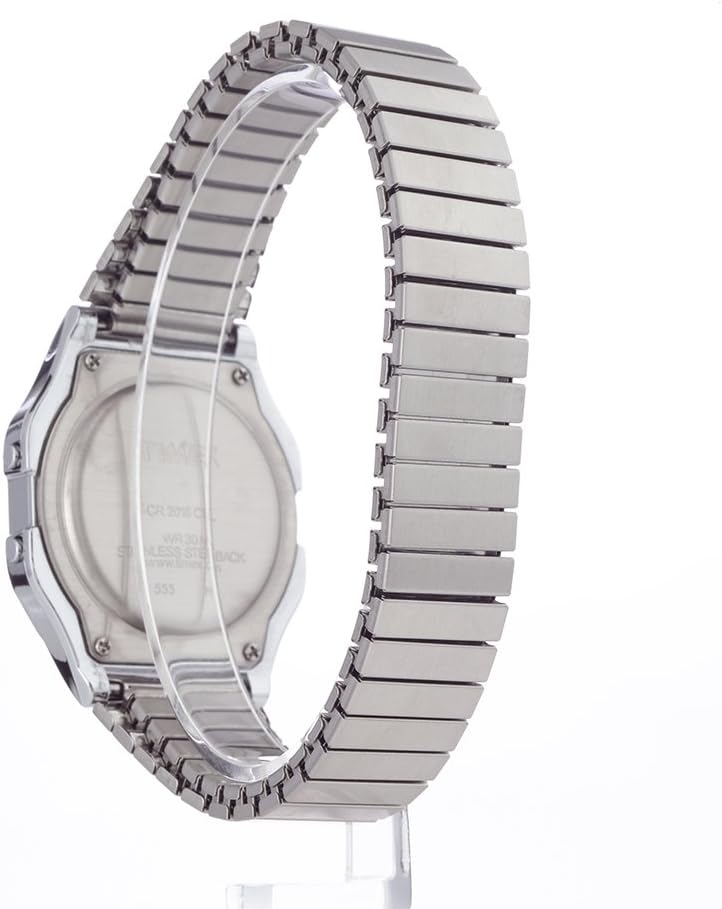
Figure 2: Back view of the Timex Men's Classic Digital 34mm Watch. The case back indicates water resistance and material information.
5. Troubleshooting
| Problem | Possible Cause | Solution |
|---|---|---|
| Display is blank or dim. | Low or dead battery. | Replace the battery (refer to Section 4.3). |
| Time is incorrect. | Time not set correctly or accidental button press. | Reset time and date (refer to Section 2.1). |
| Alarm does not sound. | Alarm not activated or set incorrectly. | Ensure alarm is activated and time is set correctly (refer to Section 2.2). |
| Water inside the watch. | Water resistance compromised due to damage or improper sealing. | Immediately take the watch to a qualified service center. Do not attempt to dry it yourself. |
6. Specifications
| Feature | Detail |
|---|---|
| Model Number | T78582 |
| Case Diameter | 34mm |
| Case Material | Resin |
| Band Material | Stainless Steel (Expansion Band) |
| Water Resistance | 30 meters (100 feet) |
| Display Type | Digital |
| Backlight | Indiglo Night-Light |
| Functions | Time, Date, Day, 24-Hour Chronograph (with lap & split times), Alarm, 24-Hour Military Time Mode |
| Battery Type | Lithium Metal (included) |
7. Warranty and Support
For warranty information, product support, or service inquiries, please refer to the official Timex website or contact Timex customer service directly. Keep your proof of purchase for warranty claims.
Official Timex Website: www.timex.com
Related documentsT78582


Ask a question about this manual
Ask about setup, troubleshooting, compatibility, parts, safety, or missing instructions. Manuals+ will review the question and use this page’s manual context to help answer it.