Introduction
This manual provides essential information for the operation and care of your Timex Expedition Rugged Metal Watch. Designed for durability and functionality, this timepiece is suitable for various outdoor activities while maintaining a classic aesthetic.
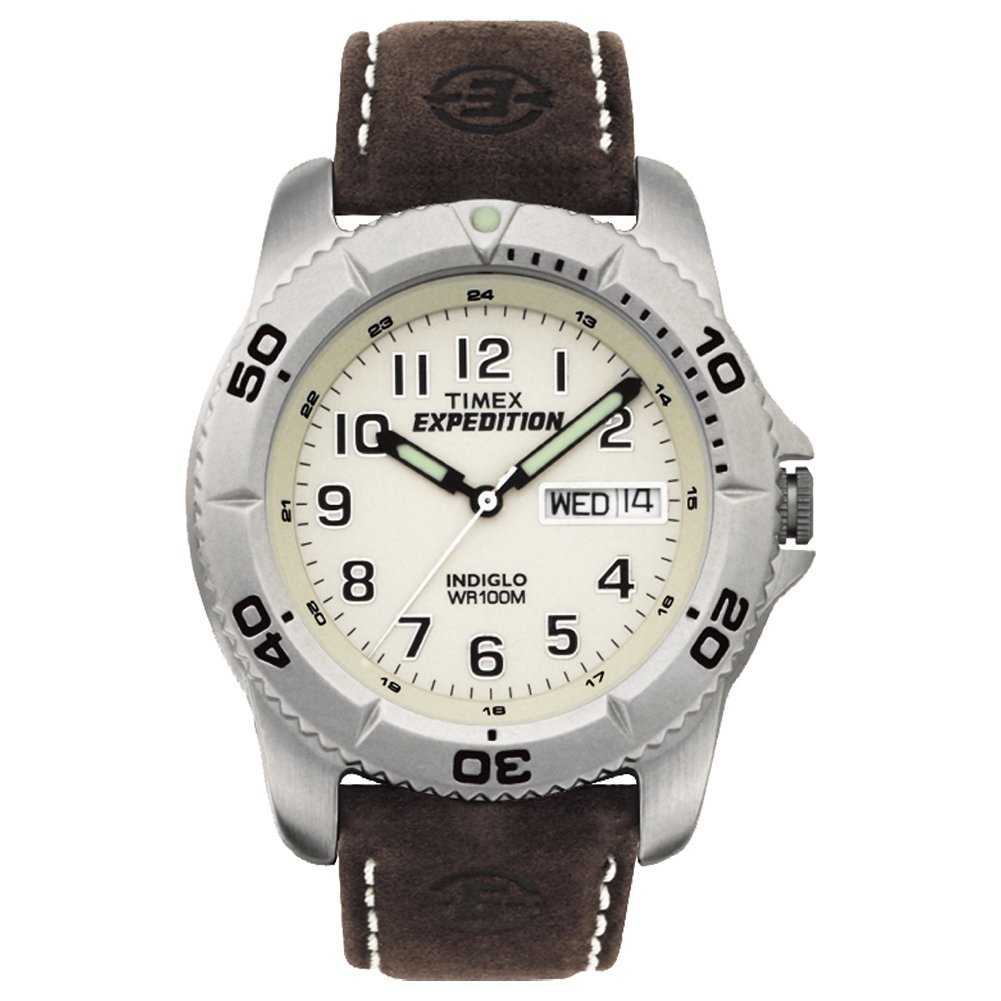
Image: Front view of the Timex Expedition Rugged Metal Watch, showcasing its cream dial, Arabic numerals, and brown leather strap.
Product Overview
The Timex Expedition Rugged Metal Watch features a robust design with practical functionalities. Key components include:
- Case: Silver-tone 40mm brass case with a mineral glass crystal for durability.
- Dial: Cream-colored dial with full Arabic numerals for clear readability.
- Date Window: Located at the 3 o'clock position.
- Strap: Adjustable brown 20mm genuine leather strap, designed to fit wrist circumferences up to 8 inches.
- Indiglo® Night-Light: Electroluminescent technology illuminates the entire dial for easy reading in low light conditions.
Setup
Setting Time and Date
- Pull the Crown: Gently pull the crown (the knob on the side of the watch) out to the first click position to set the date, or to the second click position to set the time.
- Set the Date: If in the first click position, turn the crown clockwise or counter-clockwise until the desired date appears in the date window.
- Set the Time: If in the second click position, turn the crown to move the hands clockwise until the correct time is displayed. Ensure to account for AM/PM if setting the date as well (the date will change around midnight).
- Push the Crown In: Once the time and date are set, push the crown back into its original position to start the watch movement.
Battery Installation/Replacement
The watch comes with one Lithium Metal battery included. Battery replacement should be performed by a qualified watch technician to ensure proper sealing and water resistance. Refer to the "Specifications" section for battery type.
Operating Instructions
Using the Indiglo® Night-Light
To activate the Indiglo® night-light, simply press and hold the crown. The entire dial will illuminate, allowing for easy time reading in dark environments. Release the crown to turn off the light.
Water Resistance
This watch is water-resistant to 100 meters (330 feet). This rating means it is generally suitable for snorkeling and swimming, but it is not recommended for diving. Avoid operating the crown or pushers while the watch is wet or submerged to prevent water ingress.
Maintenance
- Cleaning: Wipe the watch case and strap with a soft, damp cloth. For the leather strap, avoid excessive moisture and harsh chemicals.
- Storage: When not in use, store the watch in a cool, dry place away from direct sunlight and extreme temperatures.
- Avoid Chemicals: Do not expose the watch to solvents, detergents, perfumes, or other chemical sprays, as these can damage the case, strap, or internal components.
- Regular Servicing: For optimal performance and longevity, it is recommended to have your watch serviced by an authorized Timex service center periodically.
Troubleshooting
| Problem | Possible Cause | Solution |
|---|---|---|
| Watch stops or runs intermittently. | Low or dead battery. | Replace the battery (professional service recommended). |
| Date does not change at midnight. | Time is set to PM instead of AM. | Advance the time by 12 hours. |
| Indiglo® light does not activate. | Low battery or internal issue. | Replace the battery. If issue persists, contact support. |
| Water inside the watch. | Crown/pushers operated underwater or seal compromised. | Immediately take to an authorized service center. Do not attempt to dry it yourself. |
Specifications
- Model Number: T46681SU
- Case Material: Brass
- Case Diameter: 40mm
- Case Thickness: Approximately 10-11mm
- Crystal Material: Mineral Glass
- Strap Material: Genuine Leather
- Strap Width: 20mm
- Movement: Quartz
- Water Resistance: 100m (330 ft) - Suitable for snorkeling and swimming.
- Battery Type: 1 Lithium Metal battery (included)
- Product Dimensions: 3.94 x 3.94 x 1.97 inches
- Item Weight: 2.24 ounces
Warranty and Support
For warranty information, service, or support, please refer to the official Timex website or contact their customer service. Keep your proof of purchase for warranty claims.
Online Resources:
- Official Timex Store: Timex Store on Amazon
- User Manual (PDF): Download PDF Manual


