
Bahco 3834-ARBR-9100
Bahco 9100 Holesaw Arbor Instruction Manual
Model: 3834-ARBR-9100
Introduction
The Bahco 9100 holesaw arbor is an essential tool for any professional workshop. Designed to fit holesaws with diameters from 14 mm to 210 mm, it features a quick-change mechanism that eliminates the need for additional tools when replacing the holesaw. The 3834-ARBR-9100 model is equipped with Power Driver™ technology, which increases power and reduces holesaw play by redistributing the load from the screw to the solid base. It is compatible with carbide-tipped holesaws, but it is recommended to use the carbide-tipped pilot drill (3834-DRL-CT) for abrasive materials. For multi-construction holesaws, simply change the pilot drill to 3834-DRL-L. A high-speed steel pilot drill is included for wood or metal applications. Thanks to its lightweight construction (250 g) and compatibility with holesaw diameters from 32 mm to 152 mm, this arbor offers comfortable handling while ensuring optimal stability. Choose the 9100 arbor for precise, fast, and reliable operations.
Setup and Assembly
The Bahco 9100 arbor features a quick-change mechanism for efficient holesaw replacement. Follow these steps for proper assembly:
- Select the Correct Holesaw: Ensure the holesaw diameter is within the arbor's compatible range (14 mm to 210 mm).
- Attach the Holesaw: Align the holesaw with the arbor's threads and twist clockwise until securely fastened. The quick-change mechanism allows for tool-free attachment.
- Install the Pilot Drill:
- For general wood or metal applications, use the included high-speed steel pilot drill.
- For abrasive materials or carbide-tipped holesaws, it is recommended to use the carbide-tipped pilot drill (model 3834-DRL-CT).
- For multi-construction holesaws, use the 3834-DRL-L pilot drill.
- Mount to Power Tool: Insert the arbor's shank into the chuck of your drill or power tool and tighten securely. Ensure the arbor is centered and stable before operation.

Operating Instructions
Proper operation ensures safety and extends the life of your holesaw and arbor. Always wear appropriate personal protective equipment (PPE) such as safety glasses and gloves.
- Secure Workpiece: Always clamp the material firmly to prevent movement during drilling.
- Start Drilling: Position the pilot drill on the marked center of your desired hole. Start the drill at a low speed, applying gentle pressure.
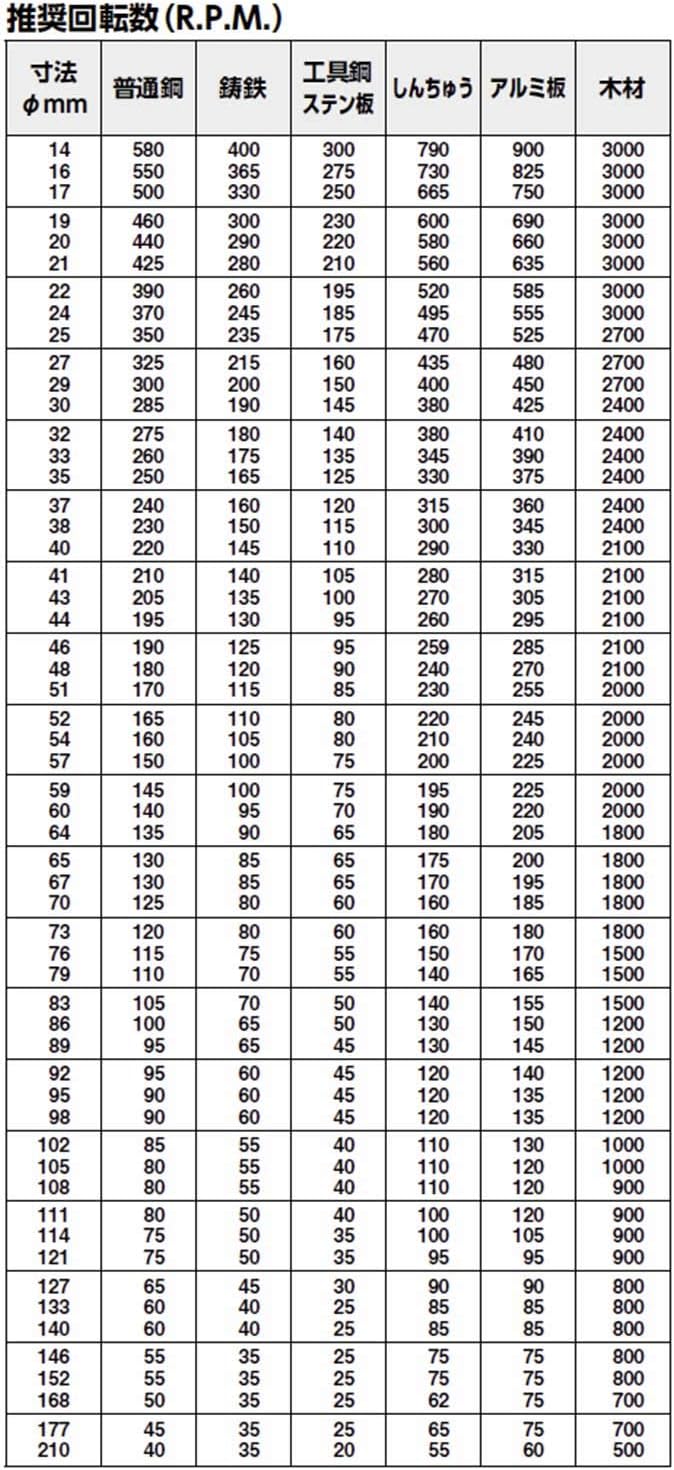
- Increase Speed (Gradually): Once the holesaw teeth engage the material, gradually increase the drill speed according to the material and holesaw diameter. Refer to the recommended RPM chart below.
- Maintain Consistent Pressure: Apply steady, even pressure throughout the cut. Avoid excessive force, which can cause overheating or damage to the holesaw.
- Clear Debris: Periodically withdraw the holesaw from the cut to clear chips and debris, especially when cutting deep holes.
- Coolant (for Metal): When cutting metal, use a suitable cutting fluid or coolant to reduce friction and heat, prolonging the life of the holesaw.
- Finish Cut: Once the holesaw has cut through the material, reduce pressure and carefully withdraw the tool.
Recommended RPM Chart
The following table provides recommended rotational speeds (RPM) for various holesaw diameters and materials. Adjust speeds based on specific material hardness and holesaw type.
.jpg)
Maintenance
Regular maintenance ensures the longevity and optimal performance of your Bahco 9100 holesaw arbor.
- Cleaning: After each use, clean the arbor and holesaw to remove dust, chips, and debris. Use a brush or compressed air. Avoid using harsh chemicals that may damage the finish.
- Inspection: Periodically inspect the arbor for any signs of wear, damage, or deformation. Check the threads for integrity and ensure the quick-change mechanism operates smoothly.
- Pilot Drill Condition: Ensure the pilot drill is sharp and straight. Replace dull or bent pilot drills to maintain accuracy and prevent damage to the holesaw.
- Lubrication: A light application of machine oil to the threads and quick-change mechanism can help maintain smooth operation and prevent corrosion.
- Storage: Store the arbor and holesaws in a dry, clean environment to prevent rust and damage.
Troubleshooting
If you encounter issues with your Bahco 9100 holesaw arbor, consider the following common troubleshooting steps:
- Holesaw Not Cutting Effectively:
- Check if the holesaw teeth are dull or damaged. Replace if necessary.
- Ensure the correct RPM is being used for the material (refer to the RPM chart).
- Verify that sufficient, consistent pressure is applied.
- Holesaw Wobbles or Vibrates Excessively:
- Ensure the holesaw is securely tightened onto the arbor.
- Check if the arbor is properly seated and tightened in the drill chuck.
- Inspect the pilot drill for bends or damage. Replace if faulty.
- Verify the workpiece is securely clamped.
- Difficulty Changing Holesaws:
- Ensure the quick-change mechanism is clean and free of debris.
- Apply a small amount of lubricant to the threads if they are stiff.
- Avoid overtightening the holesaw during assembly.
- Overheating of Holesaw or Material:
- Reduce the drilling speed.
- Apply less pressure.
- Use appropriate coolant, especially for metal.
- Clear chips and debris frequently.
Specifications
| Feature | Detail |
|---|---|
| Manufacturer | BAHCO |
| Model Number | 3834-ARBR-9100 |
| Product Dimensions (L x W x H) | 13 x 4.4 x 4.4 cm |
| Weight | 199.58 grams |
| Compatible Holesaw Diameters | 14 mm to 210 mm (general), 32 mm to 152 mm (for comfortable handling) |
| Power Type | Hand-powered (for use with power drills) |
| Included Components | Holesaw Arbor, High-Speed Steel Pilot Drill |
| Country of Origin | Sweden |
| ASIN | B0001P0P9A |

Warranty Information
Bahco products are manufactured to high standards. For specific warranty terms and conditions, please refer to the documentation provided with your purchase or visit the official Bahco website. Warranty coverage typically addresses manufacturing defects under normal use.
Customer Support
If you have any questions, require technical assistance, or need to report an issue with your Bahco 9100 Holesaw Arbor, please contact Bahco customer support through their official website or the retailer from whom you purchased the product. Have your model number (3834-ARBR-9100) and purchase details ready.
Official Bahco Website: www.bahco.com
Ask a question about this manual
Ask about setup, troubleshooting, compatibility, parts, safety, or missing instructions. Manuals+ will review the question and use this page’s manual context to help answer it.