
1. Introduction
Thank you for purchasing the Sunbeam SB975 Cordless Rechargeable Bug Zapper. This device is designed to effectively eliminate flying insects both indoors and outdoors, providing a clean and comfortable environment. Its portable design and rechargeable battery offer convenience and flexibility for various settings, including home, camping, picnics, and barbecues.
2. Important Safety Information
Please read all instructions carefully before using this product and retain for future reference.
- Electrical Hazard: Do not insert foreign objects into the zapper grid. Keep fingers and other body parts away from the internal grid.
- Water Exposure: Do not expose the unit to rain or immerse it in water or other liquids. This product is not waterproof.
- Children and Pets: Keep out of reach of children and pets. This is not a toy.
- Flammable Materials: Do not use near flammable liquids, gases, or materials.
- Cleaning: Always unplug the unit before cleaning. Do not use water or abrasive cleaners on the unit.
- Damage: Do not operate the unit if the cord or plug is damaged, or if the unit has been dropped or damaged in any way. Contact customer support for assistance.
- Intended Use: Use this product only for its intended purpose as described in this manual.
3. Product Overview
The Sunbeam SB975 Bug Zapper features a compact design with a protective outer cage and an internal electrified grid. It includes a built-in rechargeable battery and a removable bug collection tray for easy cleaning.
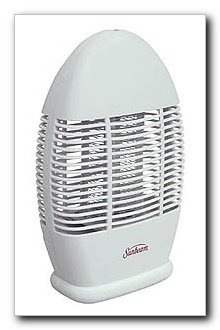
Figure 1: Front view of the Sunbeam SB975 Cordless Rechargeable Bug Zapper. The image shows the white oval-shaped device with horizontal grates on the front, revealing the internal zapping grid. The Sunbeam logo is visible at the bottom front.
Key Components:
- Protective Outer Cage: Prevents accidental contact with the electrified grid.
- Electrified Grid: Attracts and zaps flying insects.
- Rechargeable Battery: Provides cordless operation for up to 10 hours.
- AC Adapter Port: For charging the internal battery.
- Removable Bug Tray: Collects zapped insects for easy disposal.
- Hanging Hook: Integrated hook for suspending the unit.
4. Setup
- Unpack: Carefully remove the bug zapper and all accessories from the packaging.
- Initial Charge: Before first use, fully charge the unit. Refer to the "Charging the Battery" section for detailed instructions.
- Placement:
- Place the unit on a stable, flat surface.
- Alternatively, use the built-in hanging hook to suspend the unit in a desired location.
- Ensure the unit is placed away from direct sunlight and strong winds for optimal performance.
- For best results, place the zapper in a dark area, away from competing light sources.
5. Charging the Battery
The Sunbeam SB975 features a built-in rechargeable battery. To charge the unit:
- Locate the AC adapter port on the unit.
- Connect the included AC adapter to the unit and then plug it into a standard electrical outlet.
- Allow the unit to charge until the charging indicator light (if present) indicates a full charge. A full charge provides up to ten hours of continuous use.
- Once fully charged, disconnect the AC adapter. The unit can run directly from the AC adapter if desired, even when fully charged.
6. Operating Instructions
Using your Sunbeam SB975 Bug Zapper is straightforward:
- Power On: Locate the power switch (usually a toggle or push-button) on the unit. Flip or press it to the "ON" position.
- Operation: The unit will begin to attract and zap flying insects. A soft blue light may be visible, indicating operation.
- Power Off: To turn off the unit, flip or press the power switch to the "OFF" position.
- Cordless Use: Once charged, the unit can be used cordlessly for up to 10 hours.
- Continuous Use: For continuous operation, keep the unit plugged into the AC adapter.
7. Maintenance and Cleaning
Regular cleaning ensures optimal performance and longevity of your bug zapper.
- Power Off and Unplug: Always ensure the unit is turned off and unplugged from the power source before cleaning.
- Empty Bug Tray: The unit features a removable bug collection tray located at the back or bottom. Gently slide out or unclip the tray.
- Dispose of Insects: Empty the contents of the tray into a waste bin.
- Clean Tray: Wipe the tray clean with a dry cloth or brush. Do not use water.
- Clean Grid (if necessary): If insects are stuck on the electrified grid, use a small, dry, non-metallic brush (like an old toothbrush) to gently brush them off. Do not touch the grid with bare hands or metal objects.
- Reassemble: Slide the clean bug tray back into its position until securely fastened.
- Storage: When not in use for extended periods, store the unit in a cool, dry place.
8. Troubleshooting
| Problem | Possible Cause | Solution |
|---|---|---|
| Unit does not turn on. | Battery is depleted. Unit is not plugged in (if using AC power). Power switch is off. | Charge the battery. Ensure AC adapter is securely plugged into unit and outlet. Turn the power switch to "ON". |
| Zapping sound is weak or absent. | Grid is dirty or clogged with insects. Battery is low. | Clean the electrified grid as per maintenance instructions. Charge the battery. |
| Fewer insects are being zapped. | Unit placement is not optimal. Competing light sources nearby. | Relocate the zapper to a darker area or closer to insect activity. Minimize other light sources in the area. |
9. Specifications
- Model: SB975
- Brand: Sunbeam
- Type: Cordless Rechargeable Bug Zapper
- Power Source: Rechargeable Battery / AC Adapter
- Battery Life: Up to 10 hours (continuous use on full charge)
- Recommended Use: Indoor, Outdoor
- Dimensions: Approximately 37.59 x 22.86 x 14.22 cm (14.8 x 9 x 5.6 inches)
- Weight: Approximately 1.88 kg (4.14 lbs)
- UPC: 662230310573
10. Warranty and Support
For warranty information or technical support, please refer to the documentation included with your purchase or visit the official Sunbeam website. Keep your purchase receipt as proof of purchase for any warranty claims.
For further assistance, you may contact Sunbeam customer service through their official channels. Please have your model number (SB975) and purchase date ready when contacting support.