
BOSE 125
Bose 125 Speaker System Instruction Manual
Model: 125
Introduction
This manual provides essential information for the proper setup, operation, and maintenance of your Bose 125 Speaker System. Please read this manual thoroughly before using the product to ensure optimal performance and longevity.
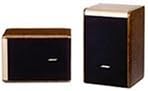
An image showing two Bose 125 speakers, one positioned horizontally and one vertically, showcasing their compact design and brown/black finish.
The Bose 125 Speaker System features a specially developed "Crystal Driver" for wide-band reproduction and pure sound quality. It incorporates an Acoustic Waveguide for enhanced bass and a hybrid enclosure that combines high rigidity, high sound quality, and a compact size. The system is designed with a premium aesthetic.
Safety Information
- Ensure proper ventilation around the speakers to prevent overheating.
- Do not expose the speakers to water or excessive moisture. This product is not waterproof.
- Avoid placing speakers near heat sources or in direct sunlight.
- Use only recommended speaker cables and connectors.
- Keep out of reach of children.
- Do not attempt to open or service the speakers yourself. Refer all servicing to qualified personnel.
Package Contents
Verify that all items are present in the package:
- Bose 125 Speaker (2 units)
- Instruction Manual (this document)
- Speaker Cables (may be sold separately or included depending on region/retailer)
Setup
1. Placement
- For optimal sound dispersion, place the Bose 125 speakers above ear level when seated.
- Position the speakers on a stable, flat surface, such as a tabletop, using their tabletop mount design.
- Ensure there is adequate space around each speaker for proper sound projection and heat dissipation.
- Maintain an equal distance from your listening position to each speaker for a balanced stereo image.
2. Connections
- Turn off your amplifier or receiver before making any connections.
- Connect the speaker cables to the speaker terminals on the back of each Bose 125 speaker. Ensure positive (+) terminals on the speaker connect to positive (+) terminals on your amplifier, and negative (-) to negative (-).
- Connect the other end of the speaker cables to the corresponding speaker output terminals on your amplifier or receiver.
- The Bose 125 speakers have an impedance of 6 ohms and a rated input of 60W. Ensure your amplifier is compatible with these specifications.
- For best audio quality, consider using high-quality speaker cables such as Belden 8460 or 8470.
Operating
1. Power On
- After all connections are securely made, turn on your amplifier or receiver.
- Select the appropriate input source on your amplifier.
2. Volume Control
- Start with the volume level on your amplifier set to minimum.
- Gradually increase the volume to a comfortable listening level.
- Avoid excessively high volume levels that may cause distortion or damage to the speakers.
3. Amplifier Compatibility
The Bose 125 speakers are known for good compatibility with various amplifiers. They perform well with digital amplifiers (e.g., Onkyo A-5VL, Bose digital amplifiers). For analog amplifiers, models with performance equivalent to or exceeding Onkyo A-922 are recommended.
Maintenance
- Cleaning: Use a soft, dry cloth to gently wipe the speaker cabinets. Do not use liquid cleaners, solvents, or abrasive cloths, as these may damage the finish.
- Dust Removal: Regularly dust the speaker grilles and surfaces to prevent accumulation. A soft brush or a vacuum cleaner with a brush attachment can be used carefully.
- Cable Inspection: Periodically check speaker cables for any signs of wear, fraying, or damage. Replace damaged cables immediately.
- Storage: If storing the speakers for an extended period, place them in a cool, dry environment, ideally in their original packaging or a protective cover.
Troubleshooting
If you encounter issues with your Bose 125 Speaker System, refer to the following common troubleshooting steps:
- No Sound:
- Check all cable connections between the speakers and the amplifier. Ensure they are secure and correctly wired (positive to positive, negative to negative).
- Verify that the amplifier is powered on and the correct input source is selected.
- Increase the volume on the amplifier gradually.
- Test with a different audio source or amplifier if possible.
- Distorted Sound:
- Reduce the volume level on your amplifier. Excessive volume can cause distortion.
- Check speaker cable connections for any loose strands or short circuits.
- Ensure the amplifier's output power does not exceed the speaker's rated input (60W).
- Check if any tone controls (bass/treble) on your amplifier are set too high.
- Uneven Sound from Speakers:
- Verify that the balance control on your amplifier is centered.
- Ensure both speakers are connected correctly and securely.
- Check speaker placement to ensure they are equidistant from the listening position.
- Humming or Buzzing Noise:
- Ensure all audio components are properly grounded.
- Move audio cables away from power cables to reduce interference.
- Unplug and re-plug all connections to ensure they are firm.
If the issue persists after performing these steps, please contact Bose customer support or a qualified service technician.
Specifications
| Feature | Specification |
|---|---|
| Brand | BOSE |
| Model Number | 125 |
| Speaker Type | Bookshelf, Front (2) |
| Format | 1-Way |
| Number of Units | 1 per speaker |
| Enclosure Type | Bass Reflex |
| Magnetic Shielding | Magnetic Shielded Type |
| Rated Input | 60W |
| Frequency Response (Low) | 55Hz |
| Frequency Response (High) | 20000Hz |
| Impedance | 6 Ohms |
| Wireless Support | Not Supported |
| Number of Speakers | 2 |
| Waterproof | No |
| Color | Brown/Black |
| Mounting Type | Tabletop Mount |
| Item Weight | 4.2 kg |
| Discontinued by Manufacturer | No |
Warranty and Support
For warranty information, product registration, or technical support, please visit the official Bose website or contact your local authorized Bose dealer. Keep your proof of purchase for warranty claims.
- Online Support: www.bose.com/support (Example link, please refer to your region's official Bose website)
- Customer Service: Refer to your product packaging or the Bose website for regional contact numbers.
Related documents125


Ask a question about this manual
Ask about setup, troubleshooting, compatibility, parts, safety, or missing instructions. Manuals+ will review the question and use this page’s manual context to help answer it.