
Introduction
Thank you for choosing the SUNPAK Mini-Pro Plus Tripod 620-250. This compact and versatile tripod is designed to provide stable support for your camera in various shooting conditions, including low-angle work and use on flat surfaces. Please read this manual thoroughly before using the product to ensure proper operation and longevity.
Safety Information
- Do not exceed the maximum weight capacity of 6.6 pounds (3 kg). Overloading can cause instability and damage to the tripod or your equipment.
- Ensure all locking mechanisms are securely tightened before leaving your camera unattended on the tripod.
- Avoid exposing the tripod to extreme temperatures, direct sunlight for prolonged periods, or corrosive chemicals.
- Keep out of reach of children to prevent accidents.
- When using the suction cup, ensure the surface is clean, smooth, and non-porous for optimal adhesion. Test stability before mounting valuable equipment.
Parts Identification
Familiarize yourself with the components of your SUNPAK Mini-Pro Plus Tripod:
- Camera Mounting Plate: The platform where your camera attaches.
- Pan Head: Allows for horizontal and vertical camera movement.
- Pan/Tilt Handle: Used to control and lock the pan and tilt movements of the head.
- Center Column: The central shaft that can be extended for additional height.
- Center Column Lock: Secures the center column at the desired height.
- Legs (3): Provide the primary support for the tripod.
- Leg Extension Locks: Secure the telescopic leg sections.
- Rubber Feet: Provide grip and stability on various surfaces.
- Suction Cup: Located at the base of the center column for enhanced stability on smooth, flat surfaces.
- Bubble Level: Integrated into the mounting plate to assist in leveling the camera.
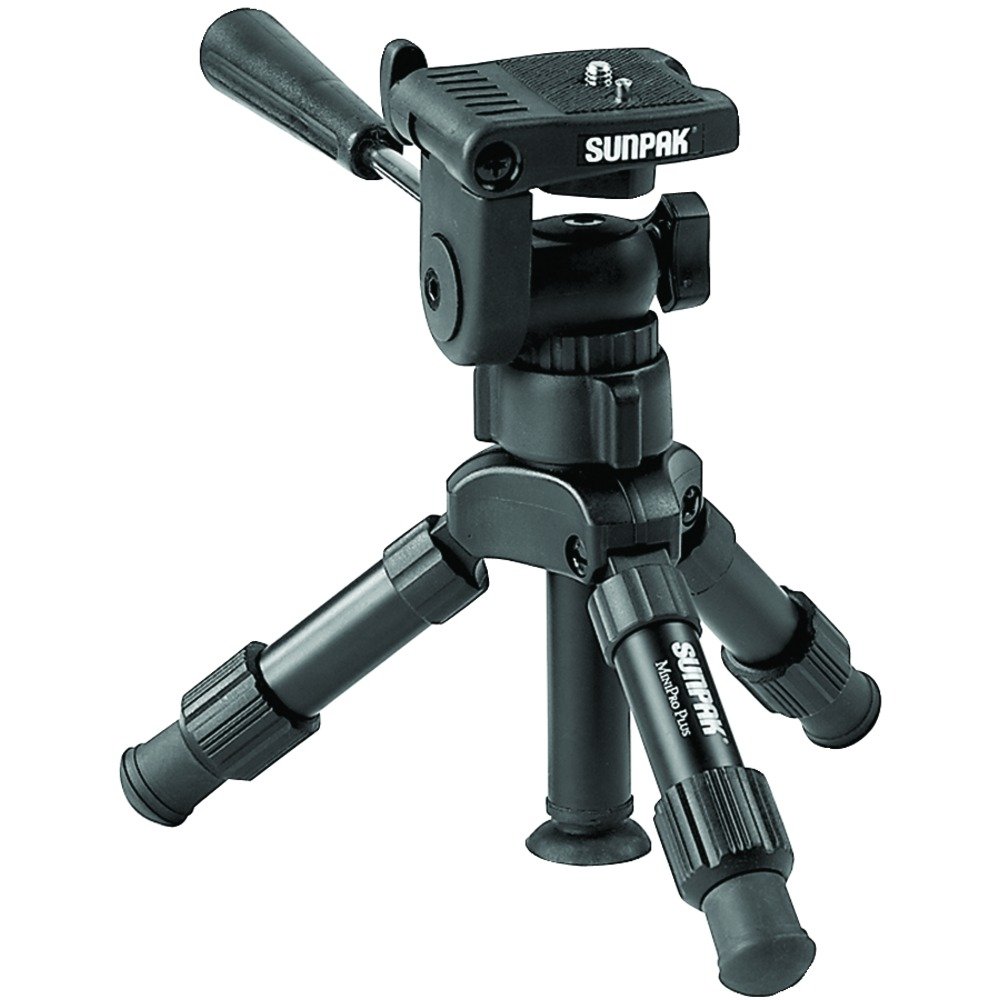
Image: The SUNPAK Mini-Pro Plus Tripod 620-250 in its extended configuration, highlighting its compact size and pan head.
Setup
1. Unpacking and Initial Inspection
Carefully remove the tripod from its packaging. Inspect for any signs of damage. Ensure all parts listed in the "Parts Identification" section are present.
2. Extending the Legs
- Gently pull each of the three legs outwards until they are fully splayed for maximum stability.
- To extend the height of the legs, release the leg extension locks on each leg, pull out the desired section, and then firmly close the locks to secure.
3. Attaching Your Camera
- Locate the camera mounting screw on the pan head.
- Align the camera's tripod socket with the mounting screw.
- Rotate the camera clockwise onto the screw until it is finger-tight. Do not overtighten.
- Ensure the camera is securely attached and stable before proceeding.
4. Using the Suction Cup (Optional)
- For enhanced stability on smooth, non-porous surfaces (like glass or polished tables), the integrated suction cup can be used.
- Ensure the surface is clean and dry.
- Press the tripod firmly onto the surface, engaging the suction cup.
- Verify the suction cup has a strong grip before mounting your camera.
Operating Instructions
1. Adjusting Tripod Height
- Leg Height: Release the leg extension locks, adjust each leg to the desired length, and then firmly close the locks.
- Center Column Height: Loosen the center column lock, extend the center column to the desired height, and then tighten the lock securely.
2. Adjusting Pan and Tilt
- The pan/tilt handle controls both horizontal (pan) and vertical (tilt) movement of the camera.
- Loosen the pan/tilt handle by turning it counter-clockwise to allow free movement.
- Position your camera as desired.
- Tighten the pan/tilt handle by turning it clockwise to lock the camera in place.
3. Vertical Shooting
The pan head features a mechanism to allow for vertical orientation of your camera:
- Loosen the pan/tilt handle.
- Carefully tilt the camera platform into the vertical notch.
- Tighten the pan/tilt handle to secure the camera in the vertical position.
- Note: Ensure the camera is balanced to prevent tipping when in vertical orientation.
4. Using the Bubble Level
The integrated bubble level helps ensure your camera is perfectly horizontal. Adjust the tripod legs and/or the pan head until the bubble is centered within the indicator.
Maintenance
Cleaning
- Wipe the tripod with a soft, dry cloth after each use to remove dust and dirt.
- For stubborn grime, use a slightly damp cloth with mild soap, then wipe dry immediately.
- Do not use abrasive cleaners or solvents, as these can damage the finish and moving parts.
- Keep the leg extension mechanisms and pan head free of sand or grit.
Storage
- Retract all leg sections and the center column before storage.
- Store the tripod in a cool, dry place, away from direct sunlight and extreme temperatures.
Troubleshooting
| Problem | Possible Cause | Solution |
|---|---|---|
| Tripod is unstable or tips easily. | Legs not fully extended or locked; uneven surface; overloaded. | Ensure legs are fully splayed and locks are secure. Place on a level surface. Verify camera weight is within the 6.6 lb limit. |
| Pan/tilt movement is loose or not holding position. | Pan/tilt handle not tightened sufficiently. | Tighten the pan/tilt handle clockwise until the desired resistance is achieved and the camera holds its position. |
| Suction cup not adhering. | Surface is dirty, porous, or uneven. | Clean the surface thoroughly. Ensure it is smooth and non-porous. Apply firm pressure to engage the suction. |
| Leg sections slide down after locking. | Leg extension locks are not fully engaged or are worn. | Ensure locks are firmly closed. If the issue persists, contact customer support. |
Specifications
| Model Number: | 620-250 |
| Brand: | SUNPAK |
| Maximum Height: | 12.2 Inches (31 cm) |
| Minimum Height: | 7.1 Inches (18 cm) |
| Weight Capacity: | 6.6 Pounds (3 kg) |
| Item Weight: | 1 Pound (0.45 kg) |
| Product Dimensions: | 3 x 3.3 x 8.5 inches (7.6 x 8.4 x 21.6 cm) (folded) |
| Tripod Head Type: | 3-Way Pan Head |
| Compatible Devices: | Camera |
| Color: | Black |
| UPC: | 090729602500 |
Warranty and Support
Limited Lifetime Warranty
This SUNPAK Mini-Pro Plus Tripod 620-250 comes with a Limited Lifetime Warranty. Please refer to the warranty documentation included with your purchase for specific terms and conditions. Keep your proof of purchase for warranty claims.
Customer Support
For technical assistance, replacement parts, or warranty inquiries, please contact SUNPAK customer support. Refer to the official SUNPAK website or your product packaging for the most current contact information.