
Introduction
This manual provides comprehensive instructions for the proper use and maintenance of your Sharp EL-2125C Desktop Calculator. Please read this manual thoroughly before using the calculator to ensure correct operation and to maximize its features. Keep this manual for future reference.
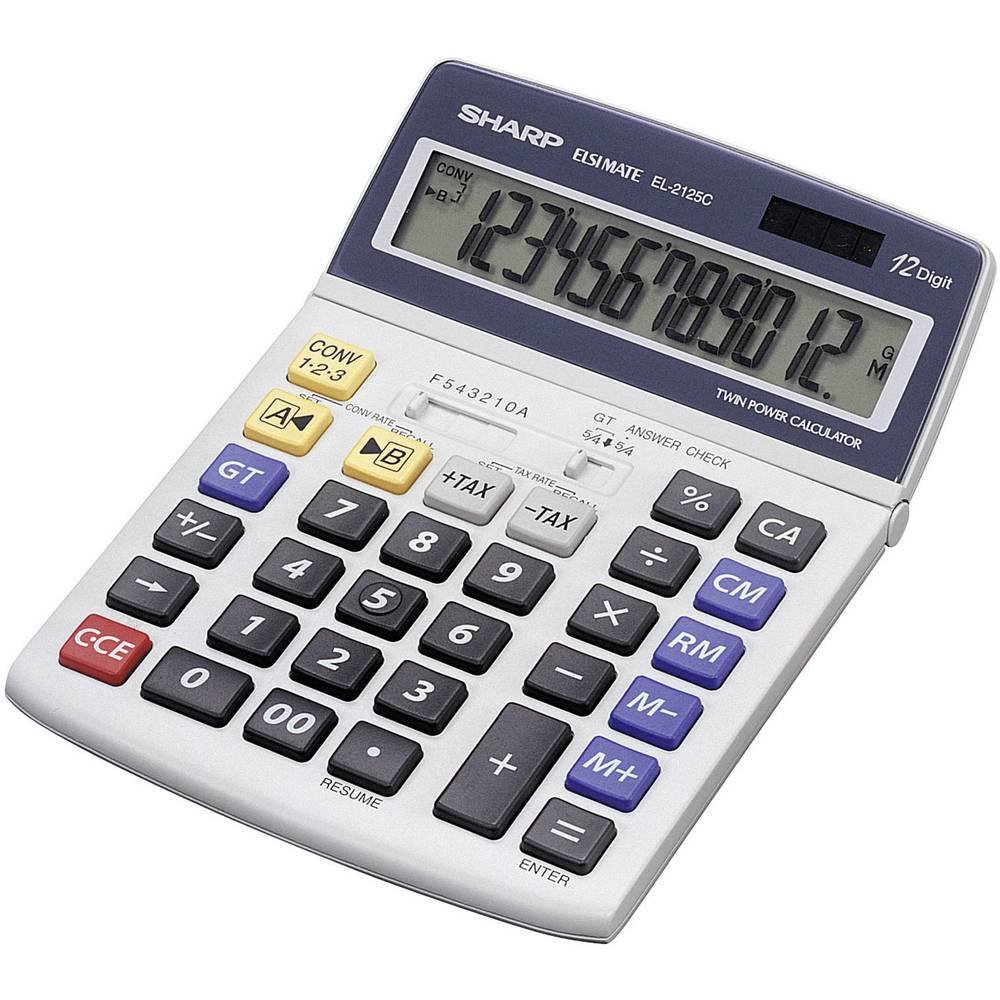
An angled view of the Sharp EL-2125C desktop calculator, showcasing its large LCD display, numeric keypad, and dedicated function buttons for tax calculation, memory, and conversion. The display shows "123456789012."
Setup
Power Source
The Sharp EL-2125C calculator operates using a dual power system: solar power and battery power. For optimal performance, ensure adequate lighting for solar operation. A backup battery (1 x LR44) is included and pre-installed to ensure continuous operation in low-light conditions.
Battery Installation/Replacement
The calculator comes with an LR44 battery pre-installed. If battery replacement is necessary:
- Turn the calculator off or ensure it is in a well-lit area to utilize solar power.
- Locate the battery compartment cover on the back of the unit.
- Remove the cover and carefully replace the old LR44 battery with a new one, observing the correct polarity (+/-).
- Securely replace the battery compartment cover.
Note: Dispose of used batteries according to local regulations.
Operating Instructions
This section details the various functions and operations of your EL-2125C calculator.
Basic Calculations
- Addition (+): Enter the first number, press +, enter the second number, press =.
- Subtraction (-): Enter the first number, press -, enter the second number, press =.
- Multiplication (x): Enter the first number, press x, enter the second number, press =.
- Division (÷): Enter the first number, press ÷, enter the second number, press =.
- Percentage (%): Enter the number, press x, enter the percentage value, press %.
Memory Functions
The calculator features a 4-button memory system:
- M+ (Memory Plus): Adds the displayed value to the memory.
- M- (Memory Minus): Subtracts the displayed value from the memory.
- RM (Recall Memory): Recalls the value stored in memory to the display.
- CM (Clear Memory): Clears the value stored in memory.
Tax Calculation Function
The EL-2125C includes dedicated keys for tax calculations:
- SET TAX RATE: To set the tax rate, press SET, then TAX RATE, enter the tax percentage, and press SET again.
- +TAX: Adds the calculated tax to the displayed value.
- -TAX: Subtracts the calculated tax from the displayed value.
Conversion Function
The calculator supports conversion between different rates (e.g., currency conversion):
- SET CONV RATE: To set conversion rates, press SET, then CONV RATE, enter the conversion factor, and press SET.
- CONV A / CONV B: Use these keys to apply the set conversion rates.
Decimal and Rounding Settings
Adjust how results are displayed using the F543210A slider switch:
- F (Floating): Displays all available decimal places.
- 5, 4, 3, 2, 1, 0: Specifies the number of decimal places to be displayed.
- A (Add Mode): Automatically adds two decimal places for currency calculations.
Rounding settings are controlled by the 5/4 switch:
- 5/4 (Round Up/Down): Rounds up if the next digit is 5 or greater, rounds down if less than 5.
- Round (No Rounding): Truncates the result without rounding.
Other Functions
- GT (Grand Total): Accumulates the results of individual calculations. Press GT to display the grand total.
- ANSWER CHECK: Allows verification of previous calculations.
- +/- (Sign Change): Changes the sign of the displayed number.
- CCE (Clear Current Entry): Clears the last entered number or calculation.
- CA (Clear All): Clears all entries and calculations, resetting the calculator.
- 00 (Double Zero): Enters two zeros simultaneously.
- RESUME: Recalls the last calculation result.
Maintenance
Cleaning
To maintain the calculator's appearance and functionality, wipe the unit with a soft, dry cloth. For stubborn dirt, a slightly damp cloth can be used, followed by a dry cloth. Avoid using abrasive cleaners, solvents, or harsh chemicals, as these can damage the casing and display.
Storage
When not in use for extended periods, store the calculator in a cool, dry place away from direct sunlight and extreme temperatures. Avoid placing heavy objects on top of the calculator to prevent damage to the keys or display.
Troubleshooting
If you encounter issues with your Sharp EL-2125C calculator, refer to the following common problems and solutions:
| Problem | Possible Cause | Solution |
|---|---|---|
| Display is blank or dim. | Insufficient light for solar power, or low battery. | Move the calculator to a brighter area. If the issue persists, replace the LR44 backup battery. |
| Incorrect calculation results. | Incorrect decimal or rounding settings, or previous calculation error. | Check the F543210A and 5/4 switches. Press CA to clear all previous operations and start a new calculation. |
| Keys are unresponsive. | Dust or debris under keys, or internal malfunction. | Gently clean around the keys. If the problem continues, contact customer support. |
Specifications
- Model: EL-2125C
- Display: 12-digit LCD, movable
- Power Source: Solar and 1 x LR44 battery (included)
- Dimensions: Approximately 19.5 x 14 x 2.2 cm (L x W x H)
- Weight: Approximately 215 g
- Material: Plastic
- Functions: Basic arithmetic, Memory (M+, M-, RM, CM), Tax Calculation (+TAX, -TAX), Conversion, Percentage (%), Grand Total (GT), Answer Check, Decimal Selector (F, 5, 4, 3, 2, 1, 0, A), Rounding Selector (5/4, Round), Sign Change (+/-), Clear Entry (CCE), Clear All (CA), Double Zero (00), Resume.
Warranty and Support
For warranty information or technical support, please refer to the documentation provided with your purchase or contact Sharp customer service. Keep your proof of purchase for warranty claims.
Manufacturer: Sharp


