
1. Product Overview
This manual provides instructions for the SANYO SC-P10N Genuine 3-Layer Vacuum Cleaner Paper Bags. These bags are specifically designed for use with SANYO vertical personal cleaners to ensure optimal performance and efficient dust collection. Each pack contains 10 replacement bags.
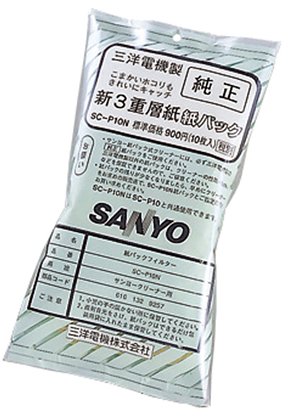
Image shows the packaging of the SANYO SC-P10N vacuum cleaner paper bags, indicating a pack of 10.
2. Installation Instructions (Setup)
Follow these steps to correctly install a new paper bag into your vacuum cleaner:
- Power Off: Ensure your vacuum cleaner is turned off and unplugged from the electrical outlet before proceeding.
- Locate Compartment: Identify the dust compartment or bag housing on your vacuum cleaner. Refer to your vacuum cleaner's specific user manual if you are unsure of its location.
- Open Cover: Carefully open the dust compartment cover.
- Remove Old Bag: Gently remove the old, full paper bag. Dispose of it responsibly according to local waste disposal guidelines.
- Unfold New Bag: Unfold a new SANYO SC-P10N paper bag.
- Insert Bag: Align the bag's cardboard collar with the bag holder inside the vacuum cleaner. Push it firmly until it is securely seated to prevent any dust leakage during operation.
- Close Cover: Close the dust compartment cover firmly until it latches securely.
- Ready for Use: Your vacuum cleaner is now ready for use with the new paper bag.
3. Usage and Replacement (Operating)
The SANYO SC-P10N paper bags are designed for single use. Replace the bag when it is full or when you observe a noticeable decrease in suction power.
- Check Fullness: Periodically open the dust compartment to check the bag's fullness.
- Performance Impact: A full bag will significantly reduce the vacuum cleaner's efficiency and can lead to increased motor strain.
- Genuine Bags: Always replace with genuine SANYO SC-P10N bags to maintain optimal performance and protect your appliance from potential damage.
4. Care and Storage (Maintenance)
Proper care and storage of your vacuum cleaner bags ensure their effectiveness and longevity.
- Storage: Store unused paper bags in a cool, dry place, away from direct sunlight and moisture, to preserve their material integrity.
- Do Not Reuse: Do not attempt to empty and reuse paper bags. This can compromise their filtration capabilities and potentially damage your vacuum cleaner.
- Clean Compartment: Regularly inspect the bag holder and surrounding areas within the dust compartment for any dust buildup and clean as necessary to ensure a proper seal for new bags.
5. Troubleshooting
If you encounter issues related to the vacuum cleaner bag, refer to the table below for common problems and solutions.
| Problem | Possible Cause | Solution |
|---|---|---|
| Reduced Suction Power | The paper bag is full or improperly installed. | Check the paper bag. Replace it if full. Reinstall it securely if loose. |
| Dust Leaking from Vacuum | The bag is not installed correctly or is damaged. | Ensure the bag's collar is securely seated in the holder. Replace the bag if it appears damaged. |
| Unusual Odor During Use | The bag contains old debris or perishable matter. | Replace the paper bag with a new one. |
6. Product Specifications
- Model: SC-P10N
- Brand: SANYO
- Material: Paper
- Color: White
- Package Contents: 10 bags per pack
- Package Dimensions: 18.2 x 9 x 3.8 cm
- Package Weight: 18.14 grams
- ASIN: B0000C9A94
7. Warranty and Customer Support
This product is a consumable item. For specific warranty information regarding your SANYO vacuum cleaner or for further assistance with your appliance, please refer to the documentation provided with your vacuum cleaner or contact SANYO customer support directly.
Important Note: Using non-genuine replacement bags may void your vacuum cleaner's warranty and could potentially lead to damage or reduced performance. Always use genuine SANYO replacement parts.


