Introduction
This manual provides essential information for the safe and efficient operation of your Thomson TM 9850 Radio. Please read it thoroughly before using the device and keep it for future reference.
Safety Information
- Do not expose the unit to rain or moisture to prevent fire or electric shock.
- Do not block ventilation openings. Ensure adequate space around the unit for proper airflow.
- Use only the power supply specified for this device.
- Do not open the casing. Refer all servicing to qualified personnel.
- Keep the unit away from direct sunlight, heat sources, and strong magnetic fields.
Product Overview
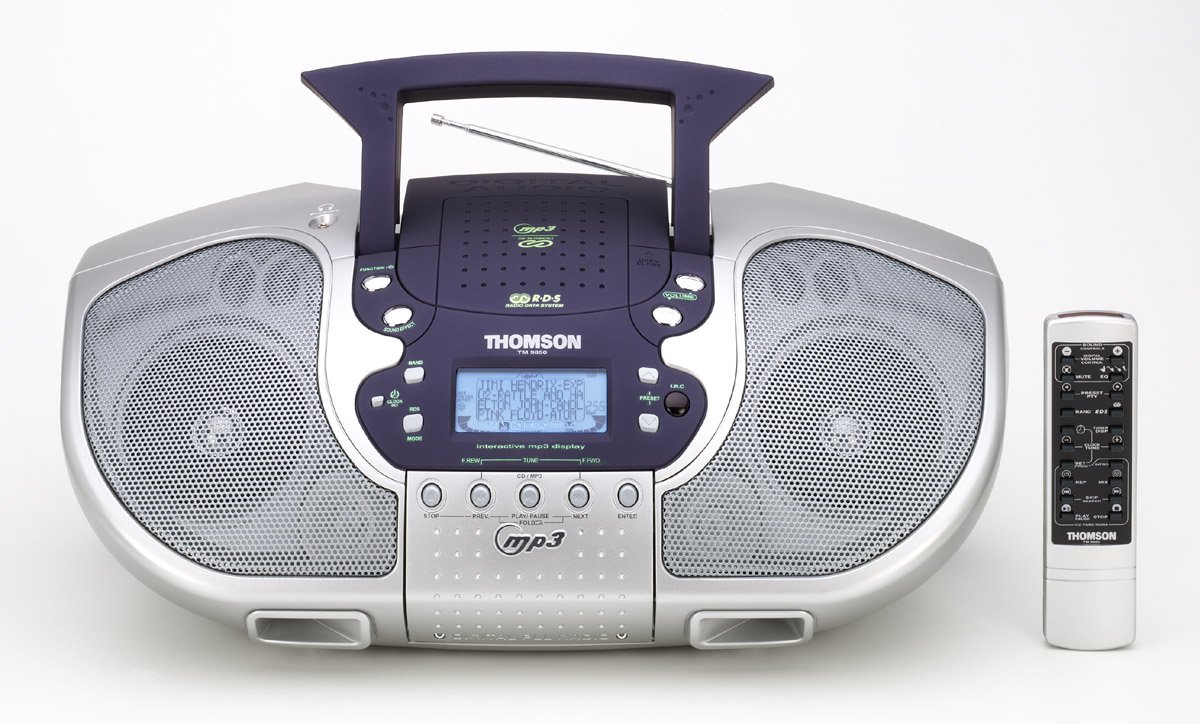
Figure 1: Front view of the Thomson TM 9850 Radio with its accompanying remote control. The radio features dual speakers, a central control panel with an LCD display, and a top-mounted handle and telescopic antenna. The remote control is slender and white with various function buttons.
The Thomson TM 9850 is a portable radio designed for versatile audio playback. It features an integrated CD/MP3 player, an FM/AM radio tuner, and a clear LCD display for easy navigation. The unit also includes a remote control for convenient operation from a distance.
Setup
Power Connection
- Ensure the unit is placed on a stable, flat surface.
- Connect the AC power cord to the AC IN jack on the back of the unit.
- Plug the other end of the AC power cord into a standard wall outlet (AC 230V ~ 50Hz).
- Alternatively, for portable use, insert 8 x "C" size batteries (not included) into the battery compartment located on the bottom of the unit, observing correct polarity.
Antenna Adjustment
- For FM reception, extend the telescopic antenna fully. Adjust its position for optimal signal reception.
- For AM reception, the unit has a built-in ferrite bar antenna. Rotate the unit itself for best reception.
Operating Instructions
Basic Operation
- Power On/Off: Press the POWER button to turn the unit on or off.
- Volume Control: Rotate the VOLUME knob clockwise to increase volume, counter-clockwise to decrease.
- Function Selection: Press the FUNCTION button to switch between CD/MP3, FM, and AM modes.
Radio Operation (FM/AM)
- Select FM or AM mode using the FUNCTION button.
- Press the BAND button to select the desired frequency band (FM or AM).
- Use the TUNE +/- buttons to manually tune to a station. Press and hold for automatic scanning.
- To store a preset station: Tune to the desired station, press PROGRAM, then use PRESET +/- to select a preset number, and press PROGRAM again to confirm.
- To recall a preset station: Press PRESET +/- to cycle through stored stations.
CD/MP3 Playback
- Open the CD compartment cover.
- Place a CD or MP3 CD with the label side facing up.
- Close the CD compartment cover.
- Select CD/MP3 mode using the FUNCTION button. The display will show "READING" then the total number of tracks/folders.
- Press PLAY/PAUSE to start playback. Press again to pause.
- Press NEXT to skip to the next track/file. Press PREV to go to the beginning of the current track or the previous track.
- Press STOP to stop playback.
- For MP3 CDs, use FOLDER +/- buttons to navigate between folders.
Maintenance
- Cleaning: Wipe the unit with a soft, dry cloth. Do not use abrasive cleaners or solvents.
- CD Lens Care: If the CD lens gets dirty, use a commercially available CD lens cleaner. Do not touch the lens.
- Storage: If not using the unit for an extended period, remove the batteries and store it in a cool, dry place.
Troubleshooting
| Problem | Possible Cause | Solution |
|---|---|---|
| No power | Power cord not connected; Batteries depleted or incorrectly inserted. | Check power cord connection; Replace batteries or ensure correct polarity. |
| No sound | Volume too low; Mute function activated. | Increase volume; Deactivate mute. |
| Poor radio reception | Antenna not extended/adjusted; Weak signal. | Extend and adjust telescopic antenna (FM); Rotate unit (AM); Try moving the unit to a different location. |
| CD/MP3 not playing | Disc inserted incorrectly; Disc dirty or scratched; Incorrect function mode. | Insert disc with label side up; Clean or replace disc; Select CD/MP3 function mode. |
Specifications
- Model: TM 9850
- Power Source: AC 230V ~ 50Hz or 8 x "C" size batteries (UM-2)
- Frequency Range: FM 87.5 - 108 MHz, AM 522 - 1620 kHz
- Supported Disc Formats: CD, CD-R/RW, MP3-CD
- Audio Output: Stereo
- Dimensions (W x H x D): (Approximate, based on typical boombox size) 400mm x 200mm x 250mm
- Weight: (Approximate, based on typical boombox weight) 2.5 kg
Note: Specifications are subject to change without notice for improvement.
Warranty and Support
This Thomson TM 9850 Radio comes with a standard manufacturer's warranty. Please refer to the warranty card included in the original packaging for detailed terms and conditions. For technical support, service, or inquiries, please contact Thomson customer service through their official website or the contact information provided with your purchase.
For the latest information and support resources, please visit the official Thomson website: www.thomsonconsumer.com


