
Introduction
This manual provides essential instructions for the safe and efficient operation, maintenance, and troubleshooting of your KRUPS 890 Orchestro Premium Fully Automatic Espresso/Cappuccino/Latte Coffeemaker. Please read this manual thoroughly before using the appliance and retain it for future reference.
Safety Instructions
- Always ensure the appliance is connected to a grounded power outlet.
- Do not immerse the appliance, power cord, or plug in water or any other liquid.
- Keep hands and utensils away from hot surfaces and steam nozzles during operation.
- Unplug the coffeemaker from the power outlet before cleaning or when not in use.
- Do not operate the appliance with a damaged cord or plug, or if it malfunctions or has been damaged in any manner.
- This appliance is for household use only.
Product Overview
The KRUPS 890 Orchestro Premium is a fully automatic coffeemaker designed to prepare espresso, cappuccino, and latte beverages. It features an advanced ThermoBlock system for rapid heating and optimal brewing temperature, a 15-bar pump for authentic espresso extraction, and an integrated burr grinder with 6 settings for fresh coffee beans.

Figure 1: Front view of the KRUPS 890 Orchestro Premium coffeemaker, showcasing its sleek design and primary controls.
Setup
- Unpacking: Carefully remove all packaging materials and protective films from the appliance. Ensure all components are present: coffeemaker, drip tray, water tank, bean hopper lid, and filter.
- Initial Cleaning: Before first use, wipe the exterior of the machine with a damp cloth. Wash the water tank, drip tray, and coffee grounds container with warm, soapy water, then rinse thoroughly and dry.
- Water Tank Filling: Remove the water tank from the side of the machine. Fill it with fresh, cold drinking water up to the 'MAX' level indicator. Reinsert the tank securely.
- Bean Hopper Filling: Open the lid of the bean hopper located on top of the machine. Pour fresh, whole coffee beans into the hopper. Do not use ground coffee in the bean hopper.
- First Use / Priming: Plug the coffeemaker into a grounded power outlet. Turn on the machine. The system will automatically perform a rinsing cycle. Place a container under the coffee spouts to collect the water.
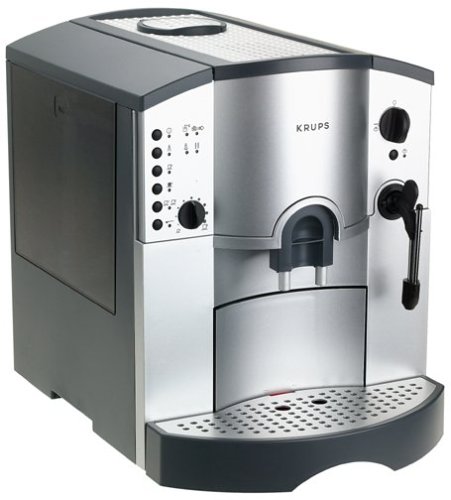
Figure 2: Side view of the KRUPS 890 Orchestro Premium, illustrating the removable water tank for easy refilling.
Operating
Making Espresso/Coffee
- Ensure the water tank is filled and the bean hopper contains fresh coffee beans.
- Place one or two cups under the coffee spouts.
- Select your desired coffee strength and volume using the control panel buttons and dial. The integrated burr grinder offers 6 grinding settings; adjust as needed for your preferred taste.
- Press the appropriate button for a single or double espresso/coffee. The machine will grind the beans, brew, and dispense the coffee automatically.
Making Cappuccino/Latte
- First, prepare an espresso shot as described above.
- Fill a milk frothing pitcher with cold milk.
- Position the steam wand into the milk. Turn the steam control knob to activate the steam function.
- Froth the milk to your desired consistency. Turn the steam control knob off when finished.
- Pour the frothed milk over your espresso to create a cappuccino or latte.
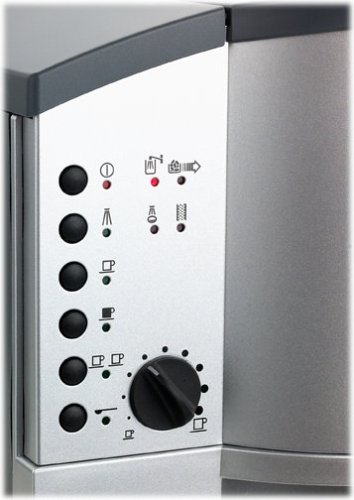
Figure 3: Detailed view of the control panel on the KRUPS 890 Orchestro Premium, showing buttons for coffee selection and the grinding adjustment dial.
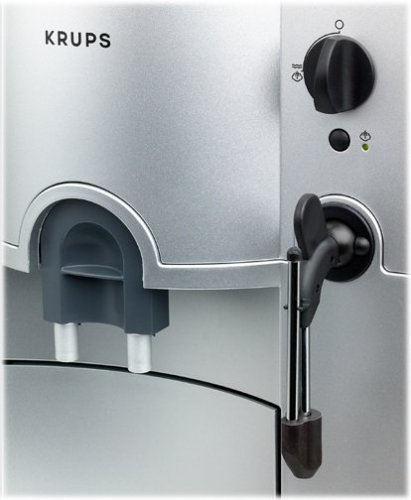
Figure 4: Close-up of the coffee dispenser and the adjustable steam wand on the KRUPS 890 Orchestro Premium, used for frothing milk.
Maintenance
Daily Cleaning
- Drip Tray and Coffee Grounds Container: Empty and rinse daily. These components are typically dishwasher safe, but hand washing is recommended for longevity.
- Coffee Spouts: Wipe with a damp cloth after each use to prevent coffee residue buildup.
- Steam Wand: After each use, purge the steam wand briefly and wipe it clean with a damp cloth to remove any milk residue.
Descaling
The machine will indicate when descaling is required. Use a descaling solution specifically designed for espresso machines. Follow the instructions provided with the descaling agent and the machine's display prompts for the descaling cycle.
Brew Unit Cleaning
Refer to the machine's display for prompts regarding brew unit cleaning. This typically involves using cleaning tablets and running a specific cleaning program.
Troubleshooting
| Problem | Possible Cause | Solution |
|---|---|---|
| No coffee dispensed | Water tank empty; coffee beans empty; clogged spouts. | Refill water tank; refill bean hopper; clean coffee spouts. |
| Weak coffee | Grind setting too coarse; insufficient coffee dose. | Adjust grinder to a finer setting; select stronger coffee strength. |
| Machine leaks water | Water tank not properly seated; drip tray full. | Ensure water tank is correctly inserted; empty and clean drip tray. |
| Steam wand not frothing milk | Steam wand clogged; insufficient steam pressure. | Clean steam wand thoroughly; allow machine to heat up fully. |
For issues not listed here, please consult the full troubleshooting guide in your product documentation or contact KRUPS customer support.
Specifications
- Model Name: 890
- Brand: KRUPS
- Operation Mode: Fully Automatic
- Coffee Maker Type: Espresso Machine
- Special Feature: Integrated Coffee Grinder
- Pressure: 15-bar pump
- Grinder Settings: 6
- Color: Black
- Included Components: Filter
- Item Dimensions (LxWxH): Approximately 46.7 x 39.9 x 39.4 Centimeters
- Item Weight: Approximately 10 g (Note: This weight may refer to packaging or a specific component; actual machine weight will be significantly higher.)
- UPC: 010942118459
Warranty
The KRUPS 890 Orchestro Premium Coffeemaker typically comes with a 1-year limited warranty. For specific terms, conditions, and to register your product, please refer to the warranty card included with your purchase or visit the official KRUPS website. Keep your proof of purchase for warranty claims.
Support
Should you require further assistance, have questions about your appliance, or need to arrange for service, please contact KRUPS customer support. Contact information can typically be found on the KRUPS official website or in the documentation provided with your product.


