
Bushnell 1954841-20
Tasco Specialty 5x20 Golf Scope Monocular User Manual
Model: 1954841-20
1. Introduction
Thank you for choosing the Tasco Specialty 5x20 Golf Scope Monocular. This compact and lightweight optical instrument is designed specifically for golfers, providing 5x magnification to help you observe the course and a built-in rangefinding reticle to assist in estimating distances to the flag or other targets.
This manual provides detailed instructions on how to set up, operate, and maintain your golf scope to ensure optimal performance and longevity. Please read it thoroughly before using your device.
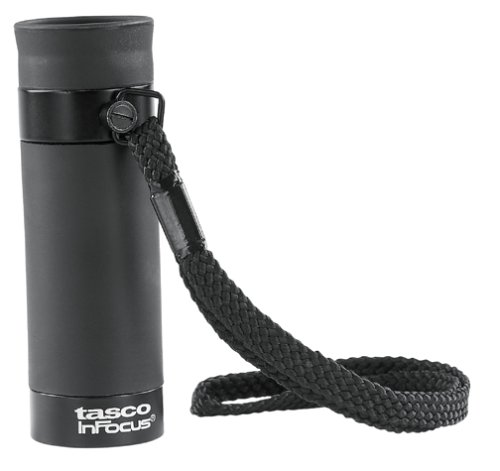
Image 1: Tasco Specialty 5x20 Golf Scope Monocular. This image displays the compact design of the monocular, highlighting its portability and ease of handling.
2. Setup
The Tasco Specialty 5x20 Golf Scope Monocular is designed for immediate use with minimal setup. It features a fixed focus system, meaning no manual focusing adjustments are required.
2.1 Unpacking
Carefully remove the monocular from its packaging. Inspect the device for any signs of damage. Retain the packaging for future storage or transport.
2.2 Holding the Monocular
Hold the monocular firmly in one hand. Bring the eyepiece (the smaller lens) to your eye. Ensure a steady grip to minimize image shake, especially when using the rangefinding reticle.
3. Operating Instructions
3.1 Viewing Through the Monocular
- Hold the monocular to your eye, ensuring the eyepiece is comfortably positioned.
- Look through the monocular at your desired target. The 5x magnification will make objects appear five times closer than with the naked eye.
- Since the focus is fixed, the image should be clear for objects at typical golf course distances.
3.2 Using the Rangefinding Reticle
The Tasco Specialty 5x20 Golf Scope features a rangefinding reticle designed to help estimate distances to objects of known height, such as a golf flagstick. While specific markings may vary, the general principle involves aligning the reticle with the target.
- Look through the monocular and locate the target (e.g., a golf flagstick).
- Position the reticle over the target. The reticle will have a series of horizontal lines or markings.
- Align the base of the target (e.g., the bottom of the flagstick) with the lowest line of the reticle.
- Note where the top of the target (e.g., the top of the flagstick) intersects with the reticle's markings.
- Refer to the specific rangefinding scale or instructions provided with your monocular (often printed on the device or its packaging) to convert this reading into an estimated distance. For example, if a standard flagstick (approximately 7 feet tall) aligns between two specific marks, the distance can be read directly or calculated.
Note: The accuracy of the rangefinding reticle depends on the user's ability to estimate the target's height and steady observation. It is an estimation tool, not a precise laser rangefinder.
4. Maintenance and Care
4.1 Cleaning Lenses
- Use only a soft, lint-free cloth or a specialized lens cleaning cloth.
- For stubborn smudges or dirt, apply a small amount of lens cleaning fluid to the cloth, not directly to the lens.
- Gently wipe the lens in a circular motion. Avoid excessive pressure.
- Never use abrasive cloths, paper towels, or household cleaners, as these can scratch the lens coatings.
4.2 General Care and Storage
- Store the monocular in a cool, dry place when not in use.
- Protect the lenses from dust and scratches by keeping the lens caps on.
- Avoid exposing the monocular to extreme temperatures or direct sunlight for extended periods.
- Do not attempt to disassemble the monocular, as this will void any warranty and may cause damage.
5. Troubleshooting
If you encounter issues with your Tasco Specialty 5x20 Golf Scope Monocular, please refer to the following common solutions:
- Image appears blurry:
- Ensure the lenses are clean. Refer to Section 4.1 for cleaning instructions.
- Verify that you are holding the monocular steadily. Image blur can occur from hand shake.
- The monocular has a fixed focus. If objects at typical viewing distances (e.g., 10-100 yards) appear blurry, there might be an issue with the optics.
- Difficulty using the rangefinding reticle:
- Practice using the reticle on objects of known height and distance to become familiar with its operation.
- Ensure sufficient light for clear visibility of both the target and the reticle markings.
- Physical damage:
- If the monocular has been dropped or sustained impact, inspect for cracks, loose parts, or misaligned optics.
- Do not attempt to repair the device yourself. Contact customer support or the retailer for assistance.
6. Specifications
| Model Number | 1954841-20 |
| Magnification | 5x |
| Objective Lens Diameter | 20mm |
| Focus Type | Fixed Focus |
| Prism Type | Roof Prism |
| Special Feature | Rangefinding Reticle, Lightweight |
| Item Weight | 0.353 ounces |
| Package Dimensions | 10.1 x 5.6 x 2 inches |
| Manufacturer | Bushnell |
7. Warranty Information
Specific warranty terms and conditions for the Tasco Specialty 5x20 Golf Scope Monocular are provided by the manufacturer, Bushnell, or the retailer at the time of purchase. Please refer to the warranty card included with your product or visit the official Bushnell website for detailed information regarding warranty coverage, duration, and claims procedures.
Note: Retain your proof of purchase for any warranty claims.
8. Customer Support
For technical assistance, troubleshooting beyond this manual, or inquiries regarding your Tasco Specialty 5x20 Golf Scope Monocular, please contact:
- Your Retailer: The store or online platform where you purchased the product.
- Bushnell Customer Service: Visit the official Bushnell website (www.bushnell.com) for contact information, FAQs, and support resources.
When contacting support, please have your product model number (1954841-20) and proof of purchase readily available.
Related documents1954841-20

Ask a question about this manual
Ask about setup, troubleshooting, compatibility, parts, safety, or missing instructions. Manuals+ will review the question and use this page’s manual context to help answer it.