
Introduction
The Dualit Classic Toaster combines simplicity and sophistication, offering a timeless design with modern functionality. Engineered and hand-assembled in the UK, this toaster is built for durability and performance. It features extra-wide slots to accommodate various bread types, including a convenient bagel function. The unique ejector system ensures your toast stays warm until you are ready to retrieve it. With its robust construction and user-friendly controls, the Dualit Classic Toaster is designed to provide perfectly browned toast every time.

Image: The Dualit Classic 2 Slice NewGen Toaster, showcasing its sleek metallic charcoal finish and two slots with toasted bread.
Important Safety Information
- Always ensure the toaster is placed on a stable, heat-resistant surface, away from flammable materials.
- Do not operate the toaster without the crumb tray correctly inserted.
- Unplug the toaster from the power outlet when not in use and before cleaning.
- Never insert metal objects into the toaster slots.
- Supervise children closely when the toaster is in use.
- Do not immerse the toaster, cord, or plug in water or any other liquid.
Setup
- Carefully unpack the toaster and remove all packaging materials.
- Place the toaster on a clean, dry, and stable countertop or table. Ensure there is adequate clearance around the toaster for ventilation.
- Verify that the removable crumb tray is fully inserted at the bottom of the toaster.
- Plug the power cord into a grounded electrical outlet.

Image: A detailed diagram highlighting the key components of the Dualit toaster, including the removable crumb tray and manual ejector.
Operating Instructions
Basic Toasting
- Insert your desired bread slices into the extra-wide 28mm slots.
- Use the top selector switch to activate the desired number of slots (e.g., 1 or 2 slices).
- Adjust the mechanical timer dial (bottom dial) to your preferred browning level. Settings range from light to dark.
- Press the manual ejector lever down to initiate the toasting cycle. The elements will begin to glow.
- To check the toast's progress without interrupting the cycle, gently lift the ejector lever. The toast will remain warm until the lever is fully pushed up to eject.

Image: A close-up view of the toaster's mechanical controls, including the energy-efficient slot selector and the browning control dial.
Defrost Function
For frozen bread, use the defrost setting (indicated by a snowflake icon) on the mechanical timer dial. This function will gently thaw the bread before beginning the toasting process, ensuring even results.
Bagel Function
The toaster features a bagel function that toasts the cut side of the bagel while gently warming the outer side. Place the bagel with the cut side facing the active heating elements for optimal results.
Video: An official overview of the Dualit Classic NewGen Toaster, demonstrating its features and operation.
Video: A look into the manufacturing process of the Dualit Classic Toaster, highlighting its hand-built quality.
Maintenance and Cleaning
- Always unplug the toaster and allow it to cool completely before cleaning.
- Crumb Tray: Regularly remove and empty the crumb tray. Wipe it clean with a damp cloth and ensure it is dry before reinserting.
- Exterior: Wipe the exterior of the toaster with a soft, damp cloth. Do not use abrasive cleaners, scouring pads, or harsh chemicals, as these can damage the finish.
- ProHeat Elements: The patented ProHeat elements are designed for durability and longevity. In the unlikely event of an element needing replacement, this can be done by a qualified electrician, ensuring the toaster's long lifespan.

Image: A hand holding a Dualit ProHeat element, emphasizing the toaster's repairable design and long-lasting components.

Image: The removable crumb tray being pulled out from the bottom of the Dualit toaster, illustrating ease of cleaning.
Troubleshooting
| Problem | Possible Cause | Solution |
|---|---|---|
| Toaster not turning on | Not properly plugged in; power outlet issue. | Ensure the toaster is securely plugged into a working power outlet. Check the circuit breaker if necessary. |
| Uneven toasting | Incorrect slice selection; first use on a cold toaster. | Confirm the correct number of slots are selected. For the first use of the day, a slightly higher browning setting or a brief preheat may be needed. |
| Bread stuck in slots | Bread too thick or small pieces. | Use the manual ejector lever to lift the toast. Do not use metal utensils. For smaller items, consider using a Dualit sandwich cage (sold separately). |
| Smoke or burning smell | Crumbs accumulated in the tray or inside the toaster. | Unplug immediately. Allow to cool, then remove and clean the crumb tray. Gently shake out any remaining crumbs from the toaster. |
Specifications
- Brand: Dualit
- Model Number: 27154
- Color: Metallic Charcoal
- Material: Stainless Steel
- Product Dimensions: 8.6"D x 10.2"W x 8.2"H
- Wattage: 1250 watts
- Number of Slices: 2
- Special Feature: Fully Repairable
- Item Weight: 7 Pounds
- Voltage: 120V
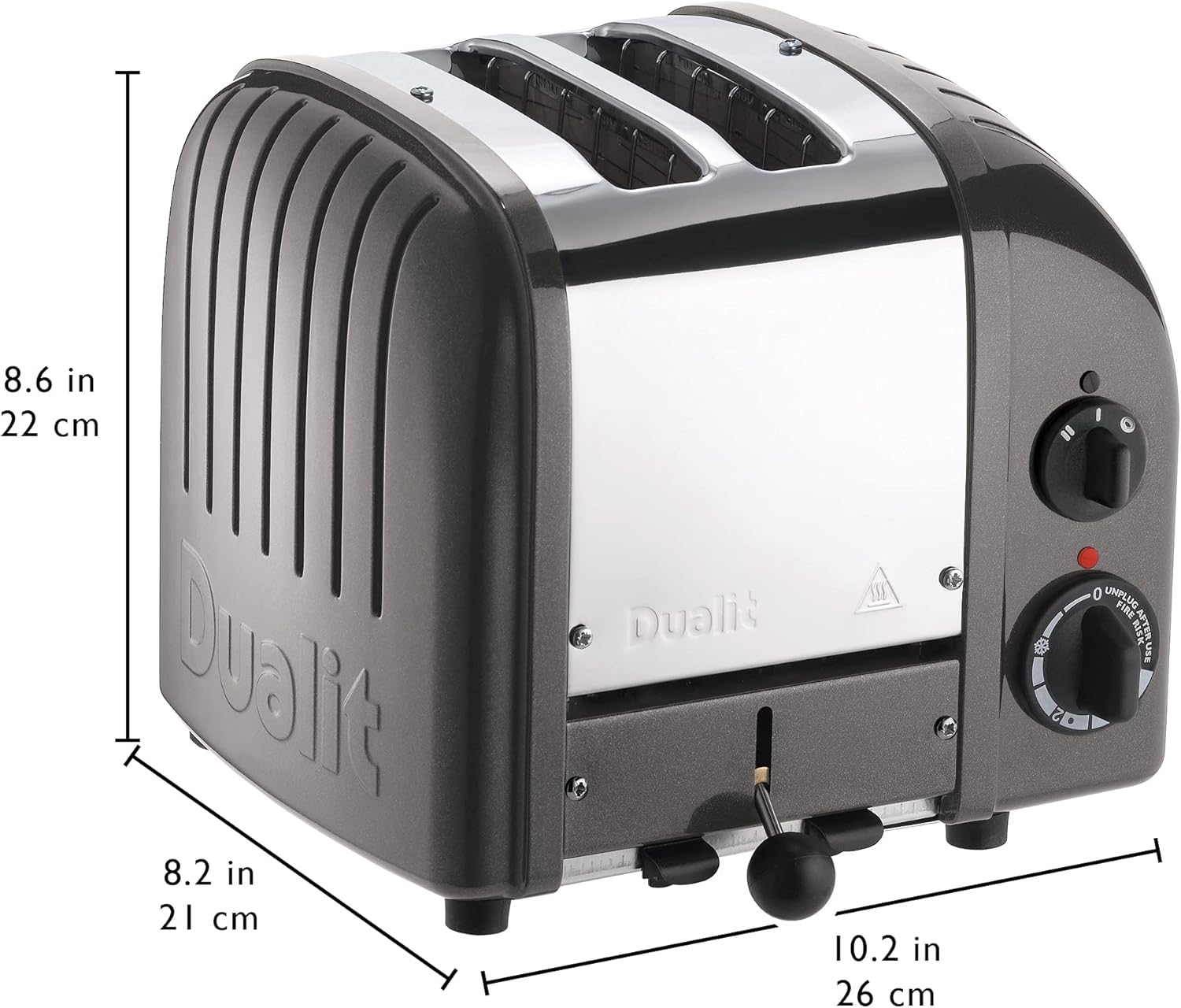
Image: The Dualit toaster with its key dimensions (depth, width, height) clearly marked for reference.
Warranty and Support
The Dualit Classic 2 Slice NewGen Toaster typically comes with a one-year warranty from the manufacturer. For specific warranty details, product registration, or technical support, please refer to the official user manual or contact Dualit customer service.
Official User Manual (PDF): Download Here
Visit the Dualit Store: Dualit Store on Amazon
