
1. Introduction
The Minolta Flash Meter V is an advanced exposure meter designed for precise light measurement in various photographic and cinematographic applications. It offers high accuracy, repeatability, and reliability, making it an essential tool for demanding professionals. This manual provides detailed instructions for the proper setup, operation, and maintenance of your Flash Meter V.
2. Package Contents
Please verify that all items listed below are included in your package:
- Minolta Flash Meter V Unit
- Spherical Diffuser
- Flat Diffuser
- Strap
- Protective Case
- One AA-size Battery
3. Product Overview
Familiarize yourself with the components of your Minolta Flash Meter V.
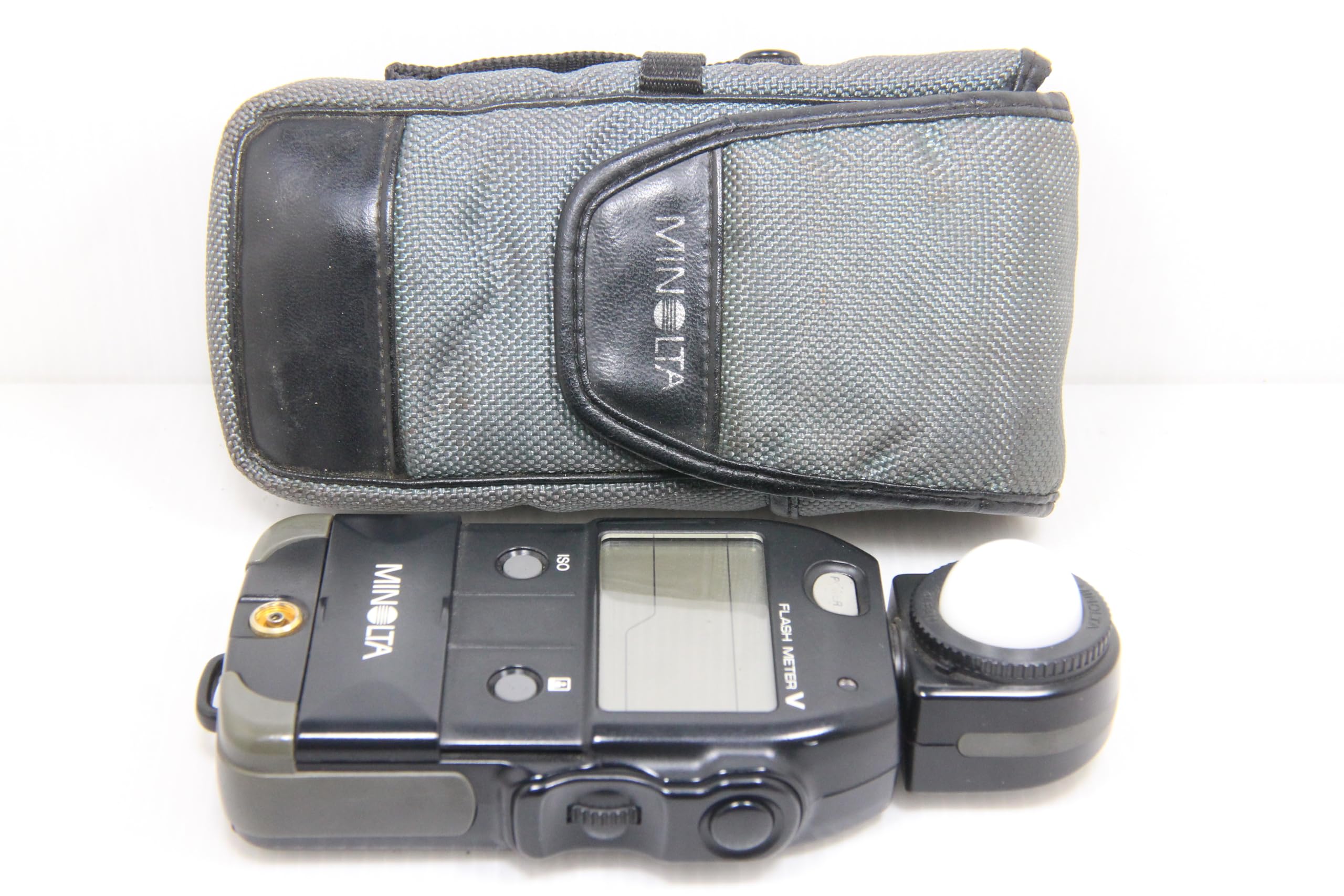
An overhead view of the Minolta Flash Meter V, showing its main display, control buttons, and the spherical diffuser attached to the sensor head. The Minolta logo is visible on the left side, and 'FLASH METER V' is printed near the display.
4. Setup
4.1 Battery Installation
- Locate the battery compartment cover, typically on the underside or side of the meter.
- Slide or unlatch the cover to open the compartment.
- Insert one AA-size battery, ensuring correct polarity (+/-) as indicated inside the compartment.
- Close the battery compartment cover securely.
4.2 Attaching the Strap
Thread the provided strap through the strap lug on the meter for secure handling and to prevent accidental drops.
4.3 Diffuser Attachment
The Flash Meter V comes with both a spherical and a flat diffuser. The spherical diffuser is generally used for incident light readings, while the flat diffuser is used for reflected light readings or when measuring light from a specific direction. Attach the desired diffuser to the sensor head by aligning it and twisting gently until it locks into place.
5. Operating Instructions
5.1 Power On/Off
Press the POWER button to turn the meter on or off. The display will illuminate upon activation.
5.2 Intelligent Auto Mode
The Flash Meter V features an innovative intelligent auto mode. When activated, it automatically distinguishes between flash light and ambient light, and between cord and non-cord flash operations. Simply press the measuring button to take a reading without manually switching modes.
5.3 Flash Light Percentage Display
If both flash and ambient light are present during a measurement, the meter's analyze scale will automatically display the percentage of flash light contributing to the total illumination. This helps in balancing mixed lighting conditions.
5.4 Manual Operation
For specific control, shutter speed and aperture values can be manually adjusted using the positive-action dial located on the meter. This allows for fine-tuning exposure settings as needed.
5.5 ISO Setting for Instant Films
A dedicated ISO button is provided to display exposure requirements specifically for instant films. Instant films often have different sensitivity characteristics compared to regular film, and this feature ensures accurate readings for both.
5.6 Data Panel Illumination
The meter's data panel automatically illuminates in low light or complete darkness, ensuring clear readability of measurements and settings in challenging environments.
5.7 Measurement Modes
- AMBI Mode: Used for taking measurements of flickering light sources.
- AMBI FNo Mode: Provides aperture-priority measurements of ambient light.
- Flash Mode: Designed for single-burst flash measurements.
- Flash Multi Mode: Allows for the cumulative measurement of multiple flash bursts.
5.8 Memory Function
The Minolta Flash Meter V can store up to 8 individual measurement values in its internal memory, allowing for comparison and reference during a shoot.
5.9 Exposure Calculation Functions
The meter is equipped with three exposure calculation functions: shadow, average, or highlight. These functions assist in determining optimal exposure based on different metering strategies.
5.10 Brightness Difference Function
Utilize the brightness difference function to help balance lighting or check for uneven illumination, particularly useful when taking product shots, portraits, or other subjects requiring precise light distribution.
6. Maintenance
6.1 Cleaning
To clean the meter, gently wipe the exterior with a soft, dry cloth. For stubborn dirt, a slightly damp cloth can be used, followed by immediate drying. Avoid using abrasive cleaners, solvents, or strong chemicals, as these can damage the finish or internal components. Keep the sensor head clean and free of dust for accurate readings.
6.2 Battery Replacement
When the battery indicator appears on the display, replace the AA-size battery promptly to ensure continuous operation and accurate measurements. Refer to section 4.1 for battery installation instructions.
6.3 Storage
When not in use for extended periods, remove the battery to prevent leakage and potential damage to the meter. Store the Flash Meter V in its protective case in a cool, dry place, away from direct sunlight, extreme temperatures, and high humidity.
7. Troubleshooting
If you encounter issues with your Minolta Flash Meter V, please refer to the following common troubleshooting tips:
- Meter not powering on: Check if the AA-size battery is correctly installed and has sufficient charge. Replace the battery if necessary.
- Inaccurate readings: Ensure the sensor head and diffuser are clean and free from obstructions. Verify that the correct measurement mode is selected for your lighting conditions.
- Display issues: If the display is dim or flickering, replace the battery.
For more detailed troubleshooting or persistent issues, please consult the official Minolta Flash Meter V PDF user manual available here.
8. Specifications
| Feature | Specification |
|---|---|
| Model Number | V |
| Manufacturer | Minolta |
| Item Weight | 11.3 ounces |
| Package Dimensions | 7.09 x 3.31 x 1.57 inches |
| First Available Date | December 9, 2002 |
9. Warranty and Support
For information regarding the product warranty, please refer to the warranty card included with your purchase or visit the official Minolta support website. For technical assistance or service inquiries, please contact Minolta customer support.


