Introduction
This manual provides essential instructions for the safe and efficient operation of your Aiwa CSD-TD69 CD/Cassette Boombox. Please read this manual thoroughly before using the unit and retain it for future reference. This device combines a CD player, cassette player/recorder, and an AM/FM radio tuner into a portable unit.
Product Overview
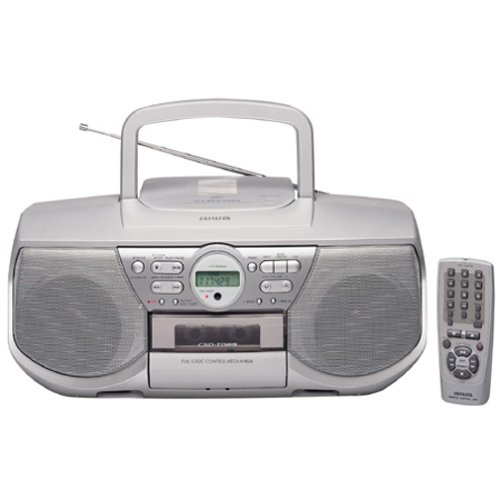
Image: Front view of the Aiwa CSD-TD69 CD/Cassette Boombox. This image displays the main unit with its CD compartment, cassette deck, radio tuner display, and control buttons. The speakers are visible on either side.
The Aiwa CSD-TD69 is a portable audio system designed for versatile media playback. It features a top-loading CD player, a front-loading cassette deck, and a digital-synthesized AM/FM radio tuner. The unit is equipped with stereo speakers and can be powered by AC current or batteries for portability. A remote control is included for convenient operation.
Setup
1. Power Connection
- AC Power: Connect the supplied AC power cord to the AC IN jack on the unit and then to a standard wall outlet.
- Battery Power: For portable use, open the battery compartment on the bottom of the unit. Insert 8 x "D" size batteries (not included), ensuring correct polarity (+/-). Close the compartment securely.
2. Antenna Setup
- FM Antenna: Extend the telescopic FM antenna fully and adjust its position for optimal FM reception.
- AM Antenna: The unit has a built-in AM antenna. Rotate the unit itself for best AM reception.
Operating Instructions
General Controls
- Power On/Off: Press the POWER button to turn the unit on or off.
- Function Selector: Use the FUNCTION switch (CD/RADIO/TAPE) to select the desired mode of operation.
- Volume Control: Rotate the VOLUME knob to adjust the sound level.
CD Player Operation
- Select CD mode using the Function Selector.
- Open the CD compartment lid by pressing the OPEN/CLOSE button.
- Place a CD with the label side facing up onto the spindle.
- Close the CD compartment lid. The display will show the total number of tracks.
- Press the PLAY/PAUSE (►/−) button to start playback.
- Press STOP (■) to stop playback.
- Use SKIP (►►| / |◄◄) buttons to skip tracks.
- Press REPEAT to repeat the current track or all tracks.
Cassette Player/Recorder Operation
- Select TAPE mode using the Function Selector.
- Press the STOP/EJECT button to open the cassette compartment.
- Insert a cassette tape with the open edge facing upwards.
- Close the cassette compartment.
- Press PLAY (►) to start playback.
- Press RECORD (●) to begin recording (ensure a recordable tape is inserted).
- Use FAST FORWARD (►►) and REWIND (◄◄) for tape navigation.
- Press STOP/EJECT to stop playback/recording and eject the tape.
Radio Tuner Operation
- Select RADIO mode using the Function Selector.
- Press the BAND button to select AM or FM.
- Use the TUNING buttons (►►| / |◄◄) to manually tune to a station. Press and hold for auto-scan.
- Setting Presets:
- Tune to the desired station.
- Press the MEMORY button.
- Use the PRESET (+/-) buttons to select a preset number.
- Press MEMORY again to confirm.
- Recalling Presets: Use the PRESET (+/-) buttons to cycle through stored stations.
Remote Control
The included remote control allows for convenient operation of most functions from a distance. Ensure the remote's battery is inserted correctly and that there are no obstructions between the remote and the unit's sensor.
Maintenance
- Cleaning the Unit: Wipe the exterior with a soft, dry cloth. For stubborn stains, use a cloth lightly dampened with mild detergent, then wipe dry. Do not use abrasive cleaners or solvents.
- CD Lens Cleaning: Use a commercially available CD lens cleaner disc periodically to maintain optimal CD playback quality.
- Cassette Head Cleaning: After every 10-20 hours of use, clean the tape heads, pinch rollers, and capstan with a cotton swab lightly moistened with isopropyl alcohol.
- Battery Replacement: When the unit's performance degrades during battery operation, replace all batteries with new ones of the same type. Do not mix old and new batteries.
Troubleshooting
| Problem | Possible Cause | Solution |
|---|---|---|
| No power | AC cord not connected; Batteries depleted or incorrectly inserted. | Ensure AC cord is firmly connected. Replace batteries, checking polarity. |
| No sound | Volume too low; Function mode incorrect. | Increase volume. Select the correct function (CD/RADIO/TAPE). |
| CD skips or does not play | CD dirty or scratched; CD inserted incorrectly; Lens dirty. | Clean CD with a soft cloth. Reinsert CD correctly. Use a CD lens cleaner. |
| Cassette tape not playing/recording | Tape incorrectly inserted; Tape heads dirty; Tape jammed. | Reinsert tape correctly. Clean tape heads. Do not force jammed tapes. |
| Poor radio reception | Antenna not extended/positioned correctly; Interference. | Extend and adjust FM antenna. Rotate unit for AM. Move away from other electronic devices. |
Specifications
- Model: Aiwa CSD-TD69
- Power Output: 2.5 watts per channel
- Speaker Type: Stereo
- Tuner: Digital-synthesized AM/FM tuner with 30 station presets
- CD Player: Top-loading, compatible with audio CDs
- Cassette Deck: Full-logic mechanism, play and record functions
- Connectivity: Auxiliary input
- Power Source: AC 230V, 50Hz or 8 x "D" size batteries (DC 12V)
- Package Dimensions (approx.): 57.66 x 50.8 x 46.48 cm
- Item Weight (approx.): 17.92 kg
- Included Accessories: Remote control


