
Introduction
This manual provides essential instructions for the safe and efficient operation of your Sharper Image SO226 Compact CD Stereo with AM/FM Digital Tuner. Please read this manual thoroughly before using the unit and retain it for future reference.
Important Safety Instructions
- Read all instructions before operating the appliance.
- Keep this manual for future reference.
- Do not use this apparatus near water.
- Clean only with a dry cloth.
- Do not block any ventilation openings. Install in accordance with the manufacturer's instructions.
- Do not install near any heat sources such as radiators, heat registers, stoves, or other apparatus (including amplifiers) that produce heat.
- Protect the power cord from being walked on or pinched, particularly at plugs, convenience receptacles, and the point where they exit from the apparatus.
- Only use attachments/accessories specified by the manufacturer.
- Refer all servicing to qualified service personnel. Servicing is required when the apparatus has been damaged in any way.
Package Contents
Verify that all items are present upon unpacking:
- Sharper Image SO226 Compact CD Stereo Unit
- AC Power Adapter (if applicable, check packaging)
- User Manual (this document)
Product Overview
Familiarize yourself with the components and controls of your SO226 unit.
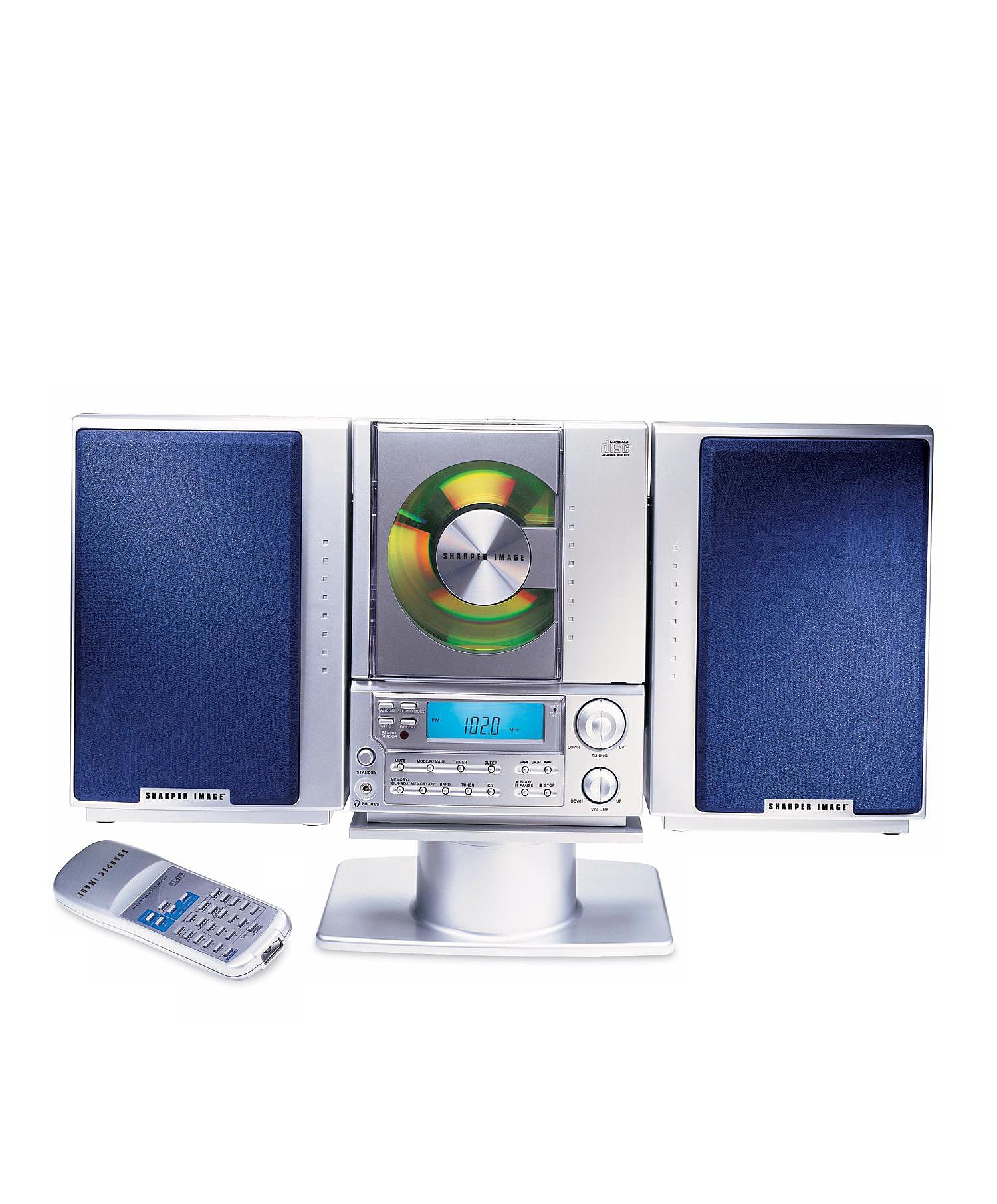
This image displays the front panel of the Sharper Image SO226 Compact CD Stereo. Visible features include the top-loading CD compartment, the digital display for radio frequencies and CD track information, and various control buttons for power, volume, CD playback, and radio tuning.
Control Panel (Typical Layout)
- POWER Button: Turns the unit on or off.
- FUNCTION/MODE Button: Switches between CD, AM, and FM modes.
- VOLUME +/- Buttons: Adjusts the audio output level.
- PLAY/PAUSE Button: Starts or pauses CD playback.
- STOP Button: Stops CD playback.
- SKIP/SEARCH Buttons (◀◀ / ▶▶): Skips tracks on CD or tunes radio frequencies.
- PROGRAM Button: Used for programming CD tracks.
- SLEEP Button: Activates the sleep timer function.
- TUNING +/- Buttons: Fine-tunes radio frequencies.
- PRESET Buttons: Stores and recalls favorite radio stations.
- LCD Display: Shows current mode, track number, frequency, and time.
Setup
Power Connection
- Ensure the unit is placed on a stable, flat surface.
- If using batteries (not included), open the battery compartment on the bottom or back of the unit and insert the required batteries, observing correct polarity.
- Alternatively, connect the AC power adapter (if supplied) to the DC IN jack on the unit and then plug the adapter into a standard wall outlet.
Antenna Setup
- For FM reception, extend the telescopic antenna fully. Adjust its position for optimal reception.
- For AM reception, the unit has a built-in ferrite bar antenna. Rotate the entire unit for best AM reception.
Operating Instructions
CD Player Operation
- Press the POWER button to turn on the unit.
- Press the FUNCTION/MODE button repeatedly until 'CD' appears on the display.
- Open the CD compartment cover.
- Place a CD with the label side facing up into the compartment.
- Close the CD compartment cover. The unit will read the CD, and the total number of tracks will be displayed.
- Press the PLAY/PAUSE button to start playback.
- To pause, press PLAY/PAUSE again. Press it once more to resume.
- To stop playback, press the STOP button.
- To skip to the next track, press the SKIP/SEARCH ▶▶ button.
- To go back to the beginning of the current track or to the previous track, press the SKIP/SEARCH ◀◀ button.
- To fast forward or rewind within a track, press and hold the SKIP/SEARCH ▶▶ or ◀◀ button during playback.
AM/FM Radio Operation
- Press the POWER button to turn on the unit.
- Press the FUNCTION/MODE button repeatedly until 'AM' or 'FM' appears on the display.
- Manual Tuning: Press the TUNING +/- buttons to adjust the frequency step by step.
- Automatic Scan: Press and hold the TUNING +/- buttons for a few seconds. The tuner will scan and stop at the next strong station.
- Storing Presets: Tune to your desired station. Press the PROGRAM button. The preset number will flash. Use the SKIP/SEARCH buttons to select a preset number, then press PROGRAM again to confirm.
- Recalling Presets: In radio mode, press the PRESET buttons to cycle through your stored stations.
Sleep Timer Function
The unit features a convenient sleep timer that automatically turns off the sound after a set period.
- While the unit is playing (CD or Radio), press the SLEEP button.
- Each press of the SLEEP button will cycle through available sleep times (e.g., 10, 20, 30, 60, 90 minutes, or OFF).
- Select your desired sleep duration. The unit will automatically power off after the selected time has elapsed.
Maintenance
- Cleaning the Unit: Wipe the exterior of the unit with a soft, dry cloth. Do not use abrasive cleaners or solvents.
- CD Care: Handle CDs by their edges. Keep them clean and free of scratches. If a CD is dirty, wipe it gently with a soft, lint-free cloth from the center outwards.
- Storage: When not in use for extended periods, disconnect the power adapter and remove batteries. Store the unit in a cool, dry place.
Troubleshooting
If you encounter issues, refer to the following common problems and solutions:
- No Power:
- Ensure the AC power adapter is securely plugged into both the unit and a working wall outlet.
- If using batteries, check if they are inserted correctly and are not depleted. - No Sound:
- Check the volume level and increase it if necessary.
- Ensure the correct function mode (CD/AM/FM) is selected. - CD Not Playing / Skipping:
- Ensure the CD is inserted correctly with the label side up.
- Clean the CD for any dirt or scratches.
- Try a different CD to rule out a faulty disc.
- Ensure the CD compartment cover is fully closed. - Poor Radio Reception:
- For FM, fully extend and adjust the telescopic antenna.
- For AM, rotate the entire unit for better signal.
- Move the unit away from other electronic devices that may cause interference. - Buttons Not Responding:
- Try turning the unit off and on again.
- Disconnect power for a few minutes, then reconnect.
Specifications
| Model Number | SO226 |
| Product Dimensions (L x W x H) | 1.3 x 19 x 5.5 inches (3.3 x 48.3 x 14 cm) |
| Item Weight | 5 pounds (2.27 kg) |
| Speaker Type | Stereo |
| Power Source | Battery Powered (AC adapter typically included or sold separately) |
| Color (as per specific variant) | Blue |
Warranty and Support
For warranty information and customer support, please refer to the documentation included with your purchase or visit the official Sharper Image website. Keep your proof of purchase for warranty claims.