
Fujifilm ZOOMDATE-125EZ
Fujifilm ZOOM DATE 125S DATE 135 mm Camera User Manual
Model: ZOOMDATE-125EZ | Brand: Fujifilm
Introduction
This manual provides detailed instructions for the proper use and care of your Fujifilm ZOOM DATE 125S DATE 135 mm Camera. Please read this manual thoroughly before operating the camera to ensure optimal performance and longevity. This camera is designed for capturing memories with 135 mm film, featuring automatic functions for ease of use.
Product Overview
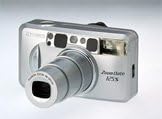
An angled view of the Fujifilm ZOOM DATE 125S DATE 135 mm Camera, showing its silver body, extended zoom lens, and various controls on the top and front. This compact film camera is designed for ease of use.
Key Features:
- Autofocus: Ensures sharp images without manual focusing.
- Zoom Lens: Features a versatile zoom range from 38mm (wide) to 125mm (telephoto).
- Built-in Flash: Provides illumination for low-light conditions.
- Red Eye Reduction: Minimizes red-eye effect in flash photography.
- Data Back: Imprints date and time onto your photographs.
- Automatic Film Loading: Simplifies film insertion and advance.
- DX Coding: Automatically reads film speed from DX-coded film cartridges.
- Compact Design: Portable and easy to carry.
Setup
1. Battery Installation
Locate the battery compartment on the bottom or side of the camera. Insert the required batteries (typically CR123A or similar, refer to the battery compartment label) according to the polarity indicators (+/-). Close the compartment securely.
2. Loading Film
Open the camera back by sliding the latch. Insert a 135 mm film cartridge into the film chamber, ensuring the film leader extends slightly. Align the film leader with the film take-up spool. Close the camera back firmly until it clicks. The camera will automatically advance the film to the first frame, indicated by the frame counter.
3. Setting Date/Time (Data Back Models)
If your model features a data back, use the small buttons near the data display on the camera back to set the current date and time. Refer to the on-screen prompts for navigation. This information will be imprinted on your photos.
Operating Instructions
1. Powering On/Off
Press the power button (usually located on the top or front of the camera) to turn the camera on. The lens will extend. To turn off, press the power button again; the lens will retract.
2. Taking a Picture
- Framing: Look through the viewfinder to compose your shot.
- Zooming: Use the zoom lever or buttons (W for wide, T for telephoto) to adjust the focal length.
- Focusing: Gently press the shutter button halfway down. The autofocus system will engage, and a focus indicator (often a green light) will illuminate in the viewfinder when focus is achieved.
- Shooting: Press the shutter button all the way down to take the picture. The camera will automatically advance the film to the next frame.
3. Flash Modes and Red-Eye Reduction
Press the flash mode button (often indicated by a lightning bolt icon) to cycle through available flash modes (e.g., Auto Flash, Fill-in Flash, Flash Off, Red-Eye Reduction). For red-eye reduction, the camera typically fires a pre-flash before the main flash to constrict the subject's pupils.
4. Film Rewind
Once all frames on the film roll have been exposed, the camera will automatically rewind the film back into the cartridge. Some models may have a manual rewind button for mid-roll rewinding. Wait until the rewind process is complete before opening the camera back.
Maintenance
- Cleaning the Lens: Use a soft, lint-free cloth specifically designed for camera lenses to gently wipe away dust or smudges. Avoid using harsh chemicals or abrasive materials.
- Camera Body Cleaning: Wipe the camera body with a dry, soft cloth. For stubborn dirt, slightly dampen the cloth with water, then wipe dry immediately. Do not allow water to enter the camera.
- Battery Care: Remove batteries if the camera will not be used for an extended period to prevent leakage. Store batteries in a cool, dry place.
- Storage: Store the camera in a cool, dry place, away from direct sunlight, extreme temperatures, and high humidity. Use a camera bag or case to protect it from dust and physical damage.
Troubleshooting
| Problem | Possible Cause | Solution |
|---|---|---|
| Camera does not power on. | Dead or incorrectly inserted batteries. | Replace batteries with fresh ones, ensuring correct polarity. |
| Film does not advance. | Film not loaded correctly; film leader not caught by take-up spool. | Open camera back in a dark room (or changing bag), re-load film, ensuring leader is properly engaged. Close back firmly. |
| Flash does not fire. | Flash mode set to "Flash Off"; insufficient battery power; subject too far. | Check flash mode settings. Replace batteries. Ensure subject is within flash range. |
| Photos are blurry. | Camera shake; subject out of autofocus range; dirty lens. | Hold camera steady. Ensure autofocus indicator confirms focus before shooting. Clean lens. |
| Date/Time not imprinted. | Data back feature turned off or not set. | Check data back settings and ensure it is enabled and correctly set. |
Specifications
| Feature | Detail |
|---|---|
| Brand | Fujifilm |
| Model Number | ZOOMDATE-125EZ |
| Camera Format | 135 mm (35mm film) |
| Lens Focal Length | 38mm (Wide) - 125mm (Telephoto) |
| Autofocus | Yes |
| Built-in Flash | Yes |
| Red Eye Reduction | Yes |
| Data Back | Yes |
| DX Coding | Yes |
| Automatic Loading | Yes |
| Dimensions (L x W x H) | 14 x 12.4 x 7.1 centimetres |
| Item Weight | 0.79 Pounds |
| UPC | 074101143041 |
Warranty and Support
For information regarding the product warranty, please refer to the warranty card included with your camera or visit the official Fujifilm website. Warranty terms and conditions may vary by region and purchase date.
For technical support, service, or inquiries not covered in this manual, please contact Fujifilm customer service through their official support channels. Keep your purchase receipt and camera serial number handy when contacting support.
You can find more information and support resources on the Fujifilm official store page: Fujifilm Store on Amazon.co.uk
Ask a question about this manual
Ask about setup, troubleshooting, compatibility, parts, safety, or missing instructions. Manuals+ will review the question and use this page’s manual context to help answer it.