
Introduction
Thank you for purchasing the GPX C3960 Personal CD/MP3 Player. This manual provides detailed instructions for the proper setup, operation, and maintenance of your device. Please read this manual thoroughly before use and retain it for future reference.
Package Contents
Ensure all items are present in the package:
- GPX C3960 Personal CD/MP3 Player
- Stereo Earbuds
- User Manual (this document)
Product Overview
Familiarize yourself with the components and features of your GPX C3960 player.
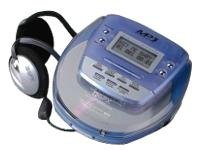
Image: The GPX C3960 Personal CD/MP3 Player, shown in a translucent blue casing, with a pair of silver over-ear headphones connected. The player features a small LCD screen and control buttons on its top surface.
Key Features:
- CD-R/RW and MP3 disc playback compatibility
- Anti-skip protection: 45 seconds for audio CDs, 120 seconds for MP3 CDs
- Dynamic Bass Boost (DBB) for enhanced audio output
- 24-track programmable memory
- Low battery alert indicator
- Operates on 2 AA batteries
Setup
1. Battery Installation
- Locate the battery compartment on the bottom of the player.
- Slide the battery compartment cover open.
- Insert two (2) AA batteries, ensuring correct polarity (+ and -) as indicated inside the compartment.
- Close the battery compartment cover securely.
- Note: Replace batteries when the low battery indicator appears on the display or when playback performance degrades.
2. Connecting Headphones
- Plug the stereo earbuds or your preferred headphones into the PHONES jack located on the side of the player.
Operating Instructions
1. Powering On/Off
- To power on, press the PLAY/PAUSE (►/‖‖) button.
- To power off, press the STOP (■) button twice, or wait for the auto-power off feature to activate after a period of inactivity.
2. Loading a CD/MP3 Disc
- Press the OPEN button to open the disc compartment lid.
- Carefully place a CD or MP3 disc onto the center spindle with the label side facing up.
- Gently press the disc down until it clicks into place.
- Close the disc compartment lid firmly until it latches.
3. Basic Playback
- Play/Pause: Press PLAY/PAUSE (►/‖‖) to start or pause playback.
- Stop: Press STOP (■) to stop playback.
- Skip Tracks: Press SKIP FORWARD (►►) or SKIP BACKWARD (◄◄) to move to the next or previous track.
- Search: Press and hold SKIP FORWARD (►►) or SKIP BACKWARD (◄◄) during playback to fast-forward or rewind within a track.
4. Volume Control
- Adjust the VOLUME dial located on the side of the player to increase or decrease the audio output level.
5. Dynamic Bass Boost (DBB)
- Press the DBB button to activate or deactivate the dynamic bass boost feature, which enhances low-frequency sounds.
6. Anti-Skip Protection
The GPX C3960 features electronic anti-skip protection to prevent audio interruptions during movement. This provides approximately 45 seconds of protection for standard audio CDs and 120 seconds for MP3 CDs.
7. Programming Tracks
- With the player stopped, press the PROG button. The program indicator will flash.
- Use the SKIP FORWARD (►►) or SKIP BACKWARD (◄◄) buttons to select the desired track.
- Press PROG again to add the selected track to the program memory.
- Repeat steps 2 and 3 for up to 24 tracks.
- Press PLAY/PAUSE (►/‖‖) to start playback of the programmed sequence.
- To clear the program, open the disc compartment or press STOP (■) twice.
Maintenance
Cleaning the Unit
- Wipe the exterior of the player with a soft, slightly damp cloth. Do not use abrasive cleaners or solvents.
- Never open the disc compartment while the player is operating.
- Keep the lens clean. If the lens becomes dirty, use a soft camera lens brush to gently remove dust.
Battery Care
- Remove batteries if the unit will not be used for an extended period to prevent leakage.
- Do not mix old and new batteries, or different types of batteries.
Disc Handling
- Handle discs by their edges to avoid fingerprints and scratches.
- Store discs in their cases when not in use.
- Clean discs with a soft, lint-free cloth, wiping from the center outwards.
Troubleshooting
| Problem | Possible Cause | Solution |
|---|---|---|
| No power | Batteries are dead or incorrectly inserted. | Replace batteries with new ones, ensuring correct polarity. |
| Disc not playing / "NO DISC" error | Disc is dirty, scratched, or inserted incorrectly. | Clean the disc. Reinsert the disc with the label side up. Try a different disc. |
| Sound skipping or distorted | Disc is dirty, scratched, or player is subjected to excessive vibration. | Clean the disc. Ensure the player is on a stable surface or reduce movement. |
| No sound from headphones | Headphones not properly connected or volume too low. | Ensure headphones are fully plugged in. Increase volume. Test with different headphones. |
Specifications
- Brand: GPX
- Model: C3960
- Supported Media: CD, CD-R, CD-RW, MP3-CD
- Anti-Skip Protection: 45 seconds (CD), 120 seconds (MP3-CD)
- Power Source: 2 x AA batteries
- Special Feature: Portable
- Item Weight: Approximately 726 g
- Dimensions: Approximately 40.64 x 38.1 x 30.48 cm (Package Dimensions)
Warranty and Support
For warranty information or technical support, please refer to the documentation included with your purchase or visit the official GPX website. Keep your proof of purchase for warranty claims.


