
Fujifilm Fujifilm FinePix 3800
Fujifilm FinePix 3800 Digital Camera User Manual
Model: FinePix 3800 (V-4401)
Introduction
This manual provides comprehensive instructions for the operation, maintenance, and troubleshooting of your Fujifilm FinePix 3800 Digital Camera. Designed for both novice and experienced photographers, the FinePix 3800 offers a 3.0-megapixel sensor, 6x optical zoom, and various features to capture high-quality images and videos.
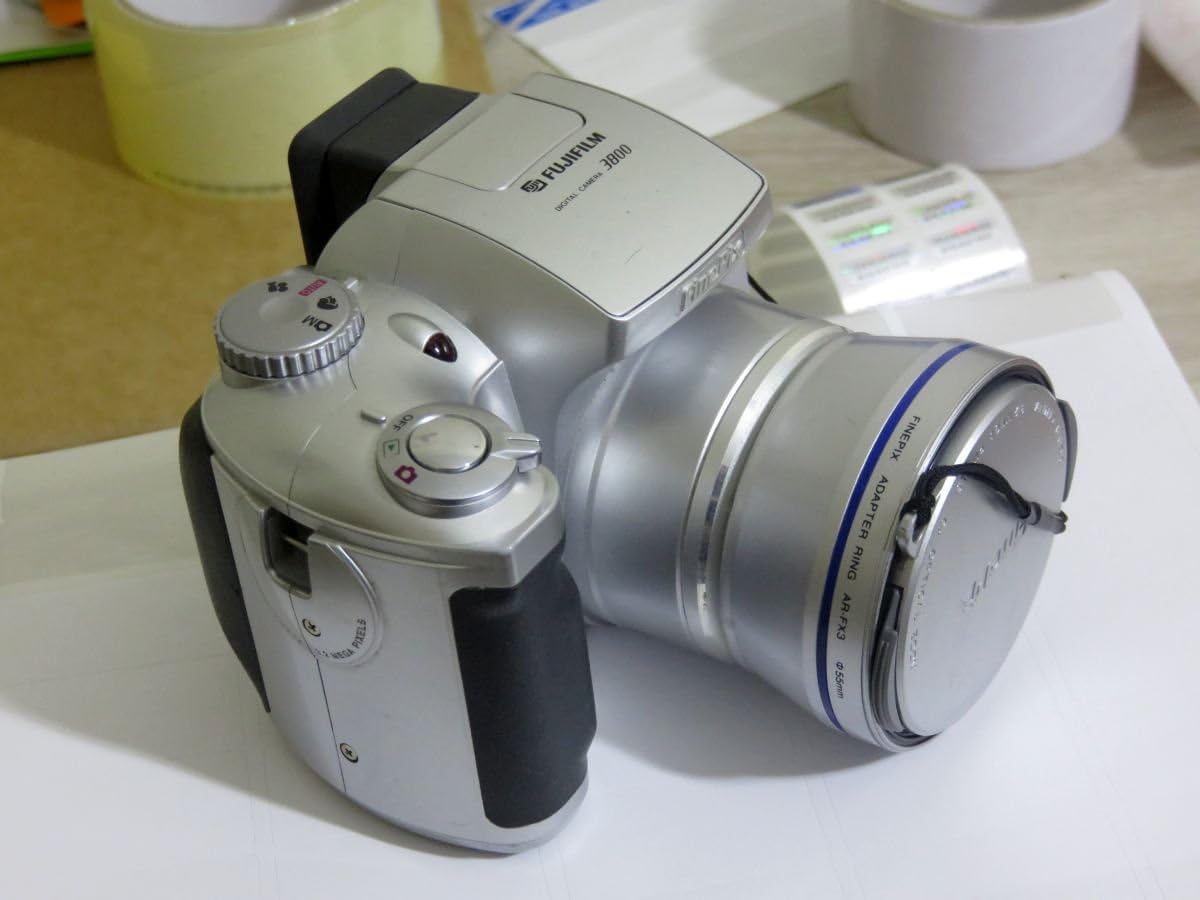
Figure 1: Front view of the Fujifilm FinePix 3800 Digital Camera with the lens cap attached, showcasing its silver body and ergonomic grip.
Setup
1. Battery Installation
The FinePix 3800 operates on four (4) AA batteries. For optimal performance and extended usage, it is highly recommended to use rechargeable Nickel Metal Hydride (NiMH) batteries. Alkaline batteries are suitable for temporary use but will deplete quickly.
- Locate the battery compartment cover on the bottom or side of the camera.
- Slide or lift the cover to open the compartment.
- Insert four AA batteries, ensuring correct polarity (+/-) as indicated inside the compartment.
- Close the battery compartment cover securely until it clicks into place.
2. Memory Card Installation
The camera uses xD-Picture Card memory. A 16 MB xD card is typically included, capable of storing approximately 12 images in fine mode or 26 images in normal mode.
- Locate the memory card slot, usually near the battery compartment.
- Open the memory card slot cover.
- Insert the xD-Picture Card with the metal contacts facing the correct direction (refer to the diagram inside the slot). Push gently until it clicks into place.
- Close the memory card slot cover securely.
3. Initial Power On and Date/Time Setting
After installing batteries and the memory card, power on the camera for the first time.
- Turn the power dial or press the power button to switch on the camera.
- The LCD monitor will display the initial setup screen, prompting you to set the date and time.
- Use the camera's navigation buttons to adjust the year, month, day, hour, and minute.
- Confirm the settings to proceed. Correct date and time settings are crucial for proper image file management.
Operating Instructions
1. Basic Photography Modes
The FinePix 3800 offers various shooting modes to suit different conditions and user preferences.
- Automatic Mode: For simple point-and-shoot operation. The camera automatically adjusts aperture, shutter speed, and white balance.
- Manual Mode: Provides control over settings such as aperture, exposure compensation, and white balance for advanced users.
- Scene Position: Optimize settings for specific scenes like landscape or portrait.

Figure 2: The Fujifilm FinePix 3800 with its lens extended and the pop-up flash activated, ready for capturing images.
2. Zoom Operation
The camera features a 6x optical zoom Fujinon lens (equivalent to 38-228mm on a 35mm camera) and a variable digital zoom.
- Use the zoom lever (typically located near the shutter button) to zoom in (telephoto) or zoom out (wide-angle).
- Optical zoom provides higher quality images. Digital zoom can be used to extend magnification further (up to 3.25x in 640x480 pixel mode), but may result in reduced image quality.
3. Flash Modes
The built-in pop-up flash offers several modes:
- Auto Flash: The camera automatically determines if flash is needed.
- Red-Eye Reduction: Emits pre-flashes to reduce red-eye effect.
- Forced Flash: Flash fires regardless of ambient light.
- Suppressed Flash: Flash is disabled.
- Slow Synchro: Combines flash with a slow shutter speed for balanced exposure of subject and background in low light.
4. White Balance and Exposure
- White Balance: In manual mode, select from 6 preset positions (e.g., Daylight, Cloudy, Fluorescent) or use automatic white balance for accurate color reproduction.
- Shutter Speed: The camera supports shutter speeds from 3 to 1/1,500 second. In manual mode, you can adjust this setting to control motion blur or freeze action.
5. LCD Monitor and Electronic Viewfinder (EVF)
The FinePix 3800 features a 1.8-inch LCD monitor and an electronic viewfinder for composing shots and reviewing images.

Figure 3: Rear view of the Fujifilm FinePix 3800, highlighting the 1.8-inch LCD monitor, electronic viewfinder, and control buttons.
- Use the LCD for a larger preview and menu navigation.
- The EVF is useful in bright sunlight or to conserve battery power during image playback.
- A dedicated button (e.g., "EVF/LCD") allows switching between the two displays.
6. Movie and Voice Memo Capabilities
- Movie Mode: Record digital videos with sound in QVGA (320 x 240) format, up to approximately 60 seconds in length at 10 frames per second.
- Voice Memo: Add up to 30 seconds of voice tags to your captured images for personal notes or descriptions.
7. Image Transfer to PC
Transferring images and videos to your computer is straightforward using the included USB cable and FinePixViewer software.
- Connect one end of the USB cable to the camera's USB port and the other end to your computer.
- Ensure the camera is powered on. Your computer should automatically recognize the camera as a removable storage device.
- Use the FinePixViewer software (included on CD-ROM) or your computer's file explorer to browse and transfer files.
Maintenance
1. Cleaning the Camera
- Lens: Use a soft, lint-free cloth specifically designed for optical lenses. Gently wipe in a circular motion. Avoid using harsh chemicals.
- Body: Wipe the camera body with a soft, dry cloth. For stubborn dirt, slightly dampen the cloth with water, then wipe dry. Do not use solvents.
- LCD Screen: Use a soft, dry cloth. For smudges, a screen cleaner designed for electronics can be used sparingly.
2. Battery Care
- Remove batteries if the camera will not be used for an extended period to prevent leakage.
- Store batteries in a cool, dry place.
- If using rechargeable batteries, follow the charger manufacturer's instructions for charging and maintenance.
3. Memory Card Handling
- Always format new memory cards in the camera before first use.
- Avoid removing the memory card while the camera is writing data (e.g., after taking a photo) to prevent data corruption.
- Keep memory cards away from strong magnetic fields and extreme temperatures.
Troubleshooting
This section addresses common issues you might encounter with your FinePix 3800.
Camera Does Not Power On
- Ensure batteries are inserted correctly with proper polarity.
- Check battery charge level. Replace with fresh alkaline batteries or fully charged NiMH batteries.
- Verify the battery compartment cover is securely closed.
Poor Image Quality
- Blurry Images: Ensure the lens is clean. Check if the camera is in focus. Use a tripod in low light or for slow shutter speeds.
- Incorrect Colors: Adjust white balance settings to match the lighting conditions.
- Dark/Overexposed Images: Check flash settings. Adjust exposure compensation if available in manual mode.
Memory Card Errors
- Ensure the memory card is inserted correctly and fully.
- Try formatting the memory card (Note: This will erase all data on the card. Back up important files first.).
- If errors persist, the memory card may be faulty and require replacement.
Computer Does Not Recognize Camera
- Ensure the USB cable is securely connected to both the camera and the computer.
- Verify the camera is powered on and in the correct connection mode (if applicable).
- Install or reinstall the FinePixViewer software and USB drivers from the included CD-ROM.
- Try a different USB port on your computer.
Specifications
Key technical specifications for the Fujifilm FinePix 3800 Digital Camera:
| Feature | Specification |
|---|---|
| Model Name | Fujifilm FinePix 3800 |
| Effective Still Resolution | 3.0 Megapixels |
| Photo Sensor Technology | CCD |
| Optical Zoom | 6x |
| Digital Zoom | Up to 3.25x (in 640x480 mode) |
| Maximum Focal Length | 228 Millimeters (35mm equivalent) |
| Minimum Focal Length | 38 Millimeters (35mm equivalent) |
| Maximum Aperture | f/2.8 |
| Shutter Speed | 3 to 1/1,500 seconds |
| ISO Sensitivity | ISO 100 equivalent (Expanded ISO Minimum: 100, Maximum: 1600) |
| LCD Screen Size | 1.8 Inches |
| Viewfinder | Electronic |
| Memory Type | xD-Picture Card (16 MB included) |
| Connectivity | USB |
| Power Source | 4 x AA Batteries |
| Dimensions (H x W x D) | Approx. 3.03 x 3.9 x 2.7 inches |
| Weight | Approx. 0.88 Pounds (without batteries/card) |
| Video Resolution | QVGA (320x240) with audio, max 60 seconds |
Warranty and Support
Warranty Information
The Fujifilm FinePix 3800 Digital Camera comes with a 1 Year Limited Warranty from the manufacturer. Please retain your proof of purchase for warranty claims. For detailed terms and conditions, refer to the warranty card included with your product or contact Fujifilm customer support.
Additional Resources
- Official User Manual (PDF): For a more detailed guide, you can download the official PDF manual: Download PDF Manual
- Fujifilm Store: Explore other Fujifilm products and support resources: Visit Fujifilm Store
Related documentsFujifilm FinePix 3800


Ask a question about this manual
Ask about setup, troubleshooting, compatibility, parts, safety, or missing instructions. Manuals+ will review the question and use this page’s manual context to help answer it.