1. Introduction
This manual provides detailed instructions for the setup, operation, and maintenance of your Koss KD250 DVD Player. Please read this manual thoroughly before using the device to ensure proper functionality and to prevent damage.
The Koss KD250 is designed to provide high-quality video and audio playback from various disc formats, including DVD-Video, CD, CD-R, CD-RW, and MP3-CDs.
2. Safety Information
To ensure safe operation and prolong the life of your DVD player, please observe the following precautions:
- Do not expose the unit to rain or moisture.
- Do not block ventilation openings.
- Do not place the unit near heat sources such as radiators, heat registers, stoves, or other apparatus (including amplifiers) that produce heat.
- Use only attachments/accessories specified by the manufacturer.
- Unplug this apparatus during lightning storms or when unused for long periods.
- Refer all servicing to qualified service personnel.
3. Package Contents
Verify that all items are present in the packaging:
- Koss KD250 DVD Player
- Remote Control
- Power Adapter
- Composite Video Cables
- User Manual (this document)
4. Product Overview
4.1 Front Panel
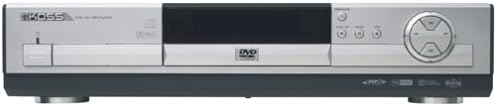
Image: Front view of the Koss KD250 DVD Player, showing the disc tray, display, and control buttons.
The front panel includes the disc tray, power button, play/pause, stop, and navigation controls, along with the display screen.
4.2 Rear Panel
The rear panel features various input/output ports for connecting the DVD player to your television and audio system. These typically include composite video output, stereo audio outputs, and digital audio outputs (coaxial and optical) for surround sound.
4.3 Remote Control
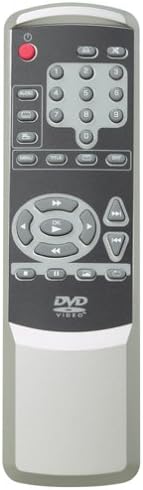
Image: The remote control for the Koss KD250 DVD Player, featuring power, numeric, navigation, and playback buttons.
The full-function remote control allows for convenient operation of all player features from a distance. It requires 2 AAA batteries (included).
5. Setup
5.1 Connecting to a Television
Use the supplied composite video cables to connect the DVD player to your television:
- Connect one end of the yellow video cable to the "VIDEO OUT" jack on the DVD player.
- Connect the other end of the yellow video cable to the "VIDEO IN" jack on your television.
- Connect the red and white audio cables from the "AUDIO OUT" jacks on the DVD player to the corresponding "AUDIO IN" jacks on your television.
- Select the correct video input on your television (e.g., Video 1, AV, Input).
5.2 Connecting to an Audio System (Optional)
For enhanced audio, connect the DVD player to an audio receiver or amplifier:
- Stereo Audio: Use the red and white audio cables from the "AUDIO OUT" jacks on the DVD player to the "AUDIO IN" jacks on your amplifier.
- Digital Surround Sound (Dolby Digital/DTS): For 5.1-channel surround sound, connect a digital audio cable (coaxial or optical, not included) from the "DIGITAL AUDIO OUT" jack on the DVD player to the corresponding digital input on your compatible AV receiver. Ensure your receiver is set to the correct digital input.
5.3 Power Connection
Connect the power adapter to the "DC IN" jack on the DVD player, then plug the adapter into a standard AC power outlet.
6. Operating Instructions
6.1 Basic Playback
- Press the POWER button to turn on the DVD player.
- Press the OPEN/CLOSE button to open the disc tray.
- Place a disc (DVD, CD, MP3-CD) onto the disc tray with the label side facing up.
- Press the OPEN/CLOSE button again to close the tray.
- The player will automatically begin playback or display a disc menu.
- Use the remote control's navigation buttons and ENTER to select options from the disc menu.
- Use PLAY/PAUSE, STOP, FAST FORWARD, and REWIND buttons for playback control.
6.2 Disc Compatibility
The Koss KD250 supports the following disc formats:
- DVD-Video
- Audio CD
- CD-R
- CD-RW
- MP3-CD (CDs containing MP3 audio files)
6.3 MP3 Playback
When an MP3-CD is inserted, the player will display a file browser. Use the navigation buttons on the remote control to select folders and MP3 files. Press PLAY to start playback of the selected track.
6.4 Advanced Features
- Picture Zoom: During DVD playback, press the ZOOM button on the remote control to magnify the picture up to 2x.
- Repeat Functions: Press the REPEAT button during playback to cycle through repeat modes (e.g., repeat chapter, repeat title, repeat all, A-B repeat).
- Multi-disc Resume Play: The player can remember the last playback position for multiple discs, allowing you to resume from where you left off.
7. Maintenance
7.1 Cleaning the Player
Wipe the exterior of the DVD player with a soft, dry cloth. Do not use liquid cleaners or aerosol cleaners, as they may damage the finish or internal components.
7.2 Disc Care
- Handle discs by their edges to avoid fingerprints on the playing surface.
- Clean discs with a soft, lint-free cloth, wiping from the center outwards.
- Store discs in their cases to protect them from dust and scratches.
8. Troubleshooting
| Problem | Possible Cause | Solution |
|---|---|---|
| No power | Power cord not connected; power outlet not active. | Ensure power adapter is securely connected to the player and a working power outlet. |
| No picture | Video cables not connected correctly; incorrect TV input selected. | Check video cable connections. Select the correct AV input on your television. |
| No sound | Audio cables not connected; TV/receiver volume too low or muted; incorrect audio input selected on TV/receiver. | Check audio cable connections. Adjust volume. Select correct audio input on your TV or audio receiver. |
| Disc does not play | Disc is dirty or scratched; disc is incompatible; disc inserted incorrectly. | Clean the disc. Ensure the disc type is supported (DVD-Video, CD, CD-R, CD-RW, MP3-CD). Insert disc with label side up. |
| Remote control not working | Batteries are dead or inserted incorrectly; obstruction between remote and player; remote sensor blocked. | Replace batteries. Ensure correct battery polarity. Remove obstructions. Point remote directly at the player's front panel. |
9. Specifications
- Model: KD250
- Disc Compatibility: DVD-Video, CD, CD-R, CD-RW, MP3-CD
- Audio Output: Dolby Digital, DTS (digital coaxial/optical), Stereo RCA
- Video Output: Composite Video
- Resolution: 720 x 576 pixels
- Dimensions (W x H x D): Approximately 16.9 x 3.6 x 12.4 inches (42.9 x 9.1 x 31.5 cm)
- Weight: Approximately 8.13 pounds (3.69 kg)
- Power Supply: AC 120V, 60Hz (via power adapter)
- Included Accessories: Remote Control, Power Adapter, Composite Video Cables
10. Warranty Information
Koss products are manufactured to high-quality standards. This product is covered by a limited warranty against defects in materials and workmanship. The duration and terms of the warranty may vary by region. Please retain your proof of purchase for warranty claims.
For specific warranty details, please refer to the warranty card included with your product or visit the official Koss website.
11. Support
If you encounter any issues not covered in the troubleshooting section or require further assistance, please contact Koss customer support.
For the most up-to-date support information, including contact details and FAQs, please visit the official Koss website:


