
Creative FPS1600
Cambridge SoundWorks FPS1600 FourPointSurround Speakers User Manual
Model: FPS1600
1. Introduction
Thank you for choosing the Cambridge SoundWorks FPS1600 FourPointSurround Speakers. This high-performance audio system is designed to deliver immersive surround sound for your gaming, music, and movie experiences. Please read this manual thoroughly to ensure proper setup, operation, and maintenance of your speaker system.
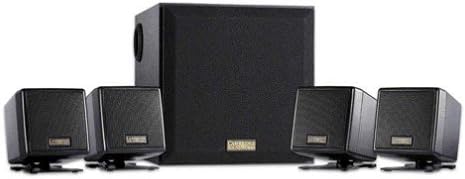
Image 1.1: The Cambridge SoundWorks FPS1600 FourPointSurround Speaker System, showing the central subwoofer unit and four compact satellite speakers.
2. Important Safety Information
- Power Source: Only use the power adapter supplied with the system. Ensure the voltage matches your local power supply.
- Ventilation: Do not block any ventilation openings. Install in accordance with the manufacturer's instructions.
- Water and Moisture: Do not expose this apparatus to dripping or splashing and ensure that no objects filled with liquids, such as vases, are placed on the apparatus.
- Heat: Do not install near any heat sources such as radiators, heat registers, stoves, or other apparatus (including amplifiers) that produce heat.
- Cleaning: Clean only with a dry cloth.
- Servicing: Do not attempt to service this product yourself. Refer all servicing to qualified service personnel.
3. Package Contents
Verify that all items listed below are present in your package:
- 1 x Cambridge SoundWorks FPS1600 Subwoofer
- 4 x Compact Satellite Speakers (2 front, 2 rear)
- 1 x In-line Remote Control
- 1 x Power Adapter
- 1 x User Manual (this document)
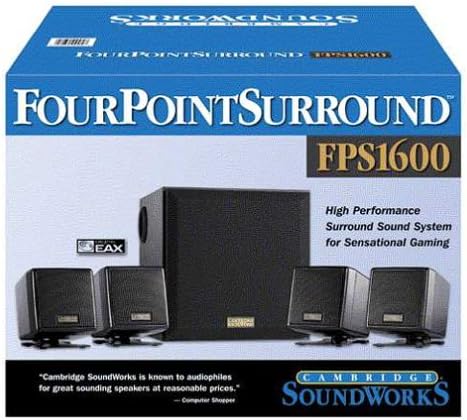
Image 3.1: The retail packaging for the Cambridge SoundWorks FPS1600, illustrating the system components and branding.
4. Setup Guide
4.1 Speaker Placement
Optimal speaker placement is crucial for achieving the best surround sound experience.
- Front Satellite Speakers: Place the two front satellite speakers equidistant from your listening position, typically on either side of your monitor or TV. Use the 6.5-foot cables for these.
- Rear Satellite Speakers: Place the two rear satellite speakers behind your listening position, ideally slightly to the sides. Use the 13-foot cables for these to allow for wider placement.
- Subwoofer: Position the subwoofer on the floor, preferably near a wall or in a corner, to enhance bass response. Avoid placing it directly against a wall or in a cabinet, which can muffle the sound.
4.2 Connecting the System
- Connect the four satellite speakers to the corresponding ports on the back of the subwoofer. Ensure the front and rear speakers are connected to their designated ports.
- Connect the in-line remote control cable to the designated port on the subwoofer.
- Connect the audio input cable from the in-line remote control to the audio output (e.g., sound card, game console, TV) of your source device.
- Connect the power adapter to the subwoofer's power input, then plug the adapter into a wall outlet.
Once all connections are secure, the system is ready for operation.
5. Operating Instructions
5.1 Powering On/Off
The system powers on automatically when connected to a power source and an audio signal is detected. There is no separate power button on the system itself; power is controlled via the main power outlet.
5.2 Volume Control
Use the large rotary dial on the in-line remote control to adjust the overall volume of the speaker system. Rotate clockwise to increase volume and counter-clockwise to decrease volume.
5.3 Audio Source Control
The FPS1600 system receives audio from a single source connected via the in-line remote control. Ensure your audio source (computer, game console, etc.) is playing sound and its volume is set to an appropriate level.
6. Maintenance and Care
- Cleaning: Wipe the speaker surfaces with a soft, dry cloth. Do not use liquid cleaners or aerosol sprays, as they may damage the finish or internal components.
- Ventilation: Ensure that the subwoofer and satellite speakers have adequate airflow around them to prevent overheating.
- Cable Management: Keep cables tidy and untangled to prevent damage and ensure optimal performance.
- Storage: If storing the system for an extended period, disconnect it from the power outlet and store it in a cool, dry place.
7. Troubleshooting
| Problem | Possible Cause | Solution |
|---|---|---|
| No sound from speakers. |
|
|
| Distorted or unclear sound. |
|
|
| Only some speakers are working. |
|
|
8. Technical Specifications
- Model: FPS1600
- Speaker Type: 4.1 FourPointSurround System with Subwoofer
- Total RMS Power: 41 Watts (24W RMS Satellites, 17W RMS Subwoofer)
- Satellite Speakers: Four compact cube satellite speakers
- Subwoofer: Wood enclosure for deep bass
- Connectivity: Wired (3.5mm stereo input via in-line remote)
- Control: In-line master volume control
- Front Satellite Cable Length: 6.5 feet (approx. 2 meters)
- Rear Satellite Cable Length: 13 feet (approx. 4 meters)
- Power Source: AC Power Adapter
- Dimensions (Package): 34.54 x 27.69 x 25.4 cm (13.6 x 10.9 x 10 inches)
- Weight (Package): 5.58 kg (12.3 lbs)
- Compatible Devices: PCs, Laptops, Gaming Consoles, MP3 Players, Tablets, Smartphones, TVs, Home Theater Systems.
9. Warranty and Support
This product is manufactured by Creative. For warranty information and technical support, please refer to the documentation provided at the time of purchase or visit the official Creative website. Please note that this product has been discontinued by the manufacturer, which may affect support availability.
For further assistance, you may contact Creative customer support through their official channels.
Related documentsFPS1600

Ask a question about this manual
Ask about setup, troubleshooting, compatibility, parts, safety, or missing instructions. Manuals+ will review the question and use this page’s manual context to help answer it.