1. Introduction
Thank you for purchasing the Pioneer S-H-509-V-S Floor-Standing Speaker. This manual provides essential information for the proper setup, operation, and maintenance of your speaker system. Please read this manual thoroughly before use to ensure optimal performance and longevity of your product. Keep this manual for future reference.
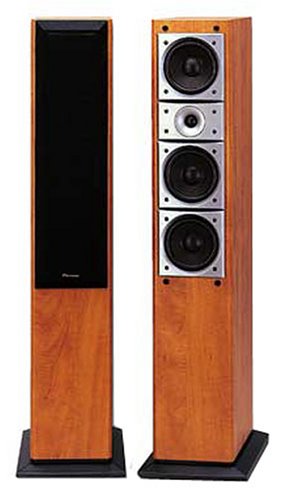
Image 1.1: The Pioneer S-H-509-V-S Floor-Standing Speaker. This image displays two tall, wooden-finished speakers. One speaker is shown with its black grille cover attached, while the other shows its internal components, including multiple drivers (woofers and a tweeter) arranged vertically.
2. Safety Information
To prevent fire, electric shock, and product damage, observe the following precautions:
- Do not expose the speaker to rain or moisture.
- Do not place objects filled with liquids, such as vases, on the speaker.
- Ensure proper ventilation; do not block any ventilation openings.
- Place the speaker on a stable, level surface to prevent it from falling.
- Keep the speaker away from heat sources such as radiators, heat registers, stoves, or other apparatus (including amplifiers) that produce heat.
- Use only attachments/accessories specified by the manufacturer.
3. Package Contents
Verify that all items are present in the package:
- Pioneer S-H-509-V-S Floor-Standing Speaker (x1 or x2, depending on purchase)
- User Manual (this document)
- Speaker Cables (if included with your specific package)
4. Setup
4.1. Placement
For optimal sound performance, consider the following placement guidelines:
- Stereo Setup: Place the left and right speakers equidistant from your primary listening position, forming an equilateral triangle.
- Surround Sound: As a surround sound speaker, position the S-H-509-V-S according to your amplifier's recommendations for rear or side channels, typically slightly behind or to the sides of the listening area.
- Room Acoustics: Avoid placing speakers directly in corners, which can overemphasize bass. Experiment with distance from walls to find the best balance.
- Stability: Ensure the speakers are placed on a firm, level surface to prevent tipping.
4.2. Connections
The S-H-509-V-S speaker connects to your audio receiver or amplifier. It also features Bluetooth connectivity for wireless audio streaming.
- Wired Connection:
- Turn off your amplifier/receiver before making any connections.
- Connect the speaker cables to the binding posts on the back of the S-H-509-V-S speaker. Ensure the positive (+) terminal on the speaker connects to the positive (+) terminal on your amplifier, and the negative (-) terminal on the speaker connects to the negative (-) terminal on your amplifier.
- Tighten the binding posts securely.
- Bluetooth Connection:
- Ensure the speaker is powered on (if applicable, for active Bluetooth functionality).
- Activate Bluetooth on your source device (e.g., smartphone, tablet, computer).
- Search for available devices and select "Pioneer S-H-509-V-S" from the list.
- Once paired, audio from your device will play through the speaker.
5. Operation
Once connected, the Pioneer S-H-509-V-S speaker operates in conjunction with your amplifier or Bluetooth source device.
- Power On/Off: The speaker's power state is typically controlled by the connected amplifier for wired connections. For Bluetooth, ensure the speaker is powered on to enable pairing and playback.
- Volume Control: Adjust volume using your amplifier's controls or the volume controls on your Bluetooth source device.
- Audio Source Selection: Select the desired audio input (e.g., CD, TV, Bluetooth) on your amplifier or source device.
6. Maintenance
Proper care ensures the longevity and appearance of your speaker.
- Cleaning: Use a soft, dry cloth to wipe the speaker cabinet. For stubborn marks, a slightly damp cloth can be used, followed by a dry cloth. Avoid abrasive cleaners or solvents.
- Grille: The speaker grille can be carefully removed for cleaning. Use a soft brush or vacuum cleaner with a brush attachment to remove dust.
- Environment: Keep the speaker in a clean, dry environment, away from direct sunlight and extreme temperatures.
7. Troubleshooting
If you encounter issues with your Pioneer S-H-509-V-S speaker, refer to the following common solutions:
| Problem | Possible Cause | Solution |
|---|---|---|
| No sound | Incorrect wiring; amplifier off; wrong input selected; Bluetooth not paired. | Check speaker cable connections (positive to positive, negative to negative). Ensure amplifier is on and correct input is selected. Re-pair Bluetooth device. |
| Distorted sound | Volume too high; damaged cable; speaker overload. | Reduce volume. Check speaker cables for damage. Ensure amplifier power matches speaker's capabilities. |
| Bluetooth connection issues | Speaker not in pairing mode; device too far; interference. | Ensure speaker is discoverable. Move device closer to speaker. Avoid sources of interference (e.g., Wi-Fi routers). |
8. Specifications
The following are the technical specifications for the Pioneer S-H-509-V-S speaker:
- Brand: PIONEER
- Model Number: S-H-509-V-S
- Speaker Type: Surround Sound
- Audio Output Mode: Surround
- Connectivity Technology: Bluetooth
- Compatible Devices: Laptop, Desktop Computer, Television
- Mounting Type: Desktop Mount (Note: While specified as 'Desktop Mount', the product design and common usage for 'stand-Hoparlör' (floor-standing speaker) suggest it is intended for floor placement.)
- Waterproof: Yes
- Product Weight: 10 grams (Note: This weight is unusually low for a floor-standing speaker and may refer to a component or be a data entry discrepancy.)
- Manufacturer: Pioneer
- ASIN: B00005OOKM
- First Available Date: February 2, 2018
9. Warranty and Support
For warranty information and technical support, please refer to the warranty card included with your product or visit the official Pioneer website. Contact Pioneer customer service for assistance with any issues not covered in this manual.


