
Nikon SB-23
Nikon SB-23 AF TTL Speedlight Flash Instruction Manual
Model: SB-23 | Model Number: FSA02301
Introduction
This manual provides detailed instructions for the safe and effective use of your Nikon SB-23 AF TTL Speedlight Flash. Please read this manual thoroughly before using the flash unit to ensure proper operation and to achieve optimal photographic results. Keep this manual in a safe place for future reference.
Safety Information
- Do not attempt to disassemble or modify the flash unit. Repairs should only be performed by authorized service personnel.
- Keep the flash unit dry. Do not expose it to rain, moisture, or high humidity.
- Avoid direct eye exposure to the flash, especially at close range, as it can cause temporary vision impairment.
- Use only the specified battery type (four AA 1.5V alkaline batteries). Incorrect battery types may cause damage or malfunction.
- Remove batteries if the flash unit will not be used for an extended period to prevent leakage.
- Keep out of reach of children.
Package Contents
Verify that your package contains the following items:
- Nikon SB-23 AF TTL Speedlight Flash Unit
- Nikon SS-23 Original Pouch
- Instruction Manual (this document)
Product Overview
The Nikon SB-23 is a compact and versatile Speedlight flash designed for use with Nikon cameras. It offers both TTL (Through-The-Lens) automatic flash control and manual power settings.
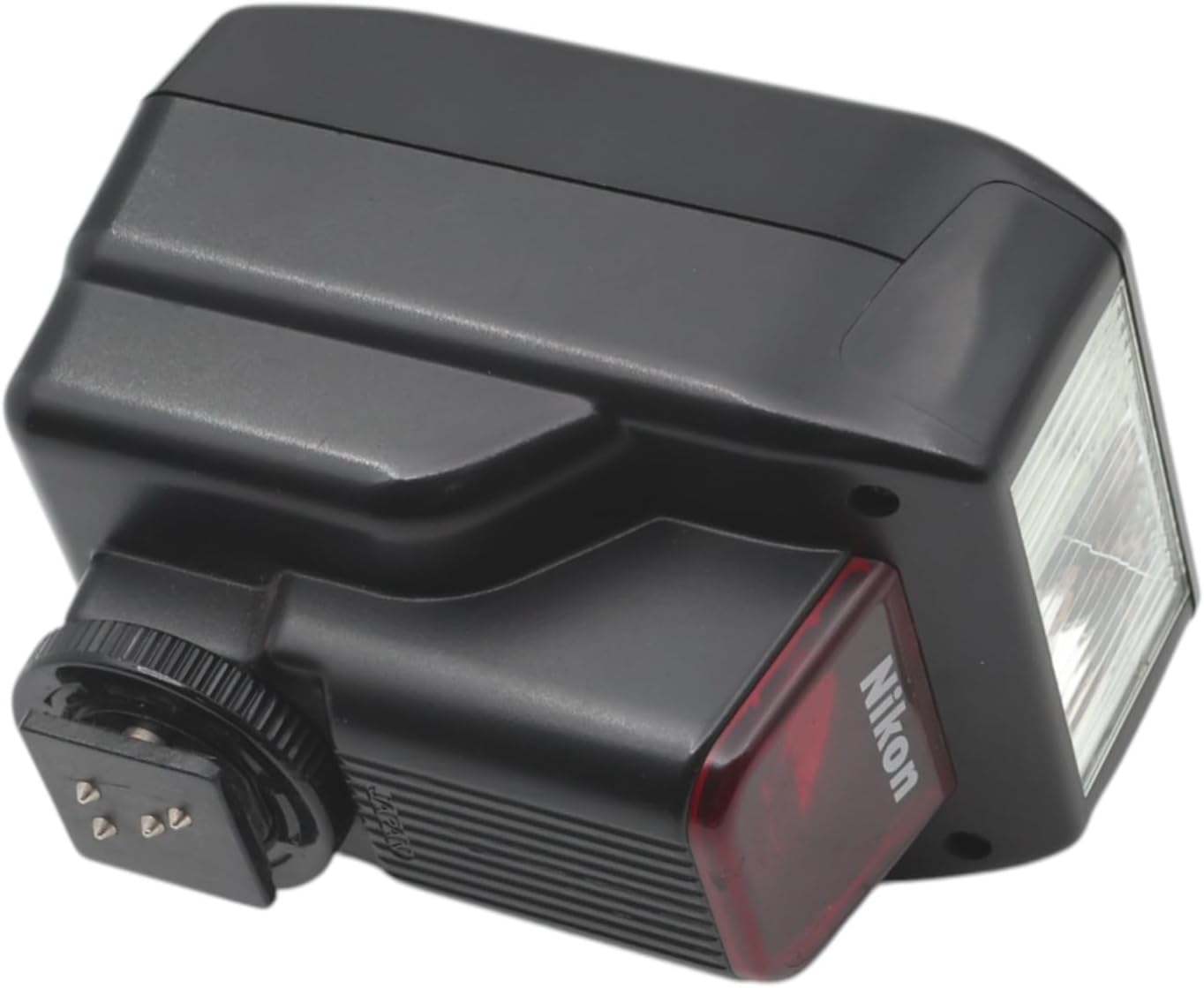
Figure 1: Angled view of the Nikon SB-23 Speedlight Flash. This image shows the overall compact design of the flash unit, including the flash head and the hot shoe mount at the base.
Components and Controls
- Flash Head: Emits the light.
- Ready Light: Illuminates when the flash is charged and ready to fire.
- Power/Mode Switch: Selects between OFF, Manual (M), and TTL modes.
- Hot Shoe Mount: Connects the flash to the camera's hot shoe.
- Locking Ring: Secures the flash to the camera.
- Battery Compartment: Holds four AA batteries.

Figure 2: Top view of the Nikon SB-23 Speedlight, highlighting the 'READY' indicator light and the 'OFF M TTL' mode switch. The guide number (GN20 ISO100/m, 66 ISO100/ft) is also visible.

Figure 3: Front view of the Nikon SB-23 Speedlight, showing the flash tube and the red Nikon branding plate.
Setup
1. Battery Installation
- Ensure the flash unit is switched to the OFF position.
- Locate the battery compartment cover on the side of the flash unit.
- Open the cover and insert four (4) AA 1.5V alkaline batteries, observing the correct polarity (+/-) as indicated inside the compartment.
- Close the battery compartment cover securely.

Figure 4: View of the Nikon SB-23 Speedlight with the battery compartment open, showing the slots for four AA batteries and polarity markings.
2. Mounting to Camera
- Ensure both the flash unit and your camera are switched OFF.
- Slide the hot shoe mount of the SB-23 into the camera's hot shoe slot.
- Rotate the locking ring clockwise until the flash unit is securely fastened to the camera. Do not overtighten.
- To remove, rotate the locking ring counter-clockwise and slide the flash unit off the hot shoe.
Operating Instructions
Powering On/Off
To power on the flash, slide the Power/Mode switch from OFF to either M (Manual) or TTL. The Ready Light will illuminate when the flash is fully charged. To power off, slide the switch to OFF.
Flash Modes
- TTL (Through-The-Lens) Auto Mode: In this mode, the flash automatically adjusts its output based on the light measured through the camera's lens. This provides accurate exposure for most shooting situations. The SB-23 supports various TTL fill-flash modes including Automatic Balanced Fill-Flash, Multi-Sensor Balanced Fill-Flash, Matrix, and Center-Weighted Fill-Flash, depending on your camera's capabilities.
- Manual (M) Mode: In Manual mode, the flash fires at full power. This mode is suitable for situations where you require consistent flash output or when using the flash off-camera with a separate trigger.
Guide Number
The Nikon SB-23 has a Guide Number (GN) of 66 feet (20 meters) at ISO 100. The Guide Number is used to calculate the maximum flash range or required aperture for a given distance. The formula is: Guide Number = Distance (ft/m) x Aperture (f-stop).
Using the Auto Range Table
The flash unit features an auto range table on its side, which can assist in determining appropriate aperture settings for various ISO sensitivities and distances when using the flash in manual mode or for reference in TTL mode.

Figure 5: Close-up view of the Auto Range table located on the side of the Nikon SB-23 Speedlight. This table provides aperture values (f-stops) for different ISO settings and flash-to-subject distances in meters and feet.
To use the table:
- Identify your camera's ISO setting (e.g., ISO 100, 200, 400).
- Estimate the distance from the flash to your subject.
- Find the intersection of your ISO and distance on the table to determine the recommended aperture setting.
Maintenance
- Cleaning: Use a soft, dry cloth to clean the exterior of the flash unit. For stubborn dirt, a slightly dampened cloth can be used, followed by a dry cloth. Do not use solvents or abrasive cleaners.
- Storage: When not in use, store the flash unit in its protective pouch (Nikon SS-23) in a cool, dry place, away from direct sunlight and extreme temperatures. Remove batteries if storing for extended periods.
- Battery Care: Replace batteries when the recycle time becomes noticeably longer or the Ready Light fails to illuminate consistently.
Troubleshooting
| Problem | Possible Cause | Solution |
|---|---|---|
| Flash does not fire. |
|
|
| Ready Light does not illuminate. |
|
|
| Flash output is too weak or too strong. |
|
|
Specifications
| Model | Nikon SB-23 AF TTL Speedlight Flash |
| Model Number | FSA02301 |
| Guide Number (ISO 100) | 66 ft (20 m) |
| Flash Modes | TTL Auto, Manual |
| Fill-Flash Modes | Automatic Balanced Fill-Flash, Multi-Sensor Balanced Fill-Flash, Matrix, Center-Weighted Fill-Flash (camera dependent) |
| Power Source | Four (4) AA 1.5V Alkaline Batteries |
| Battery Life | Approximately 6 Hours (usage dependent) |
| Compatible Mountings | Nikon 1 (Hotshoe) |
| Flash Sync Speed | 1/200 or faster (camera dependent) |
| Item Weight | 8.5 ounces (approx. 241 grams) |
| Package Dimensions | 4.41 x 3.54 x 3.46 inches (approx. 11.2 x 9.0 x 8.8 cm) |
Warranty and Support
For information regarding warranty coverage, service, or technical support for your Nikon SB-23 AF TTL Speedlight Flash, please refer to the warranty card included with your purchase or contact your authorized Nikon retailer or Nikon customer service directly. Specific warranty terms may vary by region and purchase date.
You can also visit the official Nikon website for the latest support information and contact details: Nikon Support
Related documentsSB-23


Ask a question about this manual
Ask about setup, troubleshooting, compatibility, parts, safety, or missing instructions. Manuals+ will review the question and use this page’s manual context to help answer it.