
Introduction
Thank you for choosing the Holmes HOAF90-NTUC Blizzard 9-Inch Three-Speed Oscillating Table/Wall Fan. This manual provides important information for the safe and efficient use of your fan. Please read it thoroughly before operation and retain for future reference.
Important Safety Information
READ ALL INSTRUCTIONS BEFORE USING THIS FAN.
- Do not operate any fan with a damaged cord or plug. Discard fan or return to an authorized service facility for examination and/or repair.
- Do not run cord under carpeting. Do not cover cord with throw rugs, runners, or similar coverings. Arrange cord away from traffic areas and where it will not be tripped over.
- Always unplug the fan before moving, cleaning, or servicing.
- Do not insert fingers or foreign objects into any opening on the fan.
- Do not use this fan near water, such as in a bathroom, laundry area, or near a swimming pool.
- This fan is for indoor use only.
Product Overview
The Holmes HOAF90-NTUC Blizzard fan is designed to provide powerful and customizable airflow for personal comfort. Its versatile design allows for use on a table or mounted to a wall.
Key Features:
- Provides cooling relief from hot and stale air.
- Versatile use: table or wall mount.
- Ideal for living rooms or bedrooms.
- Tilt adjustable head for directed airflow.
- Three powerful speed settings and oscillation for wide area coverage.
- Advanced blade system delivers maximum airflow.
- Removable front grill for easy cleaning.

Setup
Unpacking:
Carefully remove the fan from its packaging. Ensure all components are present and undamaged.
Placement:
Position the fan on a stable, flat surface for table use, or follow wall-mounting instructions (not included in this manual, refer to product packaging for specific wall-mount hardware and instructions) for wall installation. Ensure the fan is placed away from curtains or other objects that could obstruct airflow or interfere with oscillation.
Power Connection:
Plug the fan's power cord into a standard electrical outlet. Ensure the outlet voltage matches the fan's requirements.

Operation
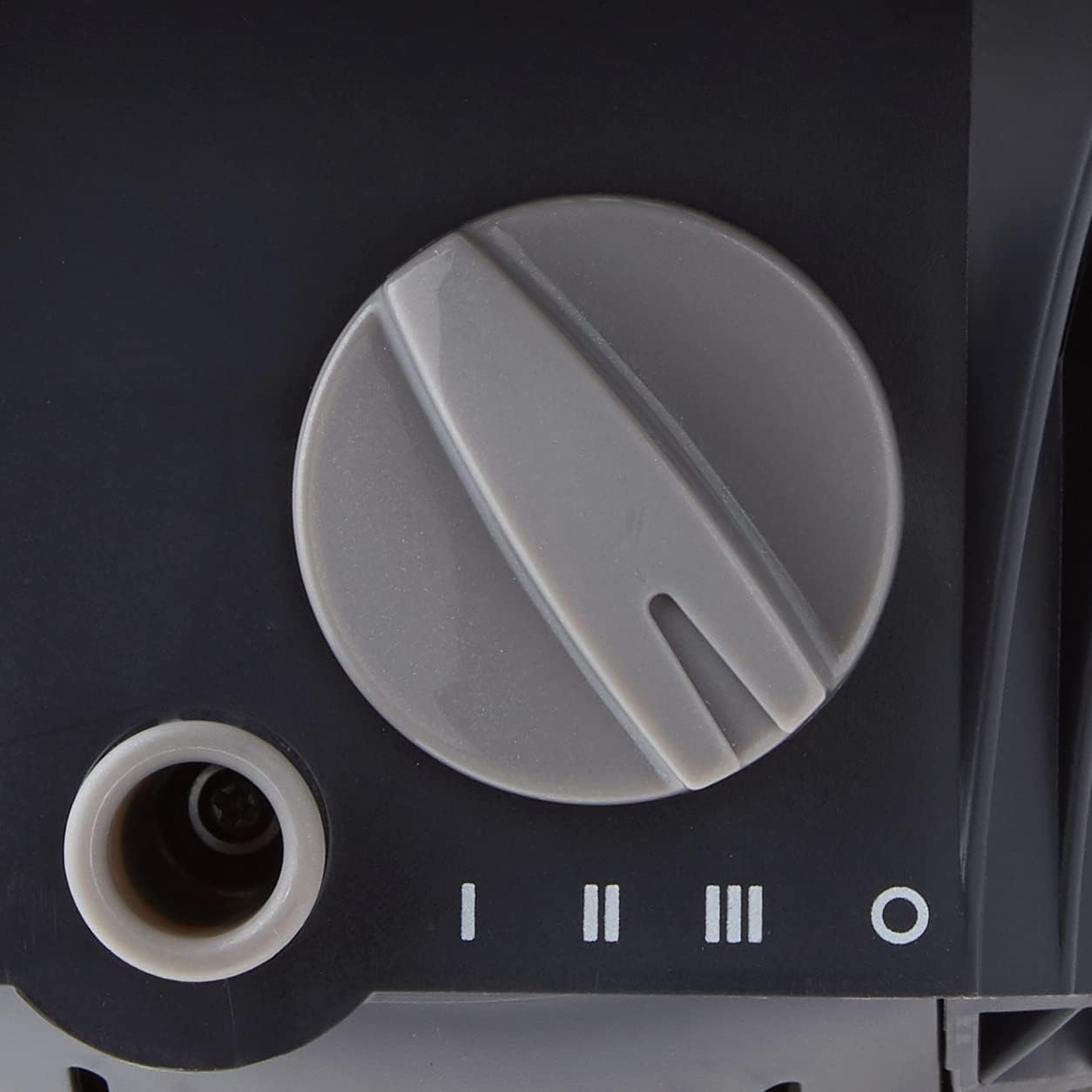
The fan features a manual control knob for power and speed selection, and a separate button for oscillation.
Power and Speed Control:
Locate the control knob on the fan's base. Turn the knob clockwise to select desired speed: I (Low), II (Medium), III (High). Turn the knob to 'O' to turn the fan off.
Oscillation Function:
To activate oscillation, press the oscillation button located on the top of the fan housing. To stop oscillation, press the button again.
Adjustable Tilt:
The fan head can be manually tilted up or down to direct airflow as needed. Gently adjust the fan head to your preferred angle.
Maintenance
Regular cleaning helps maintain optimal performance and extends the life of your fan.
- Always unplug the fan from the power outlet before cleaning.
- The front grill is removable for easier cleaning of the blades. Carefully unclip or unscrew the front grill as per the design (refer to product diagram if available).
- Use a soft, damp cloth to wipe the exterior surfaces. Do not use abrasive cleaners or solvents.
- For the blades, use a soft cloth or a vacuum cleaner with a brush attachment to remove dust and debris.
- Ensure all parts are completely dry before reassembling the front grill and plugging the fan back in.
Troubleshooting
Before attempting any troubleshooting, ensure the fan is unplugged from the power source.
Fan Does Not Turn On:
- Check if the power cord is securely plugged into a working electrical outlet.
- Verify that the control knob is set to a speed setting (I, II, or III) and not 'O' (Off).
- Check the household fuse or circuit breaker.
Weak Airflow:
- Ensure the fan grill and blades are clean and free of dust buildup. Refer to the 'Maintenance' section for cleaning instructions.
- Verify that the fan is set to a higher speed setting if more airflow is desired.
Excessive Noise:
- Ensure the fan is placed on a stable, flat surface to prevent vibrations.
- Check for any loose parts or obstructions within the fan grill or around the blades.
- Clean the fan blades and grill to remove any debris that might be causing imbalance or noise.
Specifications
| Feature | Detail |
|---|---|
| Brand | HOLMES |
| Model Number | HAOF90-NTUC (HAOF90UC) |
| Product Dimensions (D x W x H) | 10.4"D x 10.6"W x 14.4"H |
| Item Weight | 5.27 Pounds |
| Power Source | Corded Electric (Note: Product specifications incorrectly list 'Battery Powered' and 'Is Product Cordless: Yes'. This fan is corded.) |
| Number of Speeds | 3 |
| Blade Length | 9 Inches |
| Material | Plastic |
| Special Features | Adjustable Tilt, Oscillating |
| Mounting Type | Table, Wall Mount |
| Controller Type | Button Control |
Warranty and Customer Support
Warranty:
This product comes with a manufacturer's warranty. Please refer to the warranty card included in your original packaging for specific terms and conditions. The warranty description states: "Comes with manufacturer warranty."
Customer Support:
For further assistance, product information, or to inquire about warranty service, please visit the HOLMES official store page or contact their customer service department through their official website.