
Introduction
The ReliOn DC-51 Demineralization Cartridge (Model PDC51V1) is designed to reduce mineral content in the water used by ultrasonic humidifiers. Tap water, especially in hard water areas, often contains high levels of minerals. When this water is used in an ultrasonic humidifier, these minerals can be released into the air as 'white dust' and settle on surfaces.
This cartridge helps to capture these minerals before they are dispersed, contributing to cleaner air and surfaces around your humidifier. This manual provides instructions for the proper installation, use, and replacement of your demineralization cartridge.
Product Overview

Image: The ReliOn DC-51 Demineralization Cartridge, a compact blue unit with filter elements visible on one side.
The cartridge is a small, blue, rectangular unit containing filtering material. It is designed to be placed directly into the humidifier's water reservoir.
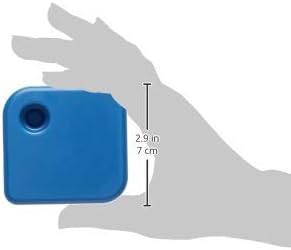
Image: A hand holding the ReliOn DC-51 Demineralization Cartridge, illustrating its compact size (approximately 2.9 inches or 7 cm in length).
Installation Instructions
Follow these steps to install the demineralization cartridge in your humidifier:
- Prepare Humidifier: Remove the water tank from your humidifier and empty all existing water from the reservoir.
- Mark Installation Date: Using a permanent marker, write the current date of installation on the top surface of the new demineralization cartridge. This helps track replacement intervals.
- Insert Cartridge: Carefully insert the demineralization cartridge into the humidifier's water reservoir. Ensure it is seated properly according to your humidifier's design.
- Prime Cartridge: Replace the water tank and wait approximately 15 minutes. This allows water to fully pass through the cartridge's filter material before restarting the humidifier.
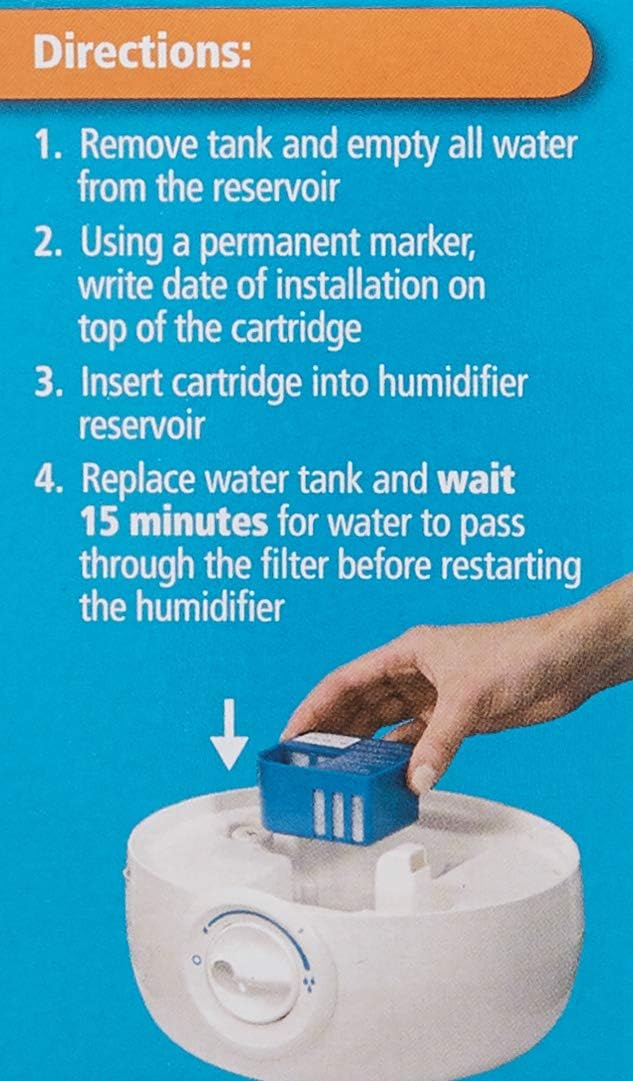
Image: A diagram showing a hand inserting the blue demineralization cartridge into the base of a white humidifier reservoir.
Replacement and Care
For optimal performance and to effectively prevent white dust, the demineralization cartridge requires regular replacement.
- Replacement Frequency: Replace the cartridge every 2 to 4 weeks, or after 15-30 humidifier fillings under normal use. The exact frequency may vary depending on the hardness of your tap water.
- Signs of Replacement: If you notice an increase in white dust despite using the cartridge, it is an indication that the cartridge needs to be replaced.
- Storage: Store unused cartridges in a cool, dry place away from direct sunlight.

Image: The back of the cartridge packaging, displaying instructions to replace every 2 to 4 weeks and a space to write the installation date.
Troubleshooting: White Dust
The primary function of this demineralization cartridge is to mitigate the issue of 'white dust' produced by ultrasonic humidifiers, particularly in areas with hard water.
- Persistent White Dust: If white dust continues to appear after installing a new cartridge, ensure the cartridge is correctly seated in the reservoir and has been adequately primed (waiting 15 minutes after filling).
- Cartridge Lifespan: White dust reappearing is the main indicator that the cartridge has reached the end of its effective life and requires replacement. Water hardness significantly impacts cartridge lifespan.
- Humidifier Cleaning: Regular cleaning of your humidifier, as per its own instruction manual, is also crucial for overall performance and hygiene, complementing the cartridge's function.

Image: A section of the product packaging explaining that the cartridge captures minerals to prevent 'white dust' and lists compatible humidifier models.
Specifications
| Model Number | PDC51V1 (also known as DC-51) |
| Manufacturer | Honeywell/Kaz Home Environment |
| Product Dimensions | 10.49 x 4.45 x 7.47 cm (4.13 x 1.75 x 2.94 inches) |
| Item Weight | 58.97 g (0.13 pounds) |
| Compatible Humidifiers | Vicks V4600 Series, V5100 Series, VUL575 Series; Sunbeam 696 |
Warranty and Support
For specific warranty information regarding your ReliOn DC-51 Demineralization Cartridge, please refer to the documentation provided with your humidifier or visit the manufacturer's official website. General product support and additional information may be available at www.kaz.com/protec.