
1. Introduction
This manual provides essential information for the installation, operation, and maintenance of the Digi Acceleport C/X16 Rack System-PCI RJ45 I/O Board, Model 70001175. Please read this manual thoroughly before attempting to install or operate the device to ensure proper functionality and to prevent damage.
2. Product Overview
The Digi Acceleport C/X16 Rack System-PCI RJ45 I/O Board is a high-performance input/output solution designed to expand serial connectivity within a server environment. It integrates into a PCI slot and connects to a C/X16 rack system, providing multiple RJ45 serial ports for various applications requiring reliable data communication.
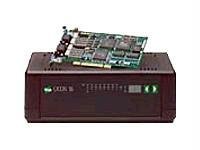
Figure 1: Digi Acceleport C/X16 Rack System-PCI RJ45 I/O Board. This image displays the physical board, highlighting its PCI connector and the interface for connecting to the C/X16 rack system.
3. Package Contents
Verify that all items are present in the package. If any items are missing or damaged, contact your vendor immediately.
- Digi Acceleport C/X16 Rack System-PCI RJ45 I/O Board (Model 70001175)
- Quick Start Guide or Installation CD (if applicable)
- Documentation (this user manual, if provided in print)
4. Setup
4.1. System Requirements
- Available PCI expansion slot in a compatible server.
- Digi Acceleport C/X16 Rack System (sold separately).
- Operating system compatible with Digi drivers.
4.2. Hardware Installation
- Power Off: Ensure the server is completely powered off and disconnected from the power source.
- Open Chassis: Open the server chassis according to the manufacturer's instructions.
- Locate PCI Slot: Identify an available PCI expansion slot.
- Insert Board: Carefully align the Acceleport I/O board with the PCI slot and press firmly until it is securely seated.
- Secure Board: Secure the board with the retaining screw or clip provided by the server chassis.
- Connect to Rack System: Connect the appropriate cable from the Acceleport I/O board to the Digi Acceleport C/X16 Rack System. Refer to the rack system's manual for specific connection details.
- Close Chassis: Close the server chassis and reconnect the power.
4.3. Driver Installation
After hardware installation, power on the server. The operating system may detect new hardware. Install the necessary drivers from the provided installation media or download the latest drivers from the official Digi International website (www.digi.com). Follow the on-screen instructions for driver installation.
5. Operating Instructions
5.1. Verifying Installation
Once drivers are installed, verify the board's functionality:
- Device Manager: In Windows, open Device Manager and check for the Digi Acceleport C/X16 board under 'Ports (COM & LPT)' or 'Multi-port serial adapters'. Ensure there are no error symbols.
- System Logs: In Linux/Unix, check system logs (e.g.,
dmesg) for messages indicating successful detection and initialization of the serial ports.
5.2. Using Serial Ports
The RJ45 ports on the C/X16 Rack System, connected via this I/O board, function as standard serial communication ports. Use appropriate serial communication software (e.g., PuTTY, HyperTerminal, or custom applications) to configure and utilize these ports for connecting to serial devices.
- Baud Rate: Configure the baud rate to match the connected serial device.
- Data Bits, Parity, Stop Bits: Set these parameters according to the device specifications.
- Flow Control: Select hardware or software flow control as required.
6. Maintenance
The Digi Acceleport C/X16 I/O Board is designed for reliable operation with minimal maintenance. Follow these guidelines:
- Keep Clean: Ensure the server environment is clean and free of dust to prevent overheating and component failure. Periodically clean the server interior with compressed air, ensuring the server is powered off and unplugged.
- Firmware Updates: Check the Digi International website periodically for firmware updates for the Acceleport C/X16 system, which may offer performance improvements or bug fixes.
- Cable Integrity: Regularly inspect all connected cables for wear or damage. Replace any damaged cables immediately.
7. Troubleshooting
If you encounter issues with your Digi Acceleport C/X16 I/O Board, consider the following troubleshooting steps:
- No Detection: If the board is not detected by the operating system, ensure it is properly seated in the PCI slot. Try a different PCI slot if available. Verify that the server's BIOS settings allow for PCI device detection.
- Driver Issues: Reinstall the latest drivers from the Digi International website. Ensure you are using the correct drivers for your operating system and board model.
- Communication Failure: Check all cable connections between the I/O board and the C/X16 Rack System, and between the rack system and the serial devices. Verify that serial port settings (baud rate, data bits, parity, stop bits, flow control) match those of the connected device.
- System Instability: Ensure your server's power supply is adequate for all installed components. Check for conflicts with other PCI devices in Device Manager.
- Consult Documentation: Refer to the comprehensive documentation available on the Digi International website for more detailed troubleshooting guides.
8. Specifications
| Feature | Specification |
|---|---|
| Brand | Digi |
| Model Number | 70001175 |
| Hardware Interface | PCI |
| UPC | 663072911652 |
| Product Weight (approximate, including system components) | 13 Pounds |
9. Warranty and Support
For detailed warranty information, please refer to the official Digi International website or the warranty card included with your product. Technical support is available through Digi International's customer service channels, including online resources, FAQs, and direct contact options. Always provide your product model number (70001175) and any relevant serial numbers when seeking support.
Official Digi International Website: www.digi.com


