
1. Product Overview
The Leviton 105-5226-ISP is a single-pole, 15 Amp, 125-Volt AC only lighted pilot switch. This device features a pilot light that illuminates when the switch is in the ON position, providing a visual indicator of the circuit status. It is designed for heavy-duty, specification-grade applications and is suitable for use with up to No. 10 copper or copper-clad conductors.
- Switch: 15 amp, 125-volt AC only
- Pilot light: 1/25 watt, 125-volt
- Single pole switch
- Heavy duty, specification grade
- Terminal screws accept up to No. 10 conductors
2. Important Safety Information
WARNING: To avoid fire, shock, or death, turn off power at the circuit breaker or fuse box and test that power is off before wiring. This device must be installed in accordance with national and local electrical codes. If you are unsure about any part of these instructions, consult a qualified electrician.
- Always disconnect power before working on electrical circuits.
- Use only copper or copper-clad wire.
- Ensure all wire connections are secure.
- Do not exceed the specified electrical ratings (15A, 125V AC).
- Pilot lights are not covered by warranty.
3. Installation Instructions
This section provides general guidance for installing the Leviton 105-5226-ISP Lighted Pilot Switch. Always refer to local electrical codes and consult a qualified electrician if needed.
3.1 Tools Required
- Screwdriver (Phillips and/or Flathead)
- Wire Strippers
- Voltage Tester
- Electrical Tape (optional)
3.2 Wiring the Switch
- Turn Off Power: Locate the circuit breaker or fuse that supplies power to the switch location and turn it OFF. Verify power is off using a voltage tester.
- Prepare Wires: Strip approximately 1/2 inch of insulation from the ends of the circuit wires.
- Connect Ground Wire: Connect the bare copper or green insulated ground wire from the electrical box to the green ground screw on the switch.
- Connect Line and Load Wires: The switch has two brass-colored terminal screws for line (incoming power) and load (to the fixture). Connect one hot wire to each of these screws. The specific orientation (which is line and which is load) typically does not matter for a single-pole switch, but ensure they are hot wires.
- Connect Neutral Wire (for Pilot Light): The pilot light requires a neutral connection to function. Connect the white neutral wire from the electrical box to the designated neutral terminal screw on the switch. If your existing switch box does not have a neutral wire, you may need to consult an electrician to run one, as the pilot light will not operate without it.
- Secure Connections: Ensure all wire connections are tight and secure. Gently push the switch into the wall box.
- Mount Switch: Secure the switch to the wall box using the provided mounting screws.
- Install Wallplate: Attach the wallplate (not included) over the switch.
- Restore Power: Turn the power back ON at the circuit breaker or fuse box.
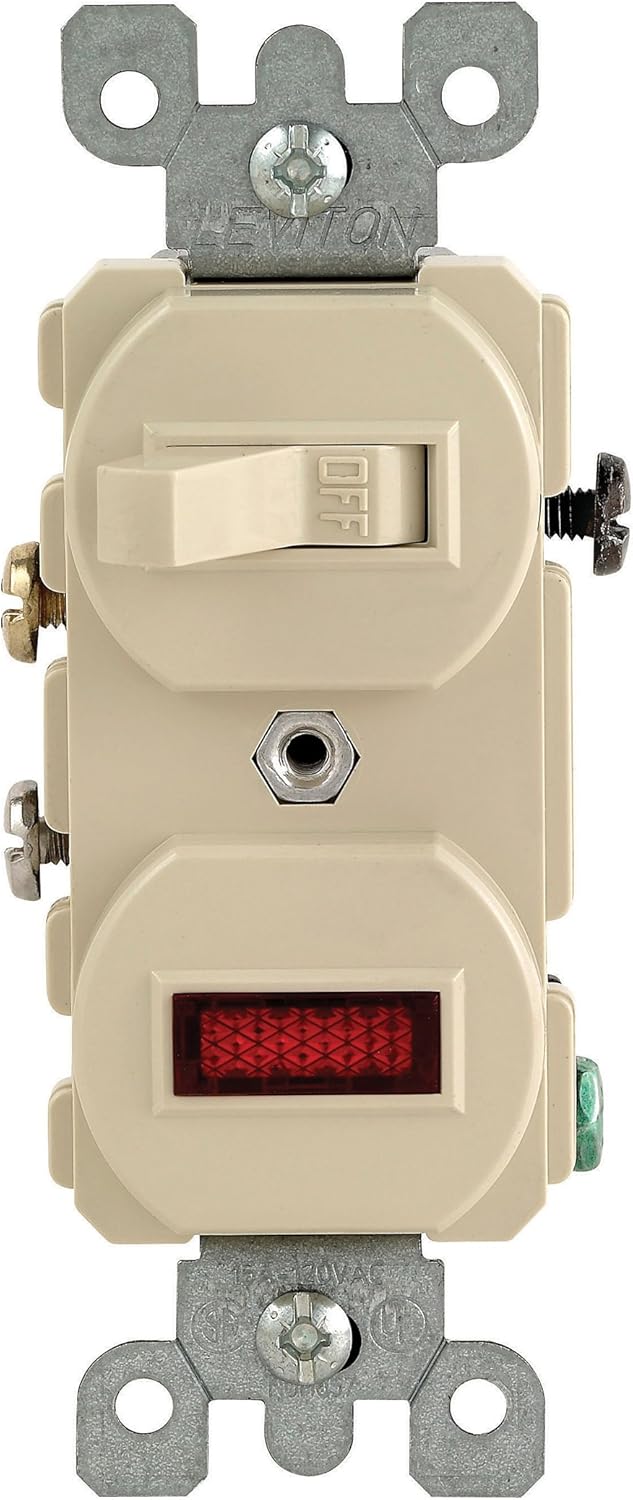
Figure 1: Front view of the Leviton 105-5226-ISP Lighted Pilot Switch. This image shows the toggle switch in the 'OFF' position and the red pilot light indicator below it. The mounting straps and terminal screws are visible on the sides.
4. Operating Instructions
The Leviton 105-5226-ISP Lighted Pilot Switch operates like a standard single-pole toggle switch with the added functionality of a pilot light.
- Turning ON: Push the toggle switch to the 'ON' position. The connected load (e.g., light fixture) will receive power, and the integrated pilot light on the switch will illuminate, indicating that the circuit is active.
- Turning OFF: Push the toggle switch to the 'OFF' position. The connected load will lose power, and the pilot light on the switch will turn off, indicating that the circuit is inactive.
The pilot light serves as a convenient visual reminder that the controlled device or light is currently powered on, which is particularly useful for loads that are out of sight or in another room.
5. Maintenance
The Leviton 105-5226-ISP Lighted Pilot Switch requires minimal maintenance.
- Cleaning: To clean the switch and wallplate, ensure power is OFF at the circuit breaker. Use a soft, damp cloth with mild soap and water. Do not use abrasive cleaners or solvents.
- Inspection: Periodically inspect the switch for any signs of damage, loose connections, or discoloration. If any issues are observed, turn off power and consult a qualified electrician.
- Pilot Light Replacement: The pilot light is integrated and generally not user-replaceable. If the pilot light fails, the entire switch unit may need replacement. Note that pilot lights are not covered by warranty.
6. Troubleshooting
| Problem | Possible Cause | Solution |
|---|---|---|
| Switch does not operate the load. | No power to the switch; Loose wiring connection; Faulty switch. | Check circuit breaker/fuse. Verify all wire connections are secure. Test switch with a voltage tester (if qualified) or replace if faulty. |
| Pilot light does not illuminate when switch is ON. | No neutral wire connected; Loose neutral connection; Pilot light failure. | Ensure a neutral wire is properly connected to the switch. Check neutral wire connection. If pilot light is faulty, the switch may need replacement. |
| Switch feels hot. | Overload; Loose connection; Short circuit. | Immediately turn off power. Reduce load on the circuit. Check for loose connections or signs of a short circuit. Consult an electrician. |
7. Technical Specifications
| Feature | Detail |
|---|---|
| Model Number | 105-5226-ISP |
| Brand | Leviton |
| Switch Type | Single Pole, Toggle |
| Current Rating | 15 Amps |
| Operating Voltage | 125 Volts AC |
| Pilot Light Wattage | 1/25 Watt |
| Operation Mode | Off |
| Contact Type | Normally Open |
| Connector Type | Screws |
| Terminal Type | Screw |
| Wire Compatibility | Up to No. 10 copper or copper-clad conductors |
| Item Dimensions (L x W x H) | 4.2 x 1.8 x 1.8 inches |
| Item Weight | 3.2 ounces |
| International Protection Rating | IP54 |
| Operating Temperature Range | 32°F (0°C) to 131°F (55°C) |
8. Warranty and Customer Support
8.1 Warranty Information
This Leviton product comes with a manufacturer's warranty. Please refer to the packaging or the official Leviton website for specific warranty terms and conditions. Note that pilot lights are generally not covered by the warranty.
8.2 Customer Support
For technical assistance, installation questions, or to report issues, please contact Leviton Customer Support. Visit the official Leviton website for contact information and additional resources.


