
1. Introduction
This manual provides instructions for the proper use and maintenance of your Taylor 5989N Instant Read Analog Thermometer. Designed for professional and home use, this thermometer offers accurate temperature readings for various food items. Please read these instructions carefully before first use.
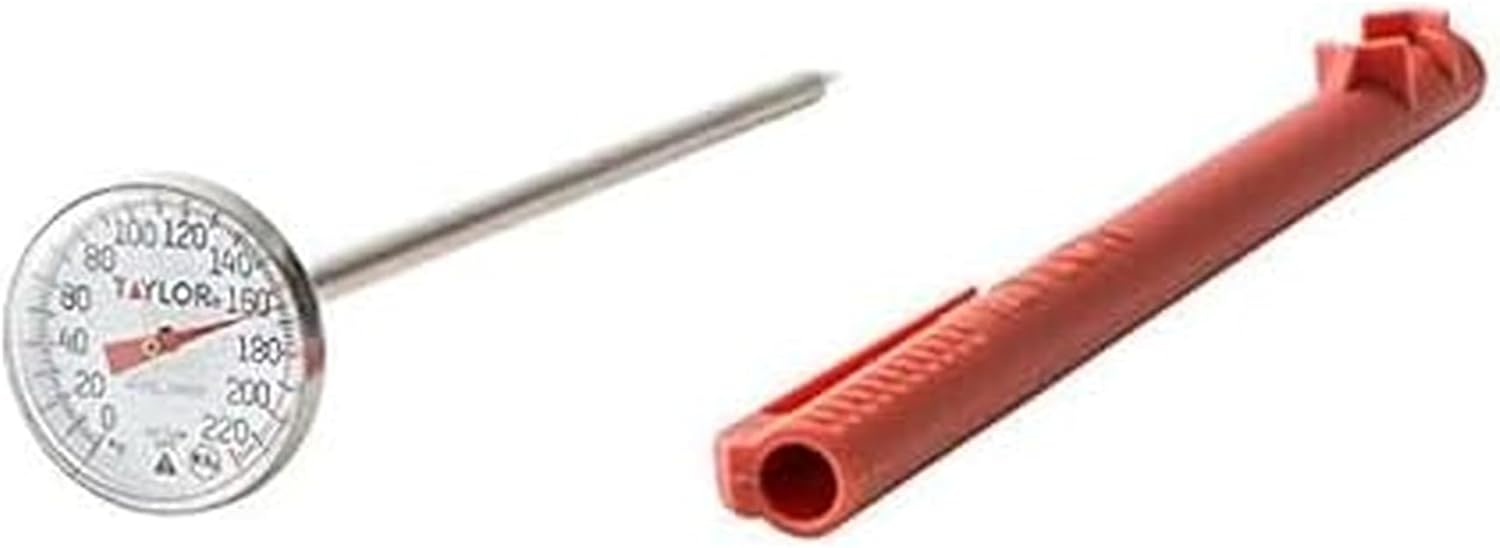
Image 1.1: The Taylor 5989N Instant Read Analog Thermometer, featuring a stainless steel probe and a 1-inch dial, accompanied by its protective red pocket sleeve.
2. Product Overview
The Taylor 5989N is an analog thermometer constructed from durable stainless steel, designed for quick and accurate temperature measurement. It features a clear 1-inch dial with black graphics on a white background for easy reading. The thermometer is NSF approved, ensuring it meets public health standards.
Key Features:
- Temperature Range: Measures from 0°F to 220°F.
- Durable Construction: Made with stainless steel for longevity and shock resistance.
- Easy-to-Read Dial: 1-inch dial with clear markings.
- Protective Sleeve: Includes a durable plastic sleeve that also functions as a recalibration tool.
- NSF Approved: Meets standards for public health and safety.

Image 2.1: A detailed view of the thermometer's analog dial, showing temperature markings from 0 to 220 degrees Fahrenheit, and the stainless steel probe.
3. Setup
- Unpacking: Carefully remove the thermometer from its packaging. Inspect for any damage.
- Protective Sleeve: The thermometer comes with a red plastic pocket sleeve. This sleeve protects the probe and also serves as a recalibration wrench. Keep this sleeve for future use.
- Initial Cleaning: Before first use, hand wash the stainless steel probe with warm, soapy water. Rinse thoroughly and dry. Do not immerse the dial in water.
4. Operating Instructions
This thermometer is designed for quick temperature readings of various foods.
- Insertion: Insert the stainless steel probe into the thickest part of the food item, avoiding bone or gristle. Ensure the probe is immersed at least 2 inches (5 cm) into the food for an accurate reading. The full immersion depth is 5 inches.
- Reading Temperature: Hold the thermometer in place until the dial stabilizes. While labeled 'instant read', analog thermometers require a few seconds for the internal mechanism to react to temperature changes. Expect a stable reading within 10-30 seconds depending on the temperature difference.
- Removal: Carefully remove the thermometer from the food. The probe will be hot.
Important Usage Notes:
- Do Not Leave in Oven/Grill: This thermometer is not designed for leave-in use in ovens, grills, or other high-heat cooking environments. Damage to the thermometer will occur.
- Probe Immersion: For accurate results, ensure the probe is inserted to the dimple located approximately 2 inches from the tip.

Image 4.1: The Taylor 5989N thermometer inserted into a cooked chicken breast, demonstrating proper placement for internal temperature measurement.
5. Calibration
Your thermometer is factory calibrated, but it can be recalibrated if accuracy is questioned. The red pocket sleeve doubles as a recalibration tool.
- Boiling Water Method: Bring a pot of water to a rolling boil. The temperature of boiling water at sea level is 212°F (100°C).
- Insert Thermometer: Carefully insert the thermometer probe into the boiling water, ensuring the probe is immersed at least 2 inches. Allow the dial to stabilize for at least 30 seconds.
- Adjust Dial: While the probe is still in the boiling water, use the hexagonal opening on the red pocket sleeve as a wrench. Fit it over the hexagonal nut located just beneath the dial. Gently turn the dial until the needle points to 212°F.
- Verify: Remove the thermometer and allow it to cool. Re-test in boiling water to confirm calibration.
Alternatively, an ice bath can be used. An ice bath (crushed ice and water) should read 32°F (0°C).

Image 5.1: The thermometer and its red pocket sleeve shown separately, highlighting the sleeve's dual function as a protective cover and calibration tool.
6. Care and Maintenance
- Cleaning: Hand wash the stainless steel probe with warm, soapy water after each use. Rinse thoroughly and dry immediately. Do not immerse the entire thermometer, especially the dial, in water.
- Storage: Store the thermometer in its protective red pocket sleeve when not in use to prevent damage to the probe and maintain calibration.
- Avoid Extreme Temperatures: Do not expose the thermometer to temperatures outside its operating range (0°F to 220°F) for extended periods, and never leave it in a hot oven or grill.
7. Troubleshooting
- Inaccurate Readings: If readings appear inaccurate, perform a calibration check using the boiling water or ice bath method as described in Section 5. Ensure the probe is inserted to the correct depth (at least 2 inches).
- Slow Response Time: Analog thermometers require time for the internal mechanism to register temperature changes. While often called 'instant read', expect a stable reading within 10-30 seconds. This is normal operation for this type of device.
- Damaged Dial/Lens: The lens is shatterproof plastic. If the dial or lens is damaged, discontinue use and consider replacement.
8. Specifications
| Model Number | 5989N |
| Brand | Taylor |
| Temperature Range | 0°F to 220°F |
| Display Type | Analog |
| Material | Stainless Steel (probe), Plastic (sleeve, lens) |
| Immersion Depth | 5 Inches (minimum 2 inches for accurate reading) |
| Special Feature | Fast Reading System, Recalibration Tool Included |
| Certifications | NSF Approved |
| Product Care | Hand Wash Only |
9. Warranty and Support
This Taylor 5989N Instant Read Analog Thermometer is backed by a 1-year limited warranty from the date of purchase. This warranty covers defects in materials and workmanship under normal use.
For warranty claims, technical support, or product inquiries, please contact Taylor customer service. Refer to the product packaging or the official Taylor website for the most current contact information.


