Introduction
This manual provides instructions for the installation, operation, and maintenance of your Westek 6603BC 3-Level Touch Control Lamp Socket Dimmer. This device converts any lamp with a metal socket into a touch-controlled lamp, offering three levels of illumination.
Important: This dimmer is designed for use with incandescent bulbs up to 150W. It is not compatible with CFL or non-dimmable LED bulbs. Dimmable LED bulbs may work, but performance can vary.
Safety Information
- Always unplug the lamp from the wall outlet before installation or maintenance.
- Do not exceed the lamp wattage specified for your lamp fixture. The dimmer supports up to 150W incandescent bulbs.
- Ensure the lamp has a metal socket for proper operation. This dimmer will not function with plastic sockets.
- Do not use this dimmer control with another dimmer in the same circuit.
- Operate within the specified temperature range: 32°F to 104°F (0°C to 40°C).
Product Overview
The Westek 6603BC is a compact screw-in device that adds touch control dimming functionality to compatible lamps.

Figure 1: Front view of the Westek 6603BC Touch Control Lamp Socket Dimmer. The device is white with a brass screw-in base and a socket for a light bulb at the top.
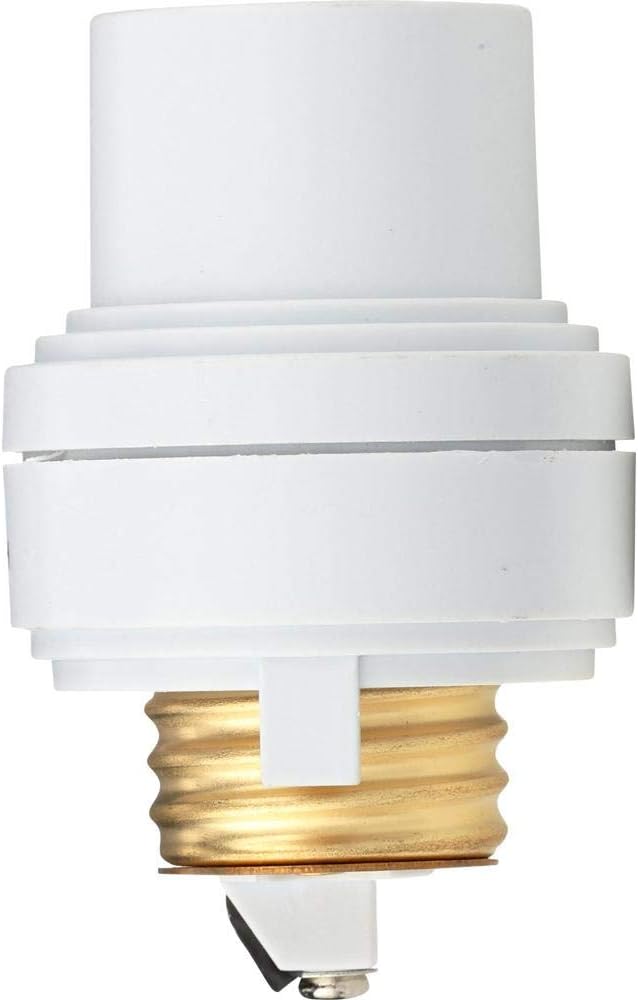
Figure 2: Side view of the Westek 6603BC Touch Control Lamp Socket Dimmer, showing its compact design.

Figure 3: Top view of the dimmer's bulb socket, showing the internal contacts where the light bulb screws in.
Setup and Installation
Follow these steps to install your touch control dimmer:
- Prepare the Lamp: Ensure your lamp is unplugged from the wall outlet. Remove the lamp shade and the existing light bulb.
- Check Socket Material: Verify that your lamp has a metal socket. This dimmer will not work with plastic sockets.
- Install Dimmer: Screw the Westek 6603BC dimmer firmly into your lamp's metal socket.
- Install Bulb: Screw an ordinary one-way incandescent light bulb (up to 150W) into the dimmer's socket. Even if your lamp originally used a 3-way bulb, a standard one-way bulb is required for this dimmer.
- Connect Power: Plug the lamp into a wall outlet.
- Activate Lamp: If your lamp has an existing switch, turn it to the "ON" position (or the second position for 3-way sockets) to allow the dimmer to function.
Video 1: A short demonstration of the Westek 6603BC dimmer in operation, showing how to touch a metal part of the lamp to cycle through light levels. This video is provided by AmerTac, the manufacturer.
Operating Instructions
Once installed and powered, operate the dimmer by touching any metal portion of your lamp:
- First Touch: Activates the Night Light level (low brightness).
- Second Touch: Activates the Medium level (normal room light brightness).
- Third Touch: Activates the High level (full brightness for reading or maximum illumination).
- Fourth Touch: Turns the lamp OFF.
The dimmer will cycle through these four states with each subsequent touch.
Maintenance
The Westek 6603BC dimmer requires minimal maintenance. Ensure the device and lamp are unplugged before cleaning.
- Wipe the exterior of the dimmer with a soft, dry cloth. Do not use liquid cleaners or abrasive materials.
- Periodically check the electrical connections for any signs of wear or damage.
- Replace incandescent bulbs as needed, ensuring they do not exceed 150W.
Troubleshooting
| Problem | Possible Cause | Solution |
|---|---|---|
| Dimmer does not respond to touch. |
|
|
| Light flickers or does not dim properly. |
|
|
| Dimmer turns on randomly or behaves erratically. |
|
|
Specifications
| Feature | Detail |
|---|---|
| Model Number | 6603BC |
| Brand | Westek |
| Operation Mode | ON-OFF, 3-Level Dimming |
| Current Rating | 1.25 Amps |
| Operating Voltage | 120 Volts |
| Compatible Devices | Incandescent bulbs (up to 150W) |
| Control Method | Touch |
| Number of Positions | 3 (Night Light, Medium, High) + OFF |
| Item Dimensions (L x W x H) | 2.75 x 1.75 x 1.75 inches |
| Item Weight | 4 ounces |
| Material | Metal (contact material) |
| Manufacturer | AMERTAC-WESTEK |
| Operating Temperature | 32°F to 104°F (0°C to 40°C) |
Warranty Information
This product comes with a manufacturer's warranty. Please refer to the packaging or contact Westek customer service for specific warranty terms and conditions.
Customer Support
For further assistance, technical support, or to inquire about replacement parts, please contact Westek customer service. Contact information can typically be found on the product packaging or the official Westek website.


