
Introduction
This manual provides essential information for the safe and effective use of the Gardner Bender GSW-18 Heavy-Duty Electrical Toggle Switch. The GSW-18 is a single pole, single throw (SPST) ON-OFF switch designed for various electrical applications. It features a compact body and 6-inch wire leads. Please read these instructions carefully before installation and operation.
Product Overview
The Gardner Bender GSW-18 toggle switch is built for reliability and ease of use. Key features include:
- Type: Single Pole, Single Throw (SPST)
- Function: ON-OFF operation
- Electrical Rating: 10 A 277 V AC / 20 A 125 V AC
- Wire Terminals: 6-inch, 18 AWG wire leads
- Temperature Rating: 75°C maximum
- Mounting: Standard nut size, 15/32 - 32 inch. Requires a 0.5-inch diameter mounting hole.
- Applications: Suitable for industrial equipment or emergency lighting.
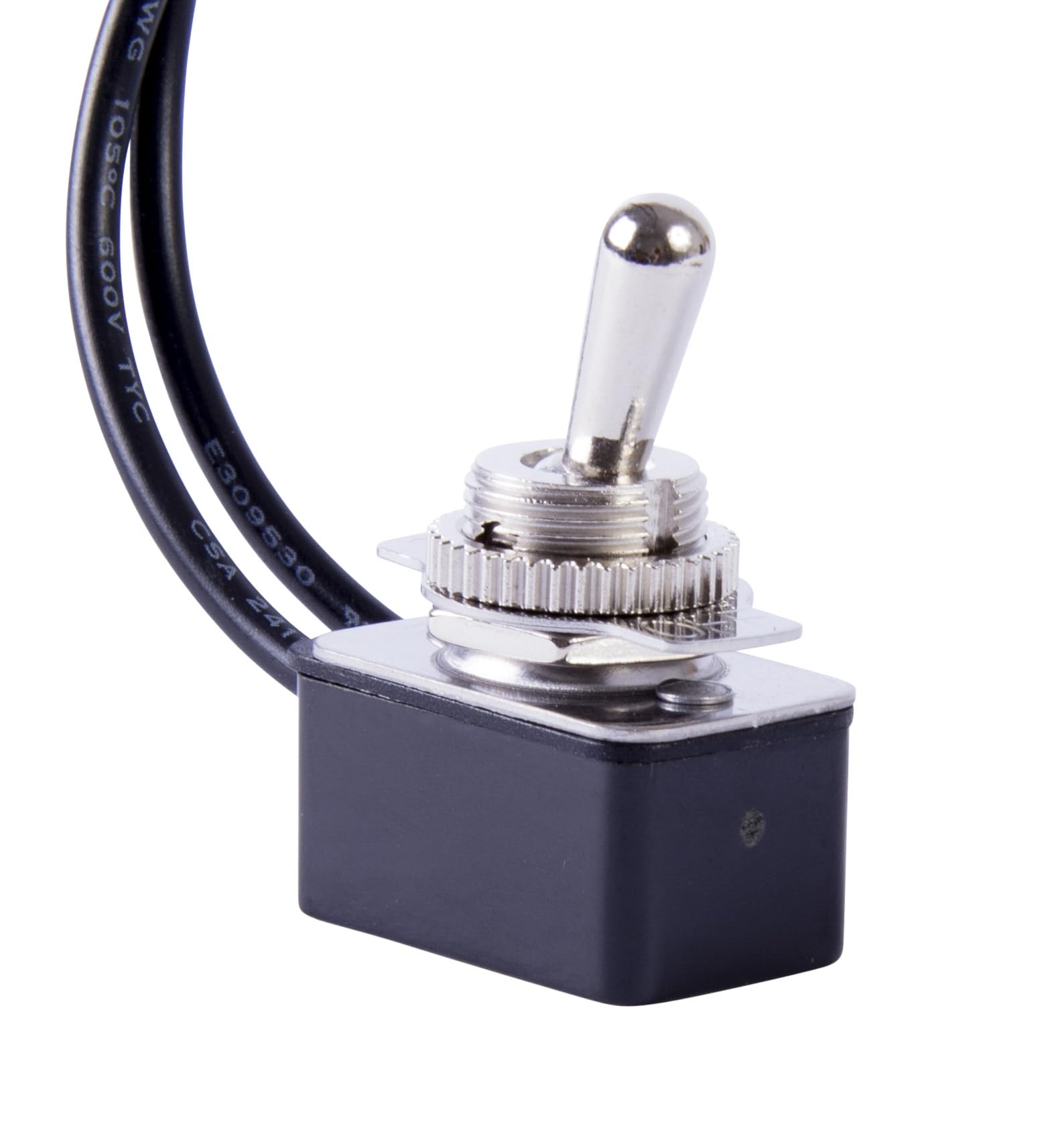
Image: Front view of the Gardner Bender GSW-18 Heavy-Duty Electrical Toggle Switch, showing the toggle lever and wire leads.
Safety Information
Always follow these safety precautions to prevent injury or damage:
- Disconnect Power: Always ensure power is disconnected at the circuit breaker or fuse box before installing, servicing, or removing the switch.
- Qualified Personnel: Installation should be performed by a qualified electrician or knowledgeable individual familiar with electrical wiring practices.
- Voltage and Current: Do not exceed the specified voltage and current ratings (10 A 277 V AC / 20 A 125 V AC).
- Proper Wiring: Ensure all wire connections are secure and insulated to prevent short circuits.
- Environmental Conditions: Do not install in wet or excessively humid environments unless the application specifically calls for a sealed switch. This switch has an IP00 rating.
- Inspection: Regularly inspect the switch for any signs of damage, wear, or loose connections.
Setup and Installation
- Prepare Mounting Location: Select a suitable location for the switch. Drill a 0.5-inch (12.7 mm) diameter mounting hole. Ensure there is sufficient space behind the mounting surface for the switch body and wiring.
- Mount the Switch: Insert the threaded portion of the toggle switch through the drilled hole. Secure it in place using the provided nut (15/32 - 32 inch standard nut size). Tighten the nut firmly but do not overtighten.
- Wire Connections: The GSW-18 is a Single Pole, Single Throw (SPST) switch with two 6-inch, 18 AWG wire leads.
- Connect one wire lead to the power source (input).
- Connect the other wire lead to the load (e.g., light, motor).
- Verify Installation: Double-check all connections and ensure the switch is securely mounted. Restore power and test the switch functionality.

Image: Close-up view of the Gardner Bender GSW-18 toggle switch, highlighting the threaded shaft and wire terminals for connection.
Operation
The GSW-18 is an ON-OFF toggle switch. To operate:
- Move the toggle lever to the ON position to complete the circuit and supply power to the connected device.
- Move the toggle lever to the OFF position to break the circuit and cut power to the connected device.
The switch provides a clear tactile and visual indication of its current state (ON or OFF).
Maintenance
The Gardner Bender GSW-18 toggle switch requires minimal maintenance. Follow these guidelines:
- Regular Inspection: Periodically check the switch for any physical damage, loose connections, or signs of overheating (discoloration, melting).
- Cleaning: If necessary, gently wipe the exterior of the switch with a dry, clean cloth. Do not use liquid cleaners or solvents, as they may damage the switch or create a safety hazard.
- Environmental Protection: Ensure the switch is not exposed to conditions beyond its specified operating environment, especially moisture, as it is not rated for high ingress protection (IP00).
Troubleshooting
If the switch is not functioning as expected, consider the following:
- No Power to Device:
- Check if the toggle switch is in the ON position.
- Verify that the power source is active (e.g., circuit breaker is not tripped).
- Inspect all wire connections for looseness or corrosion.
- Ensure the connected device is functioning correctly.
- Switch Feels Loose:
- Disconnect power.
- Carefully tighten the mounting nut on the switch.
- Overheating or Burning Smell:
- Immediately disconnect power.
- This indicates a serious electrical issue. Do not attempt to use the switch. Consult a qualified electrician for inspection and replacement.
Specifications
| Feature | Specification |
|---|---|
| Brand | Gardner Bender |
| Model | GSW-18 |
| Switch Type | Toggle Switch |
| Circuit Type | Single Pole, Single Throw (SPST) |
| Operation Mode | ON-NONE-OFF |
| Current Rating | 8 Amps (Maximum), 10 A/125 V AC, 10 A/277 V AC |
| Operating Voltage | 125 Volts AC |
| Maximum Voltage | 250 Volts AC |
| Terminal Type | 6 inch wire leads, 18 AWG Wire |
| Mounting Type | Wall Mount |
| Mounting Hole Diameter | 0.5 Inches (12.7 mm) |
| Upper Temperature Rating | 75 Degrees Celsius |
| Material | Plastic (Body), Silver (Contact) |
| Insulation Resistance | 100 Megaohms |
| Dielectric Strength | 250 volts |
| International Protection Rating | IP00 |
| Weight | 27.22 g |
Warranty and Support
Warranty: This product comes with a standard warranty. For specific details regarding the warranty period and coverage, please refer to the packaging or contact Gardner Bender customer service.
Customer Support: For technical assistance, troubleshooting, or warranty claims, please contact Gardner Bender directly. Visit the official Gardner Bender website for contact information and additional resources.
Manufacturer: GB Electrical


