
Introduction
This manual provides detailed instructions for the proper use and maintenance of your Cobra MicroTalk FRS220-2 two-way radio. Please read this manual thoroughly before operating your device to ensure optimal performance and safety.
What's in the Box
- 2 x Cobra MicroTalk FRS220-2 Radios
- 2 x Belt Clips
- User Manual
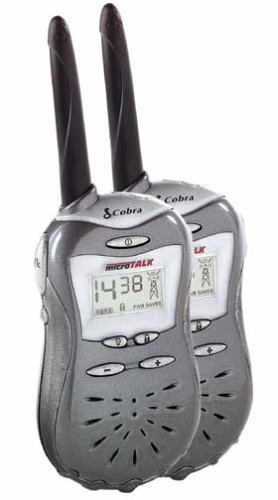
Image: A pair of Cobra MicroTalk FRS220-2 two-way radios, charcoal color, shown with their compact design.
Setup
1. Battery Installation
Your FRS220-2 radios require four (4) AAA batteries each (not included). Alternatively, an optional NiMH rechargeable battery pack (not included) can be used.
- Locate the battery compartment cover on the back of the radio.
- Press down on the latch and slide the cover off.
- Insert four AAA batteries, observing the polarity markings (+ and -) inside the compartment.
- Replace the battery compartment cover, ensuring it clicks securely into place.
- For NiMH battery packs, place the radio in a compatible charger (not included) for trickle charging.
2. Attaching the Belt Clip
Slide the belt clip into the slot on the back of the radio until it locks into position. To remove, lift the tab on the belt clip and slide it upwards.
Operating Instructions
1. Power On/Off
To turn the radio ON, press and hold the POWER button until you hear a tone and the LCD display illuminates. To turn the radio OFF, press and hold the POWER button until the display turns off.
2. Channel Selection
The FRS220-2 features 14 FRS channels. Use the external slide switch located on the side of the radio to select your desired channel. Both radios must be on the same channel to communicate.
3. Sub-Channels (Privacy Codes)
Each of the 14 channels includes 38 sub-bands (privacy codes) to help reduce interference from other users. To set a sub-channel:
- With the radio on, press the MENU button (if available, or refer to specific button for sub-channel setting).
- Use the UP/DOWN buttons to select the desired sub-channel (0-38).
- Press MENU again or wait for the setting to save automatically.
4. Transmitting and Receiving
- To Transmit: Press and hold the TALK button (usually on the side of the radio). Speak clearly into the microphone.
- To Receive: Release the TALK button. The radio will automatically switch to receive mode.
- A talk-confirmation tone will sound after you release the TALK button, signaling to others that your transmission is complete.
5. Call Alert
To send an audible call alert to another FRS220-2 radio, press the CALL button (if available, or refer to specific button for call alert). The receiving radio will ring to indicate an incoming call.
6. Key Lock
The key lock feature prevents accidental channel changes or setting adjustments. To activate/deactivate, press and hold the LOCK button (if available, or refer to specific button for key lock) until the lock icon appears/disappears on the LCD.
7. Monitor Function
The monitor function allows you to listen for weak signals on the current channel. Press the MONITOR button (if available, or refer to specific button for monitor) to temporarily disable squelch and listen to all activity on the channel.
8. Backlit LCD Display
The LCD display is backlit for easy viewing in low-light conditions. It will automatically illuminate when a button is pressed and turn off after a short period of inactivity.
9. Headphone/Speaker Jack
A headphone/speaker jack is provided for private listening or connecting an external speaker. Insert a compatible 2.5mm plug into the jack located on the side of the radio.
Maintenance
1. Cleaning Your Radio
Wipe the radio with a soft, damp cloth. Do not use abrasive cleaners or solvents. Ensure the radio is dry before use.
2. Battery Care
If the radio will not be used for an extended period, remove the AAA batteries to prevent leakage and damage. For NiMH battery packs, follow the manufacturer's guidelines for charging and storage.
3. Water Resistance
The FRS220-2 features a water-resistant body. However, it is not waterproof. Avoid submerging the radio in water or exposing it to heavy rain for prolonged periods.
Troubleshooting
| Problem | Possible Cause | Solution |
|---|---|---|
| No power | Batteries are dead or incorrectly installed. | Replace batteries or check polarity. |
| Short range or poor reception | Obstructions (buildings, hills), low battery, interference. | Move to an open area, charge/replace batteries, change channel/sub-channel. |
| Cannot communicate with other radios | Radios are on different channels or sub-channels. | Ensure all radios are set to the same channel and sub-channel. |
| Keypad is unresponsive | Key lock is activated. | Deactivate the key lock feature. |
Specifications
- Model: FRS220-2
- Channels: 14 FRS Channels
- Sub-Channels: 38 per channel
- Output Power: 500 milliwatts (maximum allowed by law)
- Frequency Range: 462-467 MHz
- Maximum Talking Range: Up to 2 miles (line of sight)
- Power Source: 4 x AAA batteries (not included) or optional NiMH rechargeable battery pack (not included)
- Battery Life: Approximately 20-25 hours (with either battery type)
- Dimensions: 4.63 x 2.13 x 1 inches
- Weight: 12 ounces (without batteries)
- Special Features: Backlit LCD, Channel Slide Switch, Key Lock, Call Alert, Monitor Function, Water-Resistant Body, Headphone/Speaker Jack
Warranty and Support
Cobra offers a two-year warranty on parts and labor for the FRS220-2 two-way radio. This warranty covers defects in materials and workmanship under normal use.
For technical support, warranty claims, or further assistance, please refer to the official Cobra website or contact their customer service department. Keep your proof of purchase for warranty validation.


